
Key Takeaways
01.
AI does not automatically make a mobile app smarter or more scalable. Architecture, data flow, inference strategy and backend design determine the outcome.
02.
On-device, cloud and hybrid AI solve different engineering problems and can coexist in one product.
03.
RAG, fine-tuning, predictive ML, prompt engineering and AI agents are different patterns, not interchangeable technologies.
04.
Production AI needs authentication, API controls, evaluation, monitoring, rate limiting and fallback behaviour.
05.
Privacy must be assessed across the complete data flow, including analytics, logs and third-party services
06.
AI mobile app development cost depends on AI complexity, integrations, device coverage, infrastructure, security, and ongoing model usage.
07.
The best AI partner should explain the architecture and evaluation strategy before the full build begins.
Mobile apps are moving beyond fixed screens and predefined workflows. Users increasingly expect apps to understand context, personalise experiences, recognise images, respond to natural language and reduce the work required to complete a task.
That is where AI in mobile app development becomes commercially useful.
A retail app can recommend products, a service app can analyse a photo, an enterprise app can search internal knowledge, and a finance app can detect unusual activity. AI is valuable because it changes what the app can help the user accomplish.
But adding AI also changes the engineering problem. Teams must decide where inference runs, how data moves, how models are evaluated, how costs behave at scale, and what happens when the model is wrong or unavailable.
The mobile platforms are evolving around these requirements. Apple provides Core ML for on-device machine learning and Foundation Models for supported on-device language-model experiences, including structured output and tool calling. Google supports on-device Gemini Nano, cloud Gemini models, and hybrid patterns for Android. Firebase AI Logic provides mobile SDKs and a proxy layer for supported generative AI workflows.
The smarter question is therefore not “How do we add AI to our app?” It is “Which part of the product should become intelligent, and what architecture can deliver that capability reliably at scale?”
In this guide, we will explore practical AI use cases in mobile apps, on-device versus cloud architecture, RAG and AI agents, the development process, scalability, security, cost, and how to choose the right AI mobile app development partner.
01
What AI in Mobile App Development Actually Means
AI in mobile app development means integrating machine learning, generative AI, computer vision, speech, recommendation systems, predictive models, or intelligent automation into a mobile product. It is much broader than adding a chatbot.
AI can help an app:
- recommend products or content
- recognise images and documents
- transcribe and summarise conversations
- understand natural-language requests
- retrieve private business information
- predict churn, demand or risk
- personalise onboarding and journeys
- detect anomalies
- automate multi-step workflows
A conventional app might follow:
-
1
User input
-
2
business rule
-
3
response
An AI-enabled app may follow:
-
1
User input
-
2
interpretation
-
3
inference
-
4
context/retrieval
-
5
business rules
-
6
response/action
The model is only one component. Production architecture also needs authentication, APIs, data, retrieval, monitoring, evaluation, and failure handling.
AI should improve a real job
A strong use case normally does at least one of four things:
Understand — interpret text, images, audio, or user context.
Predict — estimate an outcome before it happens.
Recommend — help users choose the next action.
Act — complete an approved part of a workflow.
Designoweb’s AI development services cover generative AI, LLM solutions, RAG, AI agents, computer vision, predictive analytics, and MLOps, which makes architecture and use-case definition a stronger starting point than adding isolated AI features screen by screen.
02
Where AI Creates Value in Mobile Apps
Personalisation and recommendations
Recommendation systems can rank products, content, services or next-best actions using behaviour, preferences and contextual signals. The business metric is not “recommendations shown”; it is whether users discover something useful and take action.
Computer vision
The mobile camera makes apps a natural interface for visual AI. Common uses include document capture, OCR, object detection, product identification, inspection, and image-based diagnostics.
Designoweb’s VASD case study shows this pattern in practice. Users upload images of home-maintenance issues, AI helps diagnose the problem, and the experience can move from recommendations to product or professional assistance. The value comes from the complete journey: image → understanding → recommendation → action.
Conversational experiences
Natural-language interfaces let users describe a task rather than navigate a rigid menu. But a useful enterprise assistant needs more than text generation. It may need identity, retrieval, structured business data, permissions and API actions.
Predictive intelligence
Traditional ML can be the better choice for churn prediction, fraud detection, demand forecasting, anomaly detection, and ranking. If the output changes a decision, prediction can create more value than a generative interface.
Workflow automation and AI agents
AI can reduce manual work behind a mobile interface. For example:
Capture job details → summarise notes → classify issue → retrieve guidance → create follow-up → update CRM
Agents become relevant when the system must interpret a goal, select approved tools, and perform several steps. Their value comes from controlled execution, not simply from being “more autonomous.”
For a deeper look, see Designoweb’s Agentic AI guide.
03
On-Device vs Cloud vs Hybrid AI
Where inference runs affects latency, privacy, offline capability, device compatibility, and ongoing cost.
On-device AI
On-device AI runs directly on the user’s phone or tablet. Apple’s Core ML uses device compute resources for supported ML workloads. Apple’s Foundation Models also support on-device language-model use cases on compatible Apple Intelligence devices.
Google’s Android AI guidance describes Gemini Nano and other on-device approaches for Android. Google highlights local processing, offline capability, and lower server inference requirements for suitable workloads.
On-device AI is a strong fit when the task is bounded, latency-sensitive, privacy-sensitive, or expected to work with weak connectivity.
The trade-off is device variability. Model size, memory, battery use, thermal performance, and hardware coverage need to be validated against the actual supported device set.
Cloud AI
Cloud inference is useful for larger models, centralised model management, enterprise data, complex reasoning, and high-compute workloads.
Keep model infrastructure behind authorised application services. Do not expose sensitive model credentials or unrestricted backend access through the mobile client.
Hybrid AI
Hybrid AI combines local and cloud intelligence. A simple pattern is:
-
1
On-device check
-
2
local result
-
3
cloud escalation when needed
This can reduce unnecessary network calls while preserving access to more capable cloud models.
Firebase AI Logic currently provides mobile SDKs, a proxy service, and supported hybrid/on-device options. Its documentation also describes App Check as a way to help protect AI endpoints from unauthorised clients. Firebase AI Logic · Firebase App Check
Which approach fits?
| Factor | On-device | Cloud | Hybrid |
|---|---|---|---|
| Latency | Very low for supported tasks | Network dependent | Optimisable |
| Offline | Strong | Limited | Selective |
| Privacy | More local processing | Controlled server flow required | Depends on workload split |
| Model capability | Device constrained | Broad | Broad where needed |
| Cost model | Device compute | Recurring inference | Mixed |
| Best fit | Bounded local tasks | Complex/data-heavy tasks | Mixed workloads |
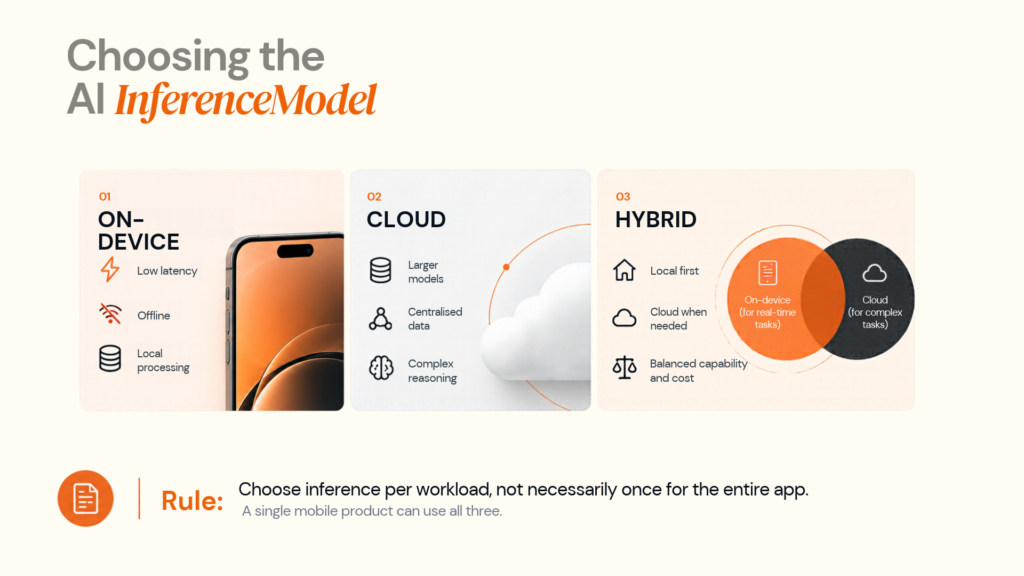
A single mobile product can use all three.
Platform strategy matters
For iOS and Android, current platform frameworks support local, cloud, and hybrid AI patterns. The platform strategy should therefore be part of the architecture, not an afterthought.
Designoweb supports iOS app development, Android app development, Flutter app development, and React Native app development, so the AI strategy can be aligned with the mobile delivery model.
04
Choosing the Right AI Technology
The correct AI technology depends on the workload.
Traditional machine learning
Use ML when the main task is prediction, classification, ranking, or forecasting. Typical examples include churn, fraud, anomaly detection, recommendations and demand prediction.
Large language models
LLMs work well when natural-language understanding or generation is central to the experience: assistants, summarisation, document analysis, natural-language search and structured extraction.
RAG
Retrieval-augmented generation is useful when a model needs private or frequently changing business knowledge.
Question → retrieve relevant context → model response → validation → action
The retrieval layer can include documents, databases, search indexes, metadata filters, and permission checks. A vector database may be part of the system, but it is not the same thing as RAG.
Fine-tuning
Fine-tuning is useful when the model consistently needs specialised behaviour, format, or style that prompting cannot reliably provide. It should not be treated as the default way to add changing company knowledge; retrieval is often easier to update.
Prompt engineering
Prompt design helps control instructions, context, formatting and behaviour. It cannot solve poor data, weak business rules, or an inappropriate model.
AI agents
Agents are useful when a mobile application needs AI to plan and execute multi-step tasks through approved tools or APIs. That adds permissions, state management, retries, logs, and approval controls.
| Requirement | Likely starting point |
|---|---|
| Numerical prediction | Machine learning |
| Image/document classification | Computer vision / ML |
| Natural-language interaction | LLM |
| Private, changing knowledge | RAG |
| Consistent specialised behaviour | Fine-tuning where justified |
| Multi-step actions | AI agent |
| Offline intelligence | On-device AI |
| Complex reasoning | Cloud AI |
05
How to Build an AI-Powered Mobile App
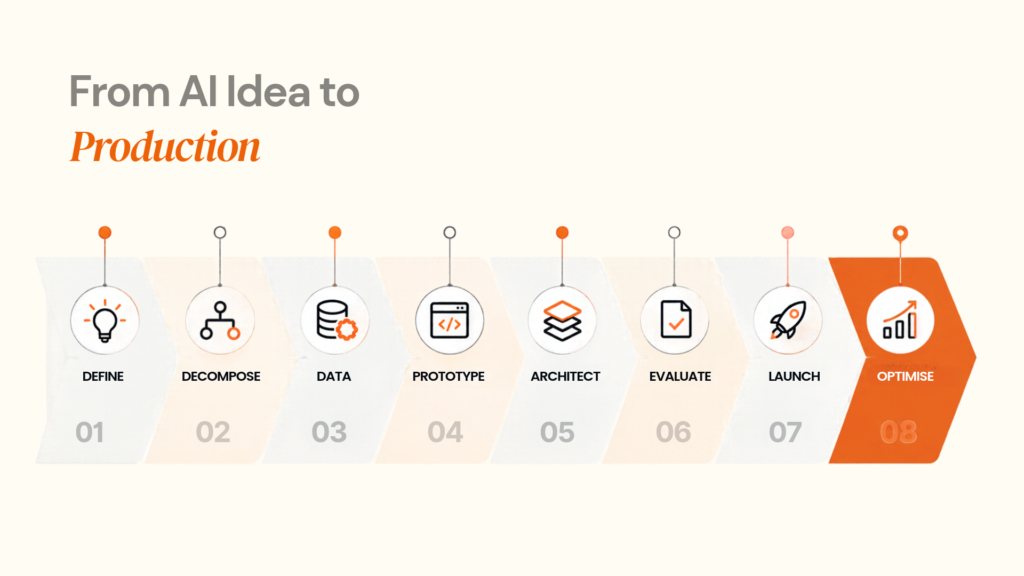
1. Define the outcome
Start with a measurable product or business objective: reduce support time, improve search relevance, reduce manual processing, increase recommendation quality, or automate a defined workflow.
2. Decompose the workflow
Separate AI tasks from deterministic tasks. For an image-led service app, the flow might be:
Capture → quality check → detection → retrieval → recommendation → booking
Not every step needs AI.
3. Audit the data
Identify the data required, where it lives, how it changes, who can access it, whether personal information is involved and how quality will be measured.
4. Define evaluation before launch
Create realistic test cases and decide how success will be measured. Depending on the feature, that may include task success, factual accuracy, classification quality, retrieval quality, user corrections, latency and cost per task.
5. Validate the riskiest assumption
Build a focused proof of concept around the biggest unknown. For example: can an image model achieve enough accuracy on real customer inputs to justify production integration?
6. Design the production architecture
Define the mobile app, backend, AI gateway, model provider, retrieval layer, business APIs, authentication, monitoring and failure paths.
7. Build the UX around AI behaviour
Include understandable loading, errors, retries, citations or sources where useful, confirmation before high-impact actions and a clear fallback when AI is uncertain.
8. Test on real devices
Validate supported iOS and Android versions, device performance, network conditions, camera quality, battery impact and offline behaviour where relevant.
9. Roll out gradually
Use a staged path such as:
Internal users → limited production cohort → broader release → full rollout
Measure quality, adoption, cost and failure rates at every stage.
Principle: Prototype the uncertainty. Engineer the validated workflow.
Designoweb’s product development services combine product definition, technical planning, engineering, and QA, which creates a practical foundation for testing AI assumptions before scaling the full application.
06
Designing for Scalability, Latency and Cost
An AI mobile feature that works for 100 users may behave differently at 100,000.
Request scale
Estimate daily users, AI adoption rate, requests per user, peak concurrency and average input/output size. Peak demand often matters more than the daily average.
Model scale
Track inference latency, context size, image/audio processing, retries, model concurrency and fallback usage. A small per-request cost can become material at high volume.
Data scale
A successful AI feature can become a data platform:
Mobile events → storage → feature generation → model/evaluation → deployment → inference → feedback
Plan for this only when the product strategy requires it; not every app needs a complex ML pipeline.
Use an AI gateway
A central gateway can handle authentication, validation, rate limits, quotas, model routing, logging and cost controls. It also separates the mobile app from sensitive AI infrastructure.
Route work intelligently
A practical pattern is:
Simple request → smaller model
Complex request → larger model
Bounded privacy-sensitive task → on-device model
Caching can also reduce repeated inference where data freshness is controlled.
Monitor AI quality, not just uptime
Useful production measures include latency, model error rate, groundedness, retrieval quality, task completion, user correction rate, escalation, token usage and cost per task.
Fast but incorrect output is not a successful production feature.
07
Security, Privacy and AI Governance
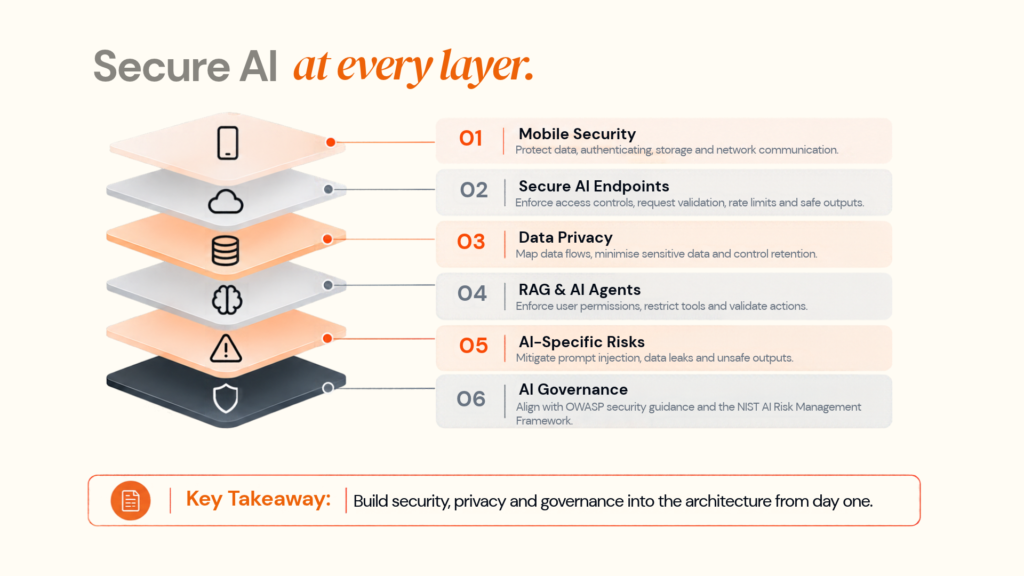
AI mobile products combine device data, user identity, backend APIs and potentially powerful model access. Security therefore needs to cover the entire flow.
Mobile security
OWASP’s Mobile Application Security Verification Standard (MASVS) provides a baseline across secure storage, cryptography, authentication, authorisation, network communication, resilience and privacy.
Protect the AI endpoint
The mobile client should never be treated as a trusted environment. Backend controls should include authentication, authorisation, request validation, file validation, rate limits, quotas, tool permissions and safe output handling.
Google’s Firebase AI Logic documentation describes a proxy model and App Check controls for protecting supported mobile AI integrations from unauthorised clients. Firebase AI Logic · App Check
Map the complete data flow
A mobile AI feature may look like:
Device → app → analytics → API → AI provider → retrieval → logging
Every boundary should be reviewed for data minimisation, access control, retention and security.
On-device inference can reduce data movement, but it does not automatically make the entire application private.
Secure RAG and agent actions
Retrieval must respect the current user’s permissions. Agents should receive only the tools they need, with high-impact actions protected by approvals and validation.
AI-specific risks
OWASP’s LLM security guidance highlights risks such as prompt injection, sensitive information disclosure, data/model poisoning and unsafe output handling. The practical response is to validate inputs and model outputs rather than trusting them as inherently safe.
Governance
NIST’s AI Risk Management Framework and Generative AI Profile provide useful references for managing AI risks across the lifecycle.
For UK and European products, privacy, transparency and AI governance should be mapped during architecture. The applicable requirements depend on the use case, data and risk profile.
08
Real-World AI Mobile App Examples
The strongest AI mobile products connect intelligence to a complete user or business journey.
VASD: image intelligence to service action
Designoweb’s VASD case study documents an AI-powered home-maintenance platform where users upload images, receive AI-supported diagnosis and suggestions, and move toward products or professional assistance.
The architecture is simple to understand:
-
1
Image understanding
-
2
recommendation
-
3
action
Nexlead: AI inside a mobile workflow
Designoweb’s Nexlead case study combines a mobile application with campaign management, approvals, inventory, analytics and AI-driven workflows.
The lesson is that AI does not need to replace the core product. It can remove friction inside a larger workflow.
Gold Sky: AI matching
Designoweb’s Gold Sky case study uses AI-powered matching alongside recruitment and workflow features.
The pattern is:
-
1
Business data
-
2
AI matching
-
3
ranked options
-
4
user action
Across these examples, the model is not the destination. The value comes from connecting data → AI capability → product experience → business action.
09
How to Choose an AI Mobile App Development Partner
An AI mobile app needs more than UI development and an API connection. Evaluate the partner across:
| Area | What to ask |
|---|---|
| Product strategy | What outcome is AI expected to improve? |
| Architecture | Why on-device, cloud or hybrid? |
| Model strategy | Why this model for this workload? |
| Data | What information is needed and where will it live? |
| RAG | How are permissions and freshness handled? |
| Agents | Which tools can the AI access? |
| Security | How are app, API and AI risks controlled? |
| Evaluation | What test set and success metrics will be used? |
| Scalability | What happens at 10x or 100x usage? |
| Cost | What are build and recurring operating costs? |
| Ownership | Who owns code, data, prompts and workflows? |
| Maintenance | Who manages model and platform changes? |
A credible proposal should show the major system boundaries:
-
1
Mobile
-
2
API
-
3
AI Gateway
-
4
model
-
5
Data/retrieval
-
6
business systems
-
7
monitoring
Designoweb combines mobile solutions with AI development, allowing product architecture, mobile engineering, and AI system design to be handled as one delivery problem.
For strategy-led engagements, Virtual CTO services can also support technology evaluation, architecture, scalability, security, and risk planning.
10
AI Mobile App Development Cost
There is no single price for an AI-powered mobile app. The engineering profile changes significantly between one AI feature and an AI-native platform.
Indicative 2026 planning ranges
| Project level | Indicative investment | Typical scope |
|---|---|---|
| AI feature integration | $15,000–$35,000 | One focused AI capability and backend integration |
| AI-enabled mobile app | $35,000–$80,000 | Multiple AI workflows, production backend, and analytics |
| Advanced AI application | $80,000–$150,000+ | Multimodal AI, RAG, advanced workflows or agents |
| Enterprise AI mobile platform | $150,000+ | Complex integrations, governance, high scale and continuous optimisation |
These are planning ranges, not fixed quotes.
What drives the cost?
What drives the cost?
AI complexity: A simple classifier is different from a multimodal agent calling several systems.
Data and RAG: Data preparation, retrieval, metadata, permissions and evaluation add engineering effort.
Mobile coverage: Supporting both platforms, older devices and varied hardware increases QA and optimisation.
Integrations: CRMs, ERPs, payment systems and internal APIs can require more engineering than the model itself.
Security: Sensitive data and high-impact workflows need stronger controls and testing.
AI operations: Models and providers change. Production systems need monitoring, regression tests, prompt/model updates, and cost controls.
Inference usage: Recurring spend depends on request volume, model choice, and input/output size.
A better budgeting path
Use:
Discovery → feasibility → proof of concept → MVP → production hardening → scale
This makes uncertainty visible before the product is locked into expensive architecture.
Measure ROI against the workflow
A useful first model is:
Monthly AI value = time savings + error reduction + attributable revenue impact − AI and operating costs
For support, measure response and resolution time. For recommendations, measure downstream engagement or conversion. For document workflows, measure processing time, extraction quality, and manual review rate.
The metric should match the job AI was introduced to improve.
11
When AI Should Not Be Used
A mature AI strategy sometimes says “not yet.”
Conventional software is often better when:
- rules are deterministic
- the required data is unavailable
- mistakes cannot be practically reviewed
- the workflow is simple and stable
- AI does not improve the user or business outcome
- inference cost outweighs the benefit
- a database, search index or rules engine already solves the problem
An exact product lookup usually does not need an LLM. A fixed notification workflow does not need an agent. A stable calculation should remain deterministic.
The goal is not to maximise the amount of AI in an app. It is to maximise the value created by the app.
Author

Frequently Asked Questions
01
What is AI in mobile app development?
AI in mobile app development means integrating technologies such as machine learning, generative AI, computer vision, speech processing, recommendation systems, or AI agents into a mobile application to perform intelligent tasks such as prediction, classification, personalisation, search, or automation.
02
What are the most common AI features in mobile apps?
Common features include recommendations, personalised content, chat assistants, voice interfaces, image recognition, OCR, predictive analytics, fraud detection, document processing, semantic search and workflow automation.
03
Does every AI mobile app need a large language model?
No. Many mobile AI use cases are better served by traditional machine learning, computer vision, or smaller specialised models. LLMs are most useful where language understanding, generation, or reasoning is part of the problem.
01
Should AI run on the device or in the cloud?
It depends on the workload. On-device AI is useful for latency-sensitive, offline, or privacy-sensitive tasks. Cloud AI is useful for larger models, centralised data, and complex processing. A hybrid architecture can combine the two. Apple and Android both currently support on-device AI approaches
02
What is hybrid AI in mobile app development?
Hybrid AI combines on-device and cloud inference. For example, a mobile application may perform a fast initial classification locally and send uncertain or more complex cases to a cloud model.
03
Should I use RAG or fine-tuning?
Use RAG when the system needs access to private or changing information. Consider fine-tuning when the main requirement is consistent task behaviour, style, or output patterns. They can also be combined.
04
When should an AI mobile app use AI agents?
or APIs. They should be introduced when that autonomy solves a real workflow problem.
01
How do I secure an AI-powered mobile app?
Start with standard mobile security controls, then secure the AI layer with authenticated APIs, input validation, rate limits, controlled tool access, output validation, safe data handling, monitoring, and evaluation. OWASP MASVS provides a useful mobile security baseline, while OWASP's LLM guidance covers AI-specific risks.
02
Does on-device AI automatically make an app private?
No. On-device inference can reduce the amount of data sent to a remote model, but privacy must be assessed across the full application. Analytics, logs, synchronisation and third-party integrations may still process personal data.
03
What should UK and European businesses consider?
Teams should assess the applicable data-protection and AI governance requirements before production deployment. The ICO provides AI and data-protection guidance for UK organisations, while the EU AI Act applies according to system type and risk category.
01
How much does AI mobile app development cost?
There is no reliable universal price. Cost depends on AI capability, data readiness, mobile platform coverage, model usage, integrations, security requirements, scale, and ongoing AI operations. A proper estimate should follow discovery and architecture rather than a feature-count estimate alone.
02
How long does it take to build an AI-powered mobile app?
The timeline depends on whether the team is adding an AI feature to an existing application or building an AI-native product. Feasibility, data preparation, model evaluation, mobile development, backend integration, security, and testing all affect the schedule.
03
How should I start an AI mobile app project?
Start by defining one business outcome, identifying the AI workload, checking data readiness, selecting an appropriate architecture, and validating the highest-risk assumption through a proof of concept.