
Key Takeaways
01
An AI copilot becomes useful when it can work with the user's real context, not just generate a plausible answer.
02
Retrieval, identity, tools, approvals and observability are as important as the underlying LLM.
03
RAG is generally the practical foundation for grounding copilots in frequently changing enterprise knowledge.
04
A copilot should not be given write access simply because it can technically call an API.
05
The best first use case is usually a repetitive, information-heavy workflow with clear success criteria and manageable risk.
06
A production copilot should be evaluated on business outcomes, not just response quality.
07
Build vs buy vs extend should be decided by workflow uniqueness, integration depth, control requirements and competitive differentiation.
08
Cost is shaped by integrations, data readiness, security, model usage, monitoring and maintenance as much as by development effort.
The workplace AI conversation has moved beyond “Should we use AI?”
The harder question now is:
Where should AI sit inside the way work actually gets done?
That is where AI copilots have become interesting.
A conventional chatbot answers questions. A conventional automation follows a fixed rule. An AI copilot sits between those two models: it understands natural-language intent, works with business context, helps complete a task, and usually keeps a person in control of the outcome.
That distinction matters because enterprise value rarely comes from generating one more paragraph of text.
It comes from removing friction from a real workflow.
Think about the difference between:
“Summarise this sales meeting.”
and:
“Summarise the meeting, compare the discussion with the opportunity record, identify unresolved commercial risks, draft the follow-up and prepare the CRM updates for approval.”
The second request requires much more than an LLM.
It needs context, data access, retrieval, workflow logic, identity, tool calling, validation and a controlled path back into systems of record.
That is the direction enterprise AI is moving. Microsoft’s 2026 Work Trend Index found that 49% of more than 100,000 analysed Microsoft 365 Copilot conversations supported cognitive work such as analysing information, solving problems, and evaluation, a useful signal that workplace AI is moving beyond simple content generation.
The strategic question for businesses is therefore no longer simply whether to adopt an AI copilot.
It is:
What should your copilot know, what should it be allowed to do, and what should remain under human control?
This guide answers that question.
Where should an AI copilot fit into your workflow?
Designoweb helps businesses identify high-value copilot opportunities, connect enterprise knowledge and systems, and build secure AI experiences around measurable outcomes.
01
What Is an AI Copilot?
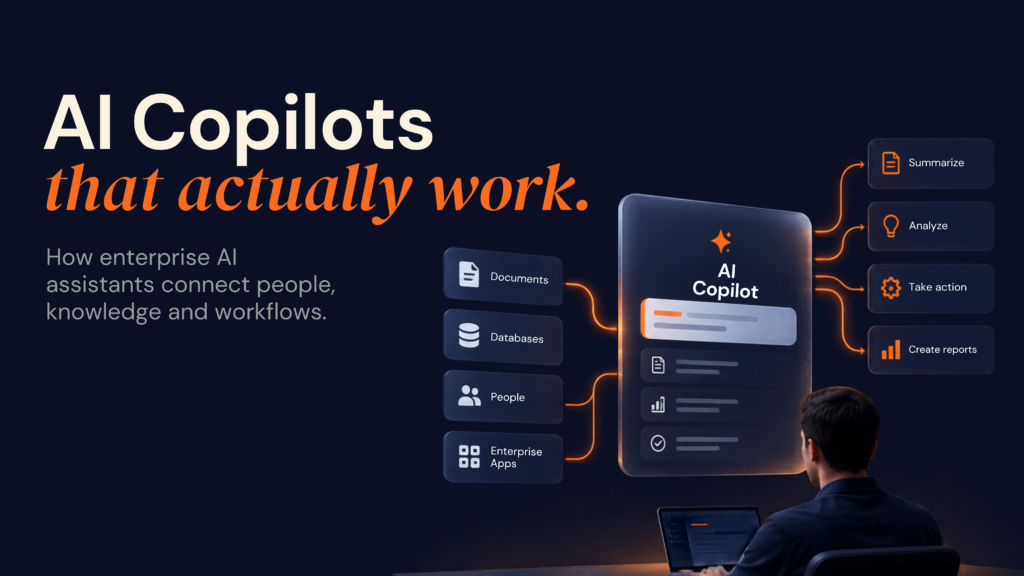
An AI copilot is an AI-powered software assistant designed to work alongside a human user by interpreting requests, generating recommendations or content, retrieving relevant information, and, increasingly, helping execute parts of a workflow.
The simplest mental model is:
User intent → AI reasoning → enterprise context → recommended or prepared action → human decision
Modern enterprise assistants can combine large language models with enterprise data, connectors, tools, and workflow logic. Gartner describes enterprise AI assistants as AI-first applications designed to augment human capabilities, increasingly combining agentic retrieval, tools, enterprise connectivity, security and governance.
Microsoft’s current Copilot extensibility model supports custom agents, connectors, plugins and APIs that bring enterprise knowledge and actions into the Copilot experience.
What makes a copilot different from “ChatGPT in a company”?
A generic AI chat interface can generate a response from the information supplied to it.
A business copilot should be able to understand:
- who the user is
- what the user is allowed to access
- what application or workflow they are in
- which internal sources are authoritative
- what actions are available
- which actions require approval
- how to record what happened
That leads to a useful definition:
An enterprise AI copilot is an intelligent interface over business context, business knowledge, and business actions, governed by human and system controls.
This is why an enterprise copilot is fundamentally a software architecture problem, not only a prompt-engineering problem. Designoweb builds that architecture around the business workflow—bringing together AI models, enterprise knowledge, integrations, permissions, evaluation, and production operations through our AI development services.
02
AI Copilot vs Chatbot vs Agent vs Automation
The terms AI chatbot, AI assistant, AI copilot, and AI agent are often used interchangeably.
They should not be.
The most useful distinction is who remains responsible for the next action and how much autonomy the software has.
| System | Primary role | Typical behaviour | Action authority |
|---|---|---|---|
| Traditional automation | Execute rules | “When X happens, do Y.” | High within fixed rules |
| Chatbot | Answer questions | User asks; system responds | Usually low |
| AI assistant | Help with knowledge/tasks | Summarises, drafts, explains | Low to moderate |
| AI copilot | Work alongside a person | Recommends, retrieves, prepares and may invoke approved tools | Human-led |
| AI agent | Pursues a delegated goal | Plans, calls tools, executes multiple steps | Delegated |
Salesforce describes the distinction similarly: a copilot assists and augments a user, while a more autonomous agent can operate independently toward a goal.
McKinsey’s enterprise research makes an adjacent distinction between broad horizontal copilots and more workflow-specific AI agents capable of planning, integration, memory, and execution. Its research also highlights the difficulty of turning broad AI adoption into measurable bottom-line impact when copilots remain disconnected from core workflows.
Why this distinction matters to buyers
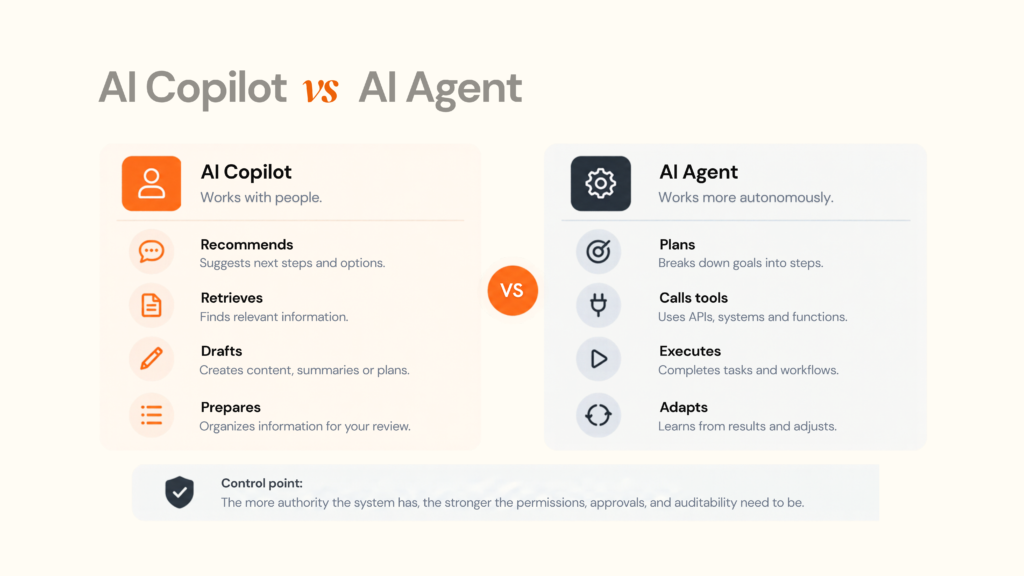
Suppose your finance team wants AI to prepare monthly variance reports.
A copilot might:
- retrieve financial data
- identify significant variances
- explain likely causes
- draft the management summary
- prepare questions for the finance manager
The manager reviews and approves.
An agent might additionally:
- update a workflow
- notify stakeholders
- open follow-up tasks
- request missing data
- close the loop after receiving responses
The difference is not simply “smarter AI”.
It is decision authority and system access.
That distinction changes your security model, architecture, audit requirements and risk tolerance.
03
Why Generic AI Copilots Plateau
The easiest AI copilot to launch is usually the least differentiated one.
Give employees a general-purpose assistant. Let them summarise, draft, brainstorm and ask questions. Adoption may happen quickly.
Business value is harder.
Why?
Because broad productivity improvements can be difficult to connect to a specific business process or financial outcome.
McKinsey has described this as a “gen AI paradox”: organisations report widespread use of generative AI while many still struggle to turn it into measurable bottom-line impact. Its research points to a gap between broad horizontal copilots and more deeply embedded, function-specific workflows.
The five layers of copilot maturity
A useful way to think about maturity is:
| Level | Capability | Business meaning |
|---|---|---|
| 1 | Generate | Produces text, code, or summaries |
| 2 | Understand | Uses business context and user history |
| 3 | Retrieve | Grounds responses in trusted enterprise information |
| 4 | Assist | Helps complete a workflow and prepares actions |
| 5 | Execute | Performs approved actions across systems |
Many pilots stop around Levels 2–3.
The bigger opportunity often begins at Levels 4–5.
But that does not mean every company should build a fully autonomous agent.
A regulated workflow may deliberately remain at Level 4 because the human approval step is itself part of the control system.
The real upgrade is workflow context
A weak copilot answers:
“What is our refund policy?”
A stronger one answers:
“What is our refund policy for this customer, under the contract attached to this opportunity, and what exception approval is required?”
The latter requires:
- document retrieval
- metadata
- identity
- customer context
- contract access
- policy interpretation
- exception logic
That is why the data and workflow layer often matters more than the model alone.
Ready to move beyond a generic AI assistant?
Designoweb can connect your business knowledge, workflows, and systems into a purpose-built enterprise copilot.
04
Enterprise AI Copilot Architecture
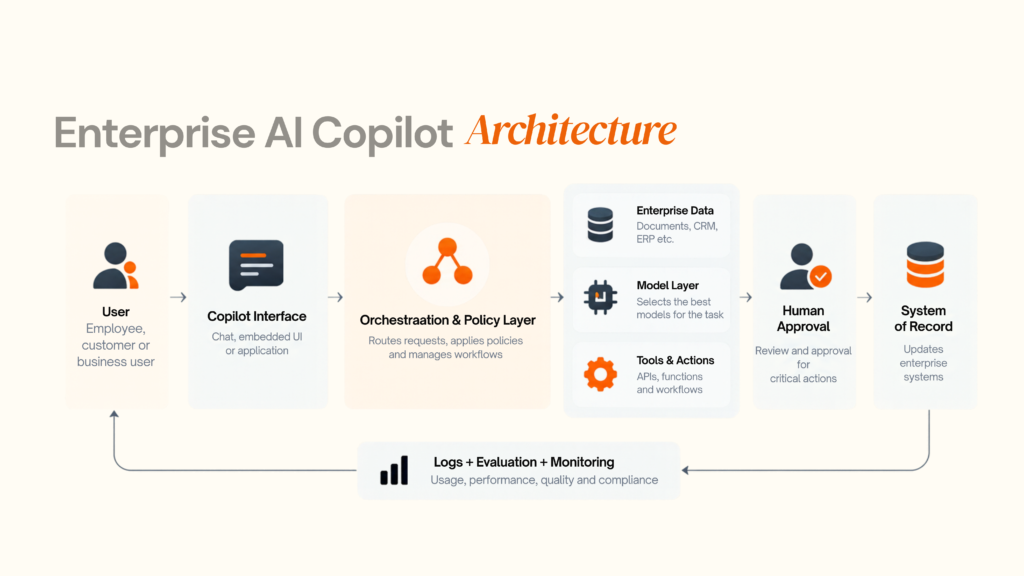
A production AI copilot can be thought of as a series of controlled layers.
4.1 The model layer
The LLM provides language understanding, reasoning, and generation.
The mistake is treating the model as the entire application.
It is not.
A model does not automatically know:
- your current business state
- which document is authoritative
- who can access which record
- which API action is safe
- which action requires approval
- whether its answer actually solved the user's problem
Model choice should therefore follow the workflow, not drive it.
A useful model-selection pattern is:
Requirement
- Classification/extraction
- Drafting/summarisation
- Complex reasoning
- Enterprise knowledge
- Structured business actions
- High-risk decisions
Typical approach
- Smaller or specialised model
- Efficient general-purpose model
- Higher-capability model
- LLM + retrieval
- Tool/function calling
- AI recommendation + human approval
For enterprises, a model gateway can also reduce dependence on one provider by allowing routing, fallbacks, experimentation, and model-specific policies.
4.2 RAG: the knowledge layer
Retrieval-Augmented Generation (RAG) connects a model to external information at query time.
Instead of trying to teach the model every internal fact, the system:
- receives the user's question
- searches relevant enterprise content
- retrieves supporting context
- passes the relevant material to the model
- generates a grounded response
This is particularly useful for:
- policies
- SOPs
- product documentation
- internal knowledge
- customer records
- contracts
- research
- technical documentation
Modern retrieval systems can use vector search, metadata filters, keyword search, semantic ranking, or combinations of these approaches.
OpenAI's current API documentation, for example, supports vector stores, file retrieval, and attributes that can be attached to stored content.
What RAG changes for the buyer
RAG is not simply a technical add-on.
It changes:
- how quickly knowledge can be updated
- how source information can be cited
- how permissions can be enforced
- how content can be re-indexed
- how enterprise-specific answers are produced
Most importantly:
RAG does not automatically make a copilot truthful.
Bad documents produce bad retrieval.
Poor chunking produces poor context.
Incorrect permissions create security risks.
Low-quality retrieval can still lead to confident but wrong answers.
4.3 Embeddings and vector databases
Embeddings represent information numerically so systems can retrieve semantically similar content.
A vector database or vector-search layer stores those representations.
But “use a vector database” is not an architecture by itself.
An enterprise retrieval layer may also need:
- source metadata
- document versions
- permissions
- tenancy boundaries
- freshness
- access policies
- hybrid retrieval
- ranking
- citations
- deletion handling
The buyer question should therefore be:
“How will the system retrieve the right authorised information?”
rather than:
“Which vector database are you using?”
4.4 Tool calling and APIs
A copilot becomes materially more useful when it can interact with business software.
OpenAI's current API documentation supports attaching tools to models, including web search, file search, and custom functions that can call external APIs or systems.
For an enterprise copilot, tools might include:
- CRM lookup
- ERP search
- ticket creation
- inventory query
- contract retrieval
- calendar operations
- BI queries
- workflow execution
- document generation
The key principle is:
Tool availability should not equal unrestricted tool authority.
Every tool should have defined permissions, inputs, outputs, and failure behaviour.
4.5 Orchestration
Orchestration controls how the pieces work together.
It may decide:
- which source to query
- which model to use
- whether a tool should be called
- whether approval is required
- when to retry
- when to escalate
- how to maintain state
For simple copilots, orchestration may be straightforward.
For complex systems, it can become a full workflow engine.
This is one reason multi-agent architecture should not be the default. Add multiple agents only when specialisation, isolation, or parallel execution produces a clear benefit.
4.6 Memory
Memory can mean several different things:
- conversation context
- user preferences
- task state
- workflow state
- long-term business context
These should not automatically be treated as one storage layer.
Persistent memory creates privacy, security, and lifecycle questions.
Ask:
- What is stored?
- Why is it stored?
- How long is it retained?
- Who can access it?
- Can the user delete it?
- Is it tenant-isolated?
- Is it used for model training?
- Can it influence future actions?
The answers belong in architecture and governance, not only in the privacy policy.
4.7 Evaluation and observability
A copilot can sound impressive while failing the workflow.
That is why production systems need evaluation.
Useful measures include:
- task success rate
- groundedness
- retrieval precision
- citation correctness
- tool-call accuracy
- escalation rate
- latency
- cost per successful task
- user acceptance
- unsafe-action rate
- failure recovery rate
OpenAI's evaluation tooling supports reusable evaluation datasets and graders for measuring system behaviour.
Designoweb's AI Development Services include operational AI and MLOps capabilities covering automated testing, monitoring, and model drift.
05
AI Copilot Use Cases That Actually Matter
The best AI copilot use cases share a pattern:
high information load + repetitive cognitive work + clear workflow boundaries
Knowledge and internal support
A knowledge copilot can:
- answer policy questions
- find internal procedures
- compare documents
- summarise technical material
- explain product changes
- surface relevant evidence
The value comes from reducing the time employees spend searching.
Sales copilots
A sales copilot might:
- summarise account history
- prepare meeting briefs
- identify missing opportunity information
- suggest discovery questions
- draft follow-up emails
- prepare CRM updates
- compare customer needs with product information
A research prototype published in 2026 described a sales copilot combining streaming speech-to-text, question detection, and RAG to surface answers during live sales conversations, illustrating how retrieval and real-time workflows can be combined.
Customer service copilots
A support copilot can:
- summarise a customer's history
- classify the issue
- recommend a resolution
- retrieve policy references
- draft a response
- surface similar cases
- prepare ticket updates
The goal should not simply be “generate faster replies”.
A stronger KPI is:
How much repetitive support work can the copilot safely remove without increasing escalations or customer dissatisfaction?
Finance copilots
Potential applications include:
- variance analysis
- management reporting
- budget explanations
- financial policy lookup
- exception analysis
- reconciliation support
- narrative preparation
For high-stakes finance workflows, the copilot should typically recommend and prepare rather than silently commit financial actions.
HR copilots
Possible use cases:
- policy Q&A
- onboarding guidance
- employee document search
- learning recommendations
- interview preparation
- workforce reporting
HR use cases require careful handling of personal data, access rights and employment-related decisions.
Engineering copilots
Engineering teams can use copilots for:
- code assistance
- incident analysis
- documentation
- architecture exploration
- testing support
- issue summarisation
- runbook retrieval
The strongest systems connect AI assistance to source repositories, tickets, observability tools, and engineering documentation rather than treating code generation as an isolated task.
Operations copilots
Operations often provide some of the clearest workflow opportunities:
- exception triage
- supply-chain research
- field-service support
- procurement analysis
- scheduling assistance
- operational reporting
- document processing
The more operational the workflow, the more important permissions, auditability, and failure handling become.
06
How to Choose the Right AI Copilot Use Case
Not every workplace task needs an AI copilot.
The strongest candidates are usually workflows where employees spend significant time searching for information, switching between systems, preparing repetitive outputs, or making routine decisions.
A good first use case should also be narrow enough to test, measurable enough to evaluate, and controlled enough to deploy safely.
The objective is not to find the most impressive AI use case.
It is to find the workflow where a copilot can create a clear, measurable improvement with manageable implementation risk.
Do not start with:
“Where can we add AI?”
Start with:
“Where does human work repeatedly get slowed down by information, coordination, or decision friction?”
That change in perspective helps teams identify genuine opportunities instead of forcing AI into processes that do not need it.
A Practical Use-Case Filter
Before selecting a pilot, assess the workflow across five dimensions:
| Dimension | Low score | High score |
|---|---|---|
| Frequency | Occasional | Daily/high volume |
| Time burden | Minimal effort | Major time sink |
| Data availability | Difficult to access | Accessible and usable |
| Outcome measurability | Subjective | Clear KPI |
| Risk controllability | High consequence | Manageable with controls |
A strong starting point will usually have:
- High frequency — The workflow happens often enough to generate meaningful value.
- Meaningful time cost — Employees spend enough time on it for improvement to matter.
- Accessible data — The information required by the copilot can actually be accessed.
- Measurable outcomes — There is a baseline against which performance can be compared.
- Manageable risk — Errors can be reviewed, contained, or escalated when necessary.
For example, preparing a weekly sales review may be a stronger first use case than automating a rare financial approval. The sales workflow happens frequently, involves information from multiple systems, and has measurable outcomes such as preparation time and manager productivity.
The 3-Question Diagnostic
Before building anything, answer three simple questions.
1. What work is being repeated?
Do not describe the problem as:
“Our people need AI.”
Describe the actual task, including who performs it, how often it happens, and where the effort goes.
For example:
“Every sales manager spends 45 minutes before a strategic account review gathering information from CRM, email, support records, and product documentation.”
That is actionable because the workflow is clearly defined.
You can then ask:
- How often does this happen?
- Which steps are manual?
- Which systems are involved?
- How much employee time does it consume?
- Where do delays or errors occur?
The more specific the workflow, the easier it becomes to determine whether a copilot can improve it.
2. What information is required?
List every source the employee currently uses to complete the task.
This might include:
- CRM records
- ERP data
- Emails
- Documents
- Knowledge bases
- Support tickets
- Business dashboards
- Internal databases
- External information
Then determine whether the copilot can access that information securely and reliably.
This step often exposes the real challenge.
The problem may not be the absence of AI. It may be fragmented data, disconnected systems, or poor information access.
A copilot cannot provide useful context if the information required to complete the task is unavailable, outdated, or inaccessible to the user.
3. What should happen after the AI responds?
This question determines how much autonomy the copilot actually needs.
The answer might be:
- Nothing — The AI simply provides information.
- Human review — The employee checks the output.
- Draft created — The AI prepares content for editing.
- Approval requested — The AI prepares an action but waits for authorisation.
- Ticket opened — The system creates a support or operational task.
- CRM updated — The copilot performs an approved system update.
- Workflow triggered — The system continues into the next business process.
This final step is often where the architecture becomes clear.
A copilot that only retrieves and summarises information needs a different architecture from one that can update systems and trigger business workflows.
The more authority the system has, the more important permissions, validation, auditability and human approval become.
From Workflow to Copilot Scope
Once the workflow has been identified, translate it into a simple scope:
Current workflow → Friction point → Copilot capability → Human control → KPI
For example:
Account review → Information gathering → Research + summarisation → Manager approval → 45 minutes → 15 minutes target
This gives the team something concrete to prototype and measure.
It also prevents scope from expanding too quickly.
Instead of building a broad “sales copilot,” the first release might focus only on:
Preparing a strategic account review from approved CRM, support, and product data.
That is easier to build, evaluate, and improve.
The best first copilot is rarely the one that does everything. It is the one that solves one valuable workflow well enough to earn expansion.
07
Buy, Extend or Build an AI Copilot?
Not every business needs a custom copilot. The choice should be based on the degree of customisation and control the workflow requires.
| Situation | Better-fit approach | Why |
|---|---|---|
| Standard productivity tasks | Buy | Fastest path with lowest custom engineering |
| Existing enterprise suite + unique knowledge | Extend | Reuses existing identity and ecosystem |
| Existing suite + unique workflows | Extend/customise | Adds differentiation without rebuilding everything |
| Proprietary customer-facing workflow | Build | Workflow itself may be part of product differentiation |
| Cross-system business process | Build or deeply extend | Requires custom orchestration and integrations |
| Strict governance/data residency requirements | Build or governed extend | More control over architecture and data handling |
| Early uncertain idea | Prototype first | Validate workflow value before broad investment |
Microsoft provides an extensibility model covering agents, connectors, plugins and APIs for organisations building customised Copilot experiences.
A useful decision rule
Buy when the workflow is standard.
Extend when the platform is right but the context is yours.
Build when the workflow, data or user experience creates strategic differentiation.
The mistake is building custom infrastructure where a managed product already solves the problem.
The opposite mistake is trying to force a generic assistant into a workflow that is commercially or operationally unique.
08
How to Implement an Enterprise AI Copilot
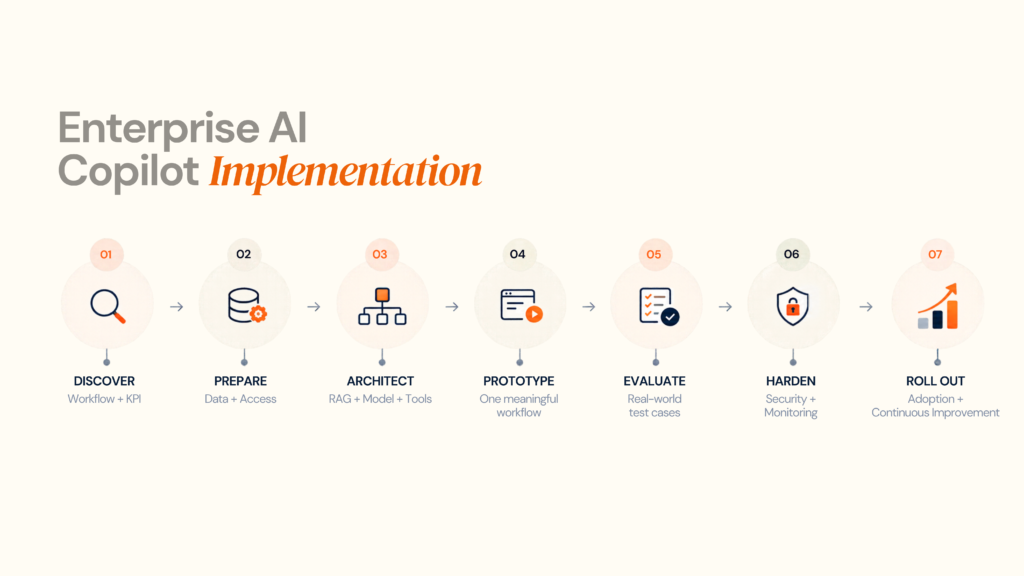
Phase 1: Workflow Discovery
Start by understanding how the work is performed today before deciding where AI belongs.
Map:
- Users
- Tasks
- Data sources
- Systems of record
- Decisions
- Approvals
- Failure states
- KPIs
Document the workflow before selecting a model. This helps identify where employees lose time, which information they need and where a copilot can create measurable value.
Designoweb's delivery methodology similarly emphasises understanding the business problem, defining the product blueprint, designing user flows, building iteratively and testing before launch.
Phase 2: Data and Access Readiness
A copilot is only as useful as the information it can access. Before development, identify where the required business knowledge lives and whether it can be accessed securely.
Inventory:
- Structured data
- Unstructured documents
- API endpoints
- Data owners
- Access policies
- Freshness requirements
- Retention requirements
This phase often reveals that the real blocker is not AI. It is fragmented information, inconsistent data or access restrictions across business systems.
Phase 3: Copilot Architecture
Once the workflow and data are understood, define the architecture that will connect the user, AI and business systems.
Define:
- Interface
- Identity
- Retrieval
- Model strategy
- Orchestration
- Tools
- Approval points
- Logging
- Evaluation
The architecture should be based on the workflow rather than the model. A simple knowledge copilot may need RAG and retrieval, while a workflow-focused copilot may also require APIs, orchestration and controlled tool access.
Phase 4: Prototype
Build one meaningful workflow that can demonstrate whether the concept works in a real business context.
Start with a focused scope and avoid building:
- An admin platform
- Ten integrations
- A multi-agent architecture
- A complex memory system
- Every possible persona
before the central workflow has been validated.
The goal of the prototype is not to create the final product. It is to prove that the AI can perform the task, access the required information and improve the target workflow.
Phase 5: Evaluation
Before scaling, test the complete copilot against realistic situations rather than relying on a handful of successful demos.
Create a representative test set that includes:
- Normal requests
- Ambiguous requests
- Missing data
- Conflicting sources
- Malicious prompts
- Permission edge cases
- Failed APIs
- Timeouts
- Unexpected outputs
Evaluate the complete workflow, not only model responses. Measure factors such as task success, retrieval quality, tool-call accuracy, escalation rate, latency and cost per successful task.
Phase 6: Production Hardening
Once the copilot performs reliably, add the controls required to operate it safely at enterprise scale.
Add:
- SSO
- RBAC
- Tenant isolation
- Audit logs
- Monitoring
- Rate limits
- Retries
- Approval workflows
- Failure handling
- Security testing
Production hardening ensures that the copilot can handle real users, sensitive data, system failures and unexpected behaviour without compromising business operations.
Phase 7: Rollout and Change Management
A technically correct copilot can still fail if employees do not understand it, trust its outputs or know when to rely on it.
Rollout should include:
- User training
- Usage guidelines
- Clear escalation paths
- Feedback loops
- Champion users
- Workflow-specific documentation
Adoption should also be monitored after launch. The goal is not simply to increase usage, but to understand whether employees are using the copilot correctly and whether it is improving the intended workflow.
The European Commission's AI Act guidance identifies AI literacy as an obligation for providers and deployers under Article 4, subject to the applicable scope and rules. For organisations operating in Europe, this makes user education and responsible AI use an important part of deployment planning.
The Enterprise AI Copilot Implementation Loop
The process does not end after rollout.
Discover → Prepare → Architect → Prototype → Evaluate → Harden → Roll Out → Improve
Production feedback can reveal new data requirements, workflow gaps, evaluation failures or opportunities for further automation.
That is why enterprise copilot implementation should be treated as a continuous product and engineering lifecycle, not a one-time AI deployment.
09
Security, Privacy and Governance
A user should not gain access to a confidential document simply because the LLM can retrieve it.
Enforce access at the application and data layer.
A practical chain looks like:
User identity → authorisation policy → retrieval filter → permitted content → model
Not:
User → model prompt → “please don't show confidential information”
The first is a control.
The second is an instruction.
Read and write tools should be treated differently
A read operation such as:
“Show me the status of this order”
is different from:
“Cancel the order.”
Write operations may require:
- confirmation
- approval
- transaction limits
- dual control
- audit logging
- reversible actions
Human-in-the-loop should be intentional
Human approval is not a sign that the AI failed.
In some workflows, it is the correct architecture.
Use human approval when:
- consequences are material
- errors are hard to reverse
- legal responsibility remains with people
- customer impact is significant
- the AI lacks sufficient confidence
- exceptions are common
Governance should cover the complete lifecycle
NIST's Generative AI Profile recommends managing risks across the AI lifecycle rather than treating governance as a one-time compliance exercise.
A useful governance layer should cover:
| Area | Example control |
|---|---|
| Identity | SSO, RBAC |
| Data | classification, retention |
| Retrieval | source restrictions, permission filtering |
| Model | approved model catalogue |
| Tools | allow-list and scoped permissions |
| Actions | human approval |
| Monitoring | logs, alerts, drift |
| Evaluation | benchmark set and regression testing |
| Incident response | rollback, disablement, investigation |
EU considerations
For organisations operating in or serving the EU, AI governance needs to account for the AI Act as well as applicable privacy, sector and employment requirements.
The European Commission states that Article 50 transparency obligations apply from 2 August 2026 for covered AI systems, including requirements around informing people when they directly interact with certain AI systems.
That makes transparency a product consideration, not simply a legal footnote.
10
AI Copilot Cost and ROI
The most misleading way to estimate an AI copilot is:
“How much does the chatbot cost?”
The better question is:
“What does it cost to make the workflow reliable, secure and useful at scale?”
A copilot may start with a simple model API, but enterprise deployment often requires data integration, retrieval, permissions, evaluation, monitoring, and ongoing optimisation. These costs should be considered from the beginning rather than added after the pilot.
The Major Cost Drivers
| Cost Driver | Why It Changes Investment |
|---|---|
| Number of workflows | Each additional workflow adds orchestration, testing, and maintenance requirements. |
| Integrations | CRM, ERP, ticketing, BI, and custom APIs can significantly increase engineering effort. |
| Data readiness | Poorly structured or fragmented knowledge requires additional preparation and retrieval work. |
| RAG | Adds indexing, retrieval, evaluation, and ongoing knowledge maintenance. |
| Model usage | Request volume, context size, and model choice influence recurring inference costs. |
| Tool execution | Actions across business systems require additional controls, validation and monitoring. |
| Security | SSO, RBAC, audit trails and data boundaries increase implementation requirements. |
| Evaluation | Real-world testing and regression checks become ongoing engineering activities. |
| Observability | Monitoring quality, failures, latency, and cost adds operational overhead. |
| UI/UX | An embedded copilot needs a product experience that fits naturally into existing workflows. |
| Support | Models, APIs, data, and business processes change after launch and require ongoing maintenance. |
The important point is that the model is only one part of the cost. The complexity around the model often determines the real investment.
A Practical Way to Budget
Instead of treating AI copilot development as one upfront project cost, separate the investment into four areas:
- Build
Discovery, architecture, UX, engineering, integrations, and initial testing. - Run
Model inference, cloud infrastructure, storage, and third-party services required during operation. - Govern
Security, compliance, evaluation, monitoring, auditability and human oversight. - Improve
New workflows, better retrieval, model updates, user feedback, optimisation and ongoing maintenance.
This provides a clearer view of total cost of ownership (TCO) and makes it easier to plan for growth.
How to Think About ROI
A useful starting point is:
Annual AI Value = Time Saved + Error Reduction + Faster Decisions + Incremental Revenue Impact
Then compare that with:
Total AI Cost = Implementation + Infrastructure + Model Usage + Maintenance + Governance
For example, a customer-support copilot may create value by reducing handling time and helping agents resolve more cases. A sales copilot may create value by reducing preparation time and increasing seller capacity. A finance copilot may create value by accelerating analysis and reducing manual reporting work.
The key is to establish a baseline before implementation and compare it with the results after deployment.
Track metrics such as:
- Time per task
- Cost per completed task
- Resolution rate
- Error rate
- Employee productivity
- Adoption
- Revenue influenced
But ROI should not be measured only in hours saved.
Some copilots create value by:
- Making expert knowledge more accessible
- Reducing operational delays
- Improving consistency
- Speeding up decisions
- Increasing seller capacity
- Shortening support resolution
- Improving employee experience
IBM's trivago case study illustrates this broader approach, combining enterprise AI adoption with governance, security, and model flexibility while reporting substantial usage and productivity benefits.
Ready to quantify the opportunity?
Designoweb can help define the workflow baseline, target KPIs, and technical architecture needed for an AI copilot business case.
11
How to Evaluate an AI Copilot Vendor
Do not evaluate vendors by demo quality alone.
A polished conversation screen can hide weak retrieval, fragile integrations, or missing governance.
Use this buyer checklist
| Evaluation area | Buyer question |
|---|---|
| Business understanding | Can the vendor map the workflow before proposing AI? |
| Architecture | Can they explain the complete system, not only the model? |
| Data | How will enterprise knowledge be ingested, refreshed, and governed? |
| Retrieval | How are permissions and source quality handled? |
| Integrations | How deeply can the system connect to existing software? |
| Security | Where are identity, access, and audit controls enforced? |
| Actions | Which actions can the AI perform, and which require approval? |
| Evaluation | How is task success measured before launch? |
| Observability | Can the team see failures, latency, cost, and tool behaviour? |
| Model strategy | Is the architecture locked to one model provider? |
| Scalability | What changes at 10 users, 1,000 users and 100,000 users? |
| Maintenance | Who maintains prompts, models, connectors and evaluations? |
| Commercial model | What is included in build cost versus ongoing operating cost? |
Gartner's current enterprise AI assistant definition emphasises agent ecosystems, connectors, governance, regional support and adoption measurement, reinforcing that enterprise evaluation is broader than raw model quality.
Red flags
Be cautious when a vendor:
- starts with the LLM instead of the workflow
- promises hallucinations will simply be “solved with prompts”
- treats RAG as a plug-in rather than a data system
- cannot explain permission enforcement
- recommends multi-agent architecture before proving the need
- measures success only through user activity
- gives no plan for evaluation after launch
How Designoweb Builds Enterprise AI Copilots
Designoweb builds enterprise AI copilots as intelligent workflow systems, not standalone chat interfaces.
Our AI capabilities span AI development, autonomous agents, custom AI solutions, generative AI, operational AI/MLOps, and AI governance. We bring those capabilities together with product engineering and enterprise integration to create copilots that fit how teams already work.
The implementation path is straightforward:
Business Workflow → Copilot Strategy → Enterprise Context → AI Architecture → Integrations → Security → Evaluation → Production
Build a copilot around the workflow
We start by identifying where employees spend time searching, analysing, preparing or coordinating work.
From there, we define:
- what the copilot needs to know
- which systems it needs to access
- what it should recommend or prepare
- which actions need approval
- how success will be measured
Explore Designoweb’s AI development services to see how we approach custom AI systems and enterprise AI implementation.
Connect AI to the systems people already use
A serious workplace copilot may need to work across:
- CRM
- ERP
- internal knowledge bases
- databases
- support platforms
- analytics systems
- document repositories
- internal APIs
That is where our product-engineering approach becomes important. Designoweb combines AI architecture with API-led engineering, UX, cloud infrastructure, testing and ongoing optimisation.
Our product development process is designed to take ideas from discovery and technical planning through iterative development, testing and deployment.
Design for measurable outcomes
We build copilots around business metrics—not AI activity metrics.
Depending on the workflow, that could mean:
Less manual work → Faster decisions → Fewer errors → Higher productivity → Better customer outcomes
The objective is not to maximise the number of AI interactions.
It is to make a meaningful workflow faster, more reliable and easier to operate.
Ready to turn a workplace AI idea into a production system?
Designoweb can help define the use case, architecture, integrations and roadmap for an enterprise AI copilot.
Designoweb AI engineering proof
Our published portfolio includes AI-enabled products that demonstrate the engineering patterns behind connected AI systems:
- Gold Sky — AI-powered candidate matching connected to recruitment workflows.
- Nexlead — AI-driven workflows, real-time data pipelines and an in-app chatbot.
- VASD — AI-based image analysis, recommendations and real-time service workflows.
These examples represent adjacent AI engineering capabilities rather than claims that each product is an enterprise workplace copilot.
12
Common AI Copilot Failure Modes
Failure 1: Starting with the model
A team selects a powerful LLM and asks what it can do.
That reverses the problem.
Start with workflow, data, controls, and outcomes.
Failure 2: Treating RAG as a magic accuracy layer
RAG improves access to relevant information.
It does not automatically solve:
- source conflicts
- permissions
- stale documents
- ambiguous policies
- poor metadata
- bad retrieval
Failure 3: Giving the copilot too much authority
A system that can:
- change records
- send emails
- issue refunds
- edit production data
- trigger workflows
needs explicit action boundaries.
Failure 4: Measuring the wrong thing
A thousand prompts do not equal business value.
Measure:
successful work completed
not just:
AI interactions generated
Failure 5: Ignoring failure states
Production AI fails in messy ways.
The system needs defined behaviour for:
- no answer
- low confidence
- conflicting sources
- unavailable API
- timeout
- duplicate action
- rejected action
- policy exception
Failure 6: Overengineering the first release
You do not need a multi-agent system because the demo looks impressive with one.
Keep the architecture as simple as the workflow allows.
Failure 7: Forgetting that AI is part of the product
The copilot should fit naturally into:
- user experience
- access control
- support
- analytics
- product strategy
- operations
That is why successful enterprise AI programmes often involve product, engineering, security, data and business teams together.
Practical AI Copilot Decision Framework
Before approving a project, ask these ten questions:
| Question | Decision implication |
|---|---|
| Is the workflow frequent? | Higher usage potential |
| Is it information-heavy? | Strong copilot fit |
| Is trusted data available? | Easier grounding |
| Is the outcome measurable? | Better ROI validation |
| Are permissions clear? | Lower security risk |
| Are actions reversible? | Easier automation |
| Can humans review critical outputs? | Safer deployment |
| Are APIs available? | Better workflow integration |
| Can success be evaluated offline? | Better release confidence |
| Does the workflow create differentiation? | Stronger case for custom build |
Author

Frequently Asked Questions
01
What is an AI copilot?
An AI copilot is an AI-powered assistant that works alongside a person to interpret requests, retrieve relevant information, generate recommendations or drafts and help complete work. Enterprise copilots can connect to internal data, applications and approved tools.
02
What can an AI copilot do?
AI copilots can summarise information, answer questions, retrieve enterprise knowledge, analyse data, draft content, prepare decisions and, when integrated with tools, initiate approved workflow actions.
03
Are AI copilots replacing employees?
The technology is generally positioned as augmentation rather than simple replacement, but its organisational impact depends on how businesses redesign workflows and roles. Microsoft’s 2026 research describes AI and agents as expanding the capacity of workers while emphasising the importance of human judgement and organisational redesign.
01
What is the difference between an AI copilot and an AI agent?
A copilot usually assists a human-led task, while an AI agent is given more authority to plan and execute work toward a goal. In practice, they can exist on the same architectural spectrum; the key difference is autonomy, permissions, and who owns the next action.
02
Does an AI copilot need RAG?
Not always. RAG is useful when the copilot needs grounded access to changing or proprietary enterprise knowledge. A narrowly scoped copilot using structured APIs may need little or no RAG.
03
Does an AI copilot need a vector database?
Not necessarily. Vector search is one retrieval technique. Depending on the use case, a copilot may use keyword search, semantic retrieval, enterprise search, relational queries, knowledge graphs, or a hybrid architecture.
04
Is fine-tuning better than RAG?
They solve different problems. RAG is generally used to bring external or changing knowledge into the model's context. Fine-tuning is more suited to changing model behaviour, formatting, or task patterns. A project may use one, the other, or both.
05
Should every AI copilot use multiple agents?
No. Multi-agent architecture adds coordination complexity. A single-agent or orchestration-first system is often easier to evaluate, secure, and operate unless multiple specialised agents provide a clear functional advantage.
01
How do you secure an enterprise AI copilot?
Use enterprise identity, least-privilege access, permission-aware retrieval, scoped tools, input/output validation, human approval for high-impact actions, audit logging, evaluation, and continuous monitoring. OWASP's 2025 guidance highlights prompt injection, sensitive information disclosure, excessive agency, and vector/embedding weaknesses among key risks.
02
Can an AI copilot access confidential company data?
It can, but only where the architecture explicitly allows it. Access should be controlled by identity and authorisation systems, not by relying on the model to decide whether information is confidential.
03
Are AI copilots affected by the EU AI Act?
Potentially, depending on how and where the system is used, its risk classification, and whether specific transparency obligations apply. The European Commission states that Article 50 transparency obligations apply from 2 August 2026 for covered systems, including certain interactive AI systems.
01
How much does an AI copilot cost?
There is no single responsible price because cost depends on workflow count, integrations, data preparation, model usage, security, evaluation, infrastructure, and support. A useful estimate separates build costs from ongoing inference, cloud, governance, and maintenance costs.
02
How long does it take to build an AI copilot?
A narrow copilot with limited integrations can be prototyped much faster than a production-grade enterprise system. Timelines increase with data migration, legacy integrations, permissions, regulated workflows, complex tool use, and large-scale rollout.
03
What should be built first?
Start with one high-value workflow that has accessible data, clear success criteria, and manageable risk. Prove task-level value before expanding to more users or more autonomous actions.
04
Should a business buy or build an AI copilot?
Buy when the workflow is standard, extend when an existing enterprise platform already fits the environment, and build when proprietary workflows, integrations, or differentiated user experiences justify custom engineering.
01
What should I ask an AI copilot development company?
Ask how the vendor handles workflow discovery, data readiness, retrieval, permissions, model selection, integrations, tool execution, evaluation, observability, security, scalability, and ongoing cost. A serious vendor should explain the entire system, not only the LLM.
02
Can an AI copilot be added to an existing SaaS product?
Yes. A copilot can be embedded into web, mobile, or enterprise products through APIs, retrieval systems, application context, tool/function calling, and workflow integration. Microsoft and other major enterprise platforms also provide extensibility models for embedding custom agents and connectors into existing ecosystems.