
Key Takeaways
01.
AR and VR solve different automotive problems. AR keeps the physical vehicle or environment in context; VR creates a controlled digital environment.
02.
AR is particularly relevant to HUDs, navigation, maintenance, inspection and real-world vehicle visualisation.
03.
VR is particularly useful for vehicle design, virtual prototyping, manufacturing planning, training and immersive simulation.
04.
Automotive AR/VR becomes a much larger engineering challenge when connected to CAD, vehicle signals, sensors, ADAS data, navigation or enterprise systems.
05.
The 3D asset is a strategic product asset. A well-governed vehicle model can support design, sales, training, service and digital-twin workflows.
06.
Safety, calibration, latency, cybersecurity, performance and fallback behaviour matter as much as visual quality.
07.
The strongest business case starts with a measurable outcome such as fewer design iterations, faster technician training, shorter service time or better customer configuration.
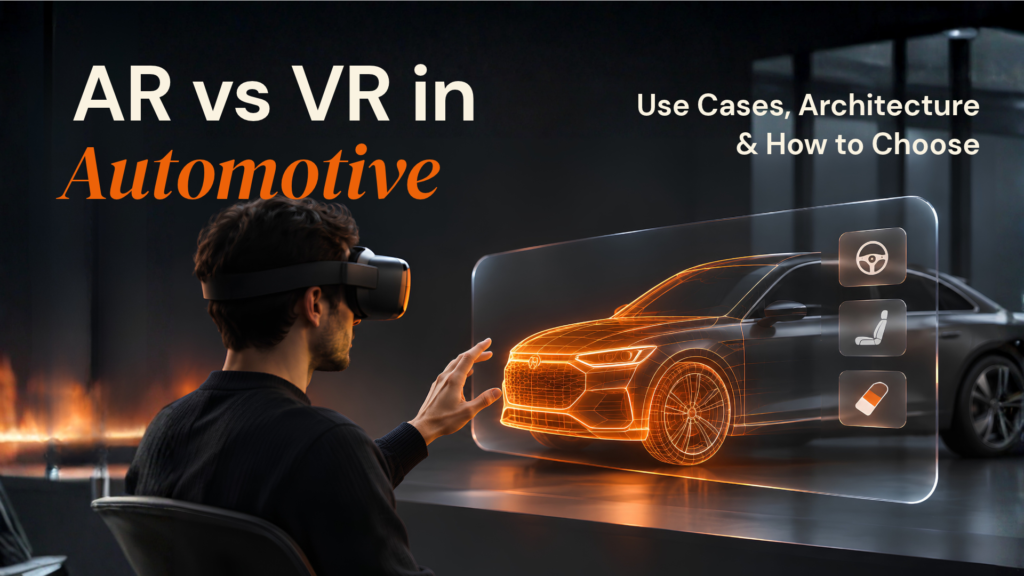
Automotive companies are using augmented reality and virtual reality well beyond showrooms and technology demonstrations. AR can place navigation, service instructions or vehicle information into a real environment. VR can put designers, engineers, technicians or customers inside a realistic digital vehicle or production scenario before the physical environment exists.
The automotive AR market reflects that shift. Grand View Research estimates the global automotive augmented reality market at $29.5 billion in 2026, up from $20.9 billion in 2025, with the market projected to continue expanding through 2033. The estimate covers applications such as AR head-up displays, vehicle visualisation and other automotive AR systems. Grand View Research
But market growth alone does not tell an OEM, Tier 1 supplier or mobility company which technology to build.
That decision depends on the job.
If the user needs to see the real vehicle or physical environment, AR is usually the natural starting point. If the team needs to simulate an environment that does not yet exist, is expensive to reproduce, or is unsafe to recreate, VR can be the better fit.
And in many automotive programmes, the answer is not AR or VR. The same 3D asset and data foundation can support design reviews, customer visualisation, training, manufacturing and service.
At Designoweb, we approach automotive AR/VR from that product and workflow perspective first. The goal is not to make an experience more immersive for its own sake. It is to make a vehicle lifecycle process, customer interaction or operational task more effective.
01
AR vs VR in Automotive: What Is the Difference?
AR and VR are often grouped because both use 3D content and immersive interfaces. The important difference is what happens to the user's surroundings.
Augmented reality adds digital information to the physical world.
Virtual reality replaces the user's view with a computer-generated environment.
That distinction changes the use case, hardware, interaction model, and engineering requirements.
A customer viewing a vehicle in their driveway can benefit from AR because the real driveway gives the experience context. A design team reviewing an interior before a physical prototype exists may benefit from VR because there is no physical cabin to augment.
A useful rule is:
If the real world is part of the task, start with AR.
If the real world is a limitation you need to remove, start with VR.
AR in automotive
AR works best when digital information needs to stay connected to a real vehicle, component, road, or working environment.
Typical applications include:
- AR head-up displays
- Navigation overlays
- Vehicle feature visualisation
- Service and repair guidance
- Component identification
- Inspection workflows
- Remote technician assistance
- Mobile vehicle configuration
BMW's Panoramic Vision and 3D Head-Up Display demonstrate how spatial information is becoming part of the vehicle interface. BMW describes Panoramic Vision as projecting personalised driving information across the windshield, alongside a synchronised 3D head-up display.
Mercedes-Benz has also documented augmented-reality navigation and AR head-up display capabilities within its MBUX system, where camera and navigation information can be combined with visual guidance.
The difficult part is not drawing a graphic. It is ensuring the information is correctly positioned, stable, readable, and appropriate for the driving context.
VR in automotive
VR becomes more useful when the real environment is unavailable, expensive to reproduce, or difficult to change repeatedly.
Common applications include:
- Vehicle design reviews
- Interior and ergonomics reviews
- Virtual prototyping
- Manufacturing planning
- Technician training
- Safety training
- Virtual showrooms
- Simulation and scenario testing
Siemens' current immersive engineering tools allow teams to review CAD data in an immersive VR environment, inspect geometry at full scale, and review ergonomics, visibility, and assembly considerations before committing resources to physical prototypes.
AR and VR work together
A vehicle programme can use VR for design and training, AR for service and in-vehicle experiences, and 3D/AR for sales. The opportunity is to reuse the same underlying 3D and product data rather than treating every experience as a separate project.
02
Where AR Creates Value in Automotive
The strongest automotive AR applications have one thing in common: the real-world object matters.
AR head-up displays
An AR HUD can place navigation, lane guidance, or other contextual information within the driver's field of view instead of requiring a separate glance at a conventional display.
But the engineering challenge is substantial. The system needs to combine vehicle state, positioning, localisation, HMI logic, spatial rendering, display calibration, and validation.
| Layer | Responsibility | Why it matters |
|---|---|---|
| Vehicle data | Speed, position, vehicle state, warnings | Supplies real-time context |
| Localisation | GNSS, IMU, cameras and other sensors | Determines where information belongs |
| HMI logic | Decides what appears and when | Controls cognitive load |
| Spatial rendering | Converts data into graphics | Creates the visible AR experience |
| Calibration | Maps virtual content to display space | Keeps overlays aligned |
| Validation | Scenario and usability testing | Reduces unsafe or confusing behaviour |
AR vehicle visualisation
AR can let customers place a digital vehicle into a real environment and explore proportions, colours, trims and selected features. It is useful for premium vehicles, custom configurations, limited physical inventory, product launches and direct-to-consumer journeys.
The important requirement is data accuracy: the 3D experience must reflect the actual vehicle catalogue, market, trim, and available options.
AR for maintenance and service
Service is one of the most practical automotive AR applications because the technician already has the physical vehicle in front of them.
An AR workflow can identify a component, highlight the correct location, display the relevant service procedure, and provide contextual instructions.
A typical flow looks like:
Vehicle model → Component data → Service procedure → AR overlay → Technician action → Completion record
PTC has described automotive AR use cases around component localisation, guided service and inspection workflows. The broader principle is straightforward: reduce the interpretation required between a service instruction and the physical component.
AR for inspection and quality
AR can bring inspection checklists, reference points and digital instructions into the physical workspace. Useful KPIs include inspection time, missed defects, first-pass quality, and rework.
03
Where VR Creates Value in Automotive
VR becomes more valuable as the cost or difficulty of reproducing the real environment increases.
VR for automotive design and engineering
Vehicle design is naturally suited to immersive 3D because teams can experience scale and proportion in a way that a conventional monitor cannot provide.
A design team can review:
- Cabin proportions
- Seating position
- Visibility
- Instrument placement
- Interior materials
- Component relationships
- Assembly access
Siemens describes this approach as immersive CAD review, allowing teams to step into vehicle geometry, manipulate components, and identify ergonomic or assembly issues early.
The important point is that VR does not replace CAD. It adds another way to interrogate the same digital product data.
VR for virtual prototyping
Physical prototypes remain important, but VR can answer many early questions first: Does the cabin feel spacious? Is the display positioned comfortably? Can an engineer reach the component? Does the assembly sequence make sense?
The closer VR is connected to trusted CAD and product data, the more useful the review becomes.
VR for technician and workforce training
VR is particularly suitable when training is hazardous, expensive to stage, difficult to repeat, or geographically distributed. A technician can practise a procedure repeatedly, and the system can capture performance for assessment and targeted retraining.
-
1
Simulation
-
2
Task execution
-
3
Assessment
-
4
Retraining
VR for manufacturing and factory planning
VR can help teams review production layouts, assembly processes and workstation design before physical deployment. Unity and Siemens both position XR around automotive design, assembly and training.
VR for customer experiences
A virtual showroom can let customers explore vehicles, interiors and configurations remotely. For consumer journeys, a headset does not have to be mandatory: Web/mobile → 3D → optional immersive mode → headset for high-intent users.
VR for simulation and digital twins
This is where VR can become one interface inside a larger engineering ecosystem.
NVIDIA's current autonomous-vehicle simulation work describes creating high-fidelity virtual environments and digital twins from real-world sensor data, modelling physics and generating varied scenarios for development and validation.
That makes simulation useful for more than visualisation. It can become part of a wider loop of design, test, analyse and refine.
04
AR vs VR by Automotive Use Case
The same technology should not be applied to every automotive problem.
The right choice depends on where the user is, what they need to interact with, and whether the physical vehicle or environment is part of the task. AR is generally more useful when digital information needs to sit alongside a real vehicle, component or workspace. VR becomes more valuable when the team needs to simulate an environment, vehicle or procedure that is expensive, unavailable or impractical to reproduce physically.
| Automotive use case | AR | VR | Natural starting point |
|---|---|---|---|
| In-vehicle navigation | High | Low | AR |
| AR head-up display | High | Low | AR |
| Vehicle visualisation | High | Medium | AR |
| Design review | Medium | High | VR |
| Interior ergonomics | Medium | High | VR |
| Virtual prototyping | Low | High | VR |
| Technician training | Medium | High | VR |
| Live repair guidance | High | Low | AR |
| Remote assistance | High | Low | AR |
| Manufacturing planning | Medium | High | VR |
| Virtual showroom | High | High | Audience-dependent |
| Product launch | High | High | Hybrid |
| Digital-twin review | Medium | High | VR/XR |
| Physical inspection | High | Low | AR |
The table highlights an important pattern: AR and VR are complementary rather than competing technologies.
For example, an automotive company may use VR to review a vehicle interior before a physical prototype exists, then use AR later to guide technicians working on the real vehicle. The customer-facing journey may use AR for vehicle visualisation, while the same underlying 3D assets support a virtual showroom or product presentation.
That is why automotive organisations should think in terms of a lifecycle strategy, rather than selecting one immersive technology for every use case.
The simple decision rule
Use AR when:
The user needs to see the real object and act on it.
Use VR when:
The user needs to explore or practise something before doing it in the real world.
Use a hybrid approach when:
The same 3D assets and product data need to support multiple lifecycle workflows.
This approach also creates more value from the initial investment. Instead of building separate visual assets for design, sales, training and service, organisations can create a reusable 3D foundation that supports multiple experiences across the vehicle lifecycle.
-
1
One asset foundation
-
2
multiple immersive experiences
-
3
broader business value
05
Automotive AR/VR Architecture: What You Actually Need
A practical system view
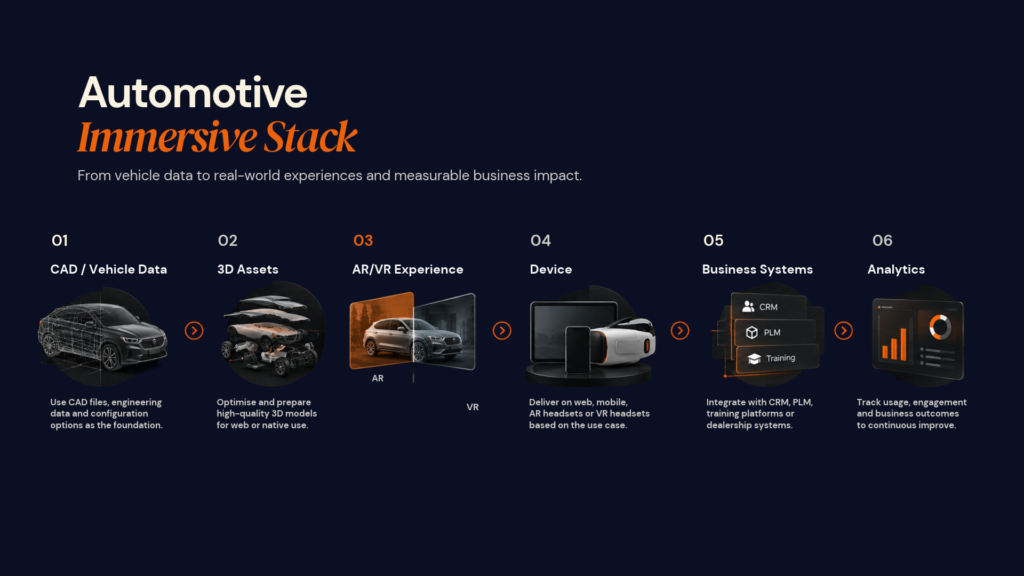
Vehicle / CAD data → 3D asset layer → immersive experience → device/interface → business systems → analytics
For AR, the experience may also depend on tracking, localisation, sensor fusion, HMI logic and calibration. For VR, the main layers are asset optimisation, real-time rendering, interaction, simulation and performance analytics.
Treat 3D as a reusable asset
Automotive CAD can be too heavy for real-time devices. Production assets may need geometry optimisation, material simplification, level-of-detail generation, texture compression and platform-specific testing.
A single vehicle model can then support:
Web configurator + AR visualisation + VR showroom + design review + training + service
That makes asset governance strategic. Define ownership, variant management, update workflows and reuse standards before production.
Where AI fits
AI is useful for defined workflows such as component recognition, computer vision, technical search, personalised training, inspection assistance and voice interfaces. It should earn its place by making a process faster, safer or more accurate.
06
Automotive AR/VR Development Cost
There is no meaningful single price for automotive AR/VR development. A mobile vehicle visualiser and an in-vehicle AR interface connected to real-time vehicle systems have completely different engineering scopes.
For planning purposes, a focused automotive AR/VR proof of concept can start around $25,000–$50,000, while a more complete product with custom 3D content, integrations, multiple platforms and production-grade analytics can move into the $75,000–$150,000+ range. Advanced in-vehicle, simulation or enterprise programmes can exceed that significantly once hardware integration, validation and safety-related engineering are involved.
These figures are planning ranges rather than fixed market prices. The final budget depends on the experience, target devices, vehicle data, 3D content, integrations, simulation requirements and validation scope.
Main cost drivers
| Cost driver | Lower complexity | Higher complexity |
|---|---|---|
| 3D assets | Existing optimised assets | Detailed CAD conversion and multiple vehicle variants |
| Platform | Single mobile or desktop target | Mobile + web + multiple headsets + in-vehicle systems |
| Tracking | Basic markerless AR | High-precision spatial tracking and localisation |
| Integration | Standalone content | CAD, vehicle data, ERP, CRM, telematics or service systems |
| Simulation | Visual interaction | Physics, dynamics and scenario simulation |
| Data | Static content | Real-time vehicle/sensor streams |
| AI | Not required | Vision, voice or intelligent decision support |
| Validation | Consumer UX testing | Scenario, safety and system validation |
| Content operations | Few model updates | Frequent variants and continuous asset management |
The hidden cost: 3D content
The biggest budget surprise is often the work required to make vehicle content usable across real-time experiences. A production workflow may involve CAD cleanup, geometry/material optimisation, LODs, runtime formats, QA and continuous updates.
With hundreds of trims and configurations, content operations can become a long-term product function.
At Designoweb, we treat the 3D layer as part of the engineering scope so that assets can be designed for performance, accuracy and reuse across multiple channels.
A better way to budget
Instead of funding the complete vision immediately, structure the investment around evidence:
-
1
Proof of Concept
-
2
Pilot
-
3
Production
-
4
Scale
Proof of Concept: validate the hardest technical interaction.
Pilot: prove one real business workflow.
Production: integrate required systems and harden the experience.
Scale: expand platforms, vehicle variants, users and advanced capabilities.
The question is not:
“How cheaply can we build the AR/VR experience?”
It is:
“What is the smallest investment that can prove whether this experience creates enough business value to scale?”
Need to scope an automotive AR/VR product?
Designoweb can map the experience, 3D requirements, integration scope and delivery phases into a practical development plan.
→ Start a Product Discussion
07
Safety, Performance and Security Considerations
Functional safety
ISO 26262 covers functional safety for safety-related electrical and electronic systems in series-production road vehicles. The standard covers a lifecycle approach to functional safety.
Not every automotive AR/VR project falls into the same safety scope. A marketing configurator is a very different engineering problem from an in-vehicle AR interface that influences safety-related information.
The architecture should classify the system early rather than discovering the safety implications after development.
Safety of the intended functionality
ISO 21448 addresses Safety Of The Intended Functionality (SOTIF), particularly where hazards can arise from limitations in the intended functionality or complex sensor and processing behaviour.
This becomes relevant when immersive interfaces depend heavily on perception, localisation or sensor-derived situational awareness.
Automotive cybersecurity
ISO/SAE 21434 defines cybersecurity engineering requirements for road-vehicle electrical and electronic systems across their lifecycle.
For connected immersive systems, security considerations can include:
- Vehicle and sensor data access
- Authentication and authorisation
- Secure APIs
- Device communication
- Telemetry
- Software dependencies
- Asset protection
- Update mechanisms
Performance and real-world testing
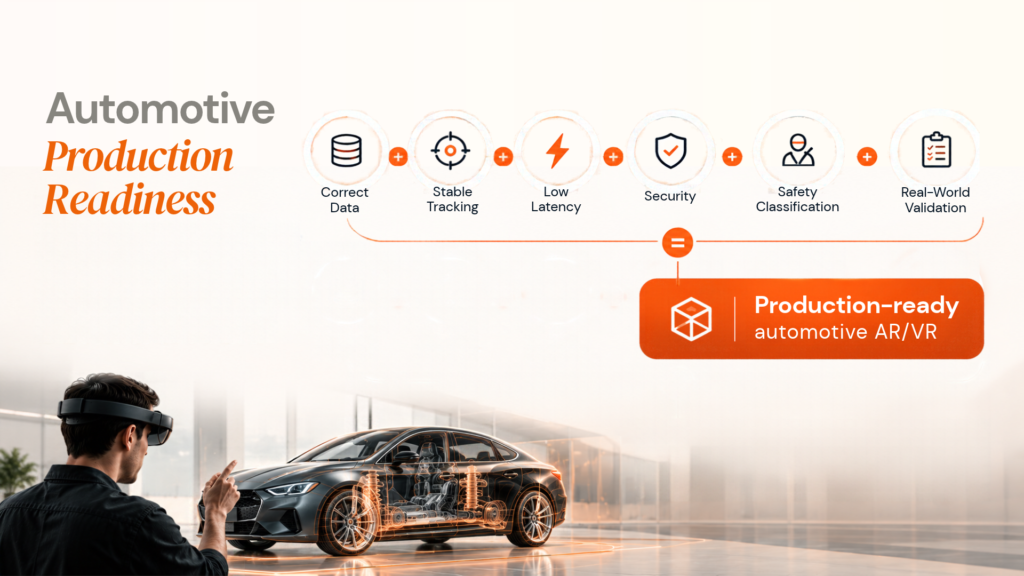
For AR, focus on tracking, calibration, latency, frame stability and environmental robustness. For VR, add frame consistency, loading, thermal behaviour and input response. Test on real hardware and realistic conditions, including movement, sensor variation and connectivity changes.
08
How to Choose AR, VR or a Hybrid Approach
Technology selection should follow the workflow.
Ask these six questions
- Does the physical environment need to remain visible? → AR.
2. Does the task need a controlled simulation? → VR.
3. Does it depend on real-time vehicle or sensor data? → Plan the data and latency architecture early.
4. Is it customer-facing or operational? → Set UX, reliability and device priorities accordingly.
5. Will 3D content change frequently? → Build asset governance and content management from the start.
6. What is the fallback when immersive capability is unavailable? → Define it before development.
The hybrid model
For many automotive organisations, the strongest long-term approach is a shared 3D foundation → Web/mobile → AR → VR/XR → enterprise workflows. The same product data can then serve multiple teams without rebuilding the core content.
For a new vehicle, that could mean VR for design, 3D/Web for exploration, AR for at-home visualisation, VR for sales-centre presentations, and AR for service guidance.
09
How to Build an Automotive AR/VR Product
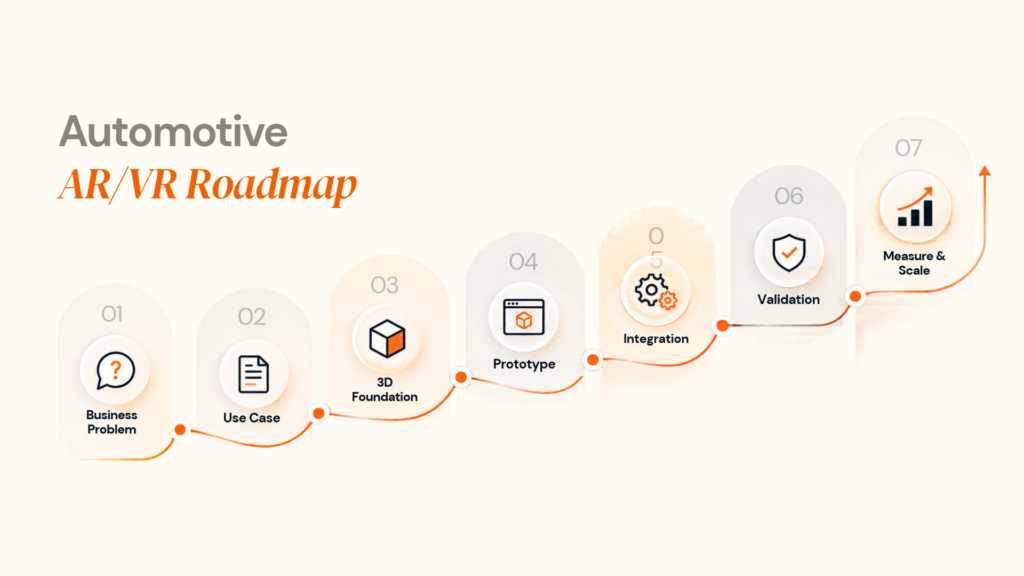
The safest way to build an immersive automotive product is to reduce uncertainty before increasing scope.
Step 1: Define the business outcome
Choose one measurable problem.
Examples:
- Reduce design-review cycles
- Improve training completion
- Reduce service time
- Increase configuration completion
- Improve inspection accuracy
- Reduce physical prototype dependency
Step 2: Define the user and environment
Document the user, vehicle/component, physical environment, hardware, connectivity, sensors and existing enterprise systems.
Step 3: Select the experience
Choose between:
-
1
3D
-
2
AR
-
3
VR
-
4
Native XR
-
5
Hybrid
based on the actual workflow.
Step 4: Audit the 3D data
Review the available CAD, models, textures and vehicle variants.
Define:
Source of truth + asset standards + optimisation rules + versioning + reuse strategy
Step 5: Prototype the highest-risk interaction
Do not spend the first sprint polishing the interface.
Prototype the difficult part:
- Spatial tracking
- Accurate vehicle placement
- CAD-to-real-time conversion
- Hand/controller interaction
- Sensor integration
- High-fidelity rendering
Step 6: Build the integrations
Connect the experience to the systems that matter: product data, CAD/PDM/PLM, CRM, service or training systems, analytics, vehicle data and content management.
Step 7: Validate on real hardware
Test target devices and real operating conditions before declaring production readiness.
Step 8: Measure the outcome
Track the KPI defined at the beginning—not just AR sessions, headset usage or time spent.
Step 9: Scale what proves valuable
Expand vehicle variants, devices and advanced capabilities only after the pilot demonstrates value.
10
Where Designoweb Fits
At Designoweb, we engineer immersive automotive experiences around the vehicle workflow, user journey and technical environment, not around a headset or technology trend.
That combination matters because automotive AR/VR rarely exists as an isolated application. A production solution may need 3D/CAD processing, mobile or immersive engineering, APIs, real-time data, analytics, content management, AI and ongoing optimisation.
Our approach is:
Business Problem → Use-Case Definition → 3D Asset Strategy → Immersive Architecture → Product Engineering → Integration → Validation → Production
Relevant Designoweb proof
Our portfolio includes immersive work such as the EGL Modular Kitchen AR experience, VR-Human and Eye Anatomy, demonstrating experience with AR visualisation and interactive 3D experiences.
We also have adjacent mobility and sensor experience. The PRO BIKE Sensor App case study covers real-time motorcycle metrics, sensor integration, mobile visualisation and post-ride analytics, while RoadtripTribes includes live location sharing, coordinated navigation and Android Auto integration.
These are not presented as automotive AR/VR case studies. They are relevant adjacent proofs for the engineering disciplines that automotive immersive products often require: sensor data + mobility + mobile product engineering + interactive experiences + real-time information.
The result is a more complete product-engineering model:
3D assets → immersive experience → business data → integrations → analytics → optimisation
Building an automotive AR/VR product?
Bring us the workflow, target users, vehicle data, hardware requirements and business KPI. We can help turn those requirements into a practical prototype-to-production roadmap.
→ Discuss Your Automotive AR/VR Project
Author

Frequently Asked Questions
01
What is the difference between AR and VR in the automotive industry?
AR adds digital information to a real environment, while VR creates a fully simulated environment. In automotive applications, AR is commonly associated with navigation, HUDs, service guidance and real-world visualisation, while VR is often used for design reviews, training, simulation and virtual showrooms.
02
Is AR or VR better for automotive?
Neither is universally better. AR is generally more suitable when the physical vehicle or environment needs to remain visible. VR is generally more suitable when a team needs to simulate an environment, vehicle or scenario before using it physically.
03
Can AR and VR be used together in automotive?
Yes. A single vehicle programme can use VR for design and training, AR for service and maintenance, and AR-based interfaces for in-vehicle experiences. Shared 3D assets and data services can connect these experiences.
01
How does an automotive AR head-up display work?
An AR HUD combines vehicle or navigation data with positioning, tracking and rendering systems to place graphics into the driver's field of view. The difficult engineering problem is maintaining stable, correctly calibrated spatial graphics while the vehicle and surrounding environment change.
02
What technologies are used to build automotive AR applications?
Depending on the use case, a system may involve mobile AR frameworks, computer vision, 3D rendering engines, spatial tracking, GPS/GNSS, IMU data, backend APIs, cloud services and device-specific display technologies.
03
Can VR use existing automotive CAD models?
Yes, provided the CAD data is converted and optimised for real-time rendering. Large engineering assemblies usually require mesh optimisation, hierarchy management, level-of-detail techniques, material optimisation and platform-specific performance tuning.
04
Does automotive AR require AI?
No. AI is optional rather than fundamental. It becomes useful when the system needs functions such as object recognition, scene understanding, intelligent assistance, personalisation or analysis of large amounts of technical data.
01
How much does automotive AR/VR development cost?
There is no meaningful single price because costs vary with 3D asset complexity, platforms, integrations, simulation depth, data requirements, AI capabilities, hardware and validation. A simple standalone configurator and an in-vehicle AR system can have completely different engineering scopes.
02
What affects the cost of a VR automotive training application?
The major drivers include 3D asset creation, scenario complexity, interaction design, analytics, assessment logic, hardware support, content management and integration with existing learning or enterprise systems.
01
Is automotive AR software subject to automotive safety standards?
Applicability depends on what the system does and how it connects to the vehicle. Safety-related E/E systems may fall within the scope of ISO 26262, while ISO 21448 addresses Safety Of The Intended Functionality and ISO/SAE 21434 addresses automotive cybersecurity engineering. The project should be classified during architecture and requirements work rather than at the end of development.
02
Should safety-related AR information depend entirely on the cloud?
Not necessarily. For time-sensitive vehicle functions, architecture should consider latency, connectivity loss, local processing and system fallback requirements. The correct split between edge, vehicle-side and cloud processing depends on the function and its safety classification.
01
Can an automotive AR/VR project start with a proof of concept?
Yes. A proof of concept is often useful for testing interaction, visual quality, device feasibility and early technical assumptions. It should then be followed by production architecture, performance testing, integration work and validation before the product is considered deployment-ready.
02
What should an automotive company measure after launching AR or VR?
Measure the outcome the solution was designed to change. For design teams, that could include review-cycle duration or prototype iterations. For training, it might be assessment performance or time-to-competence. For service, it could include task time, first-time fix or escalation rates. For sales, configuration completion or qualified enquiries may be more useful than session duration.