
Key Takeaways
01.
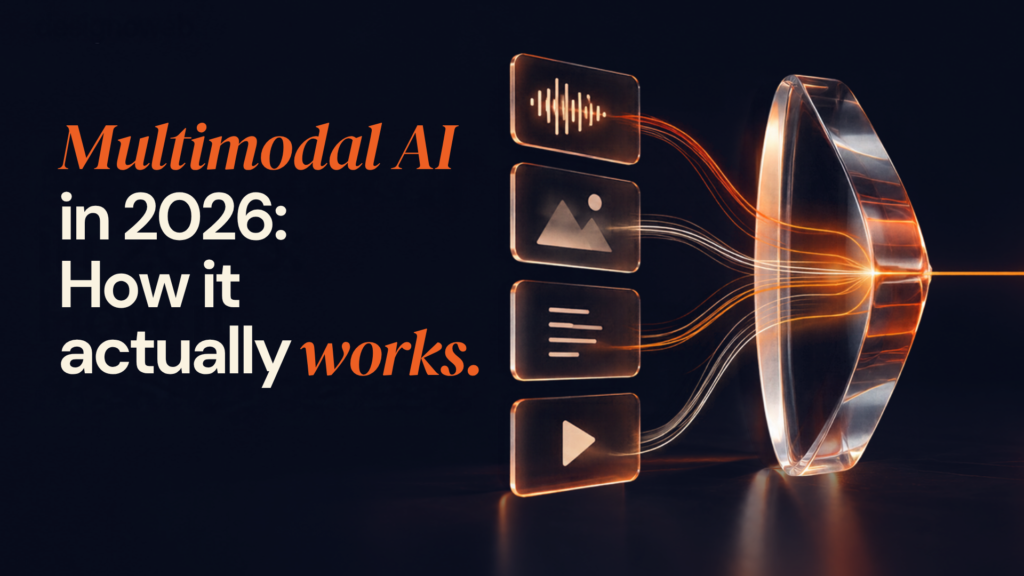
Multimodal AI connects text, images, audio, video, and other inputs so an AI system can reason over more of the information humans naturally use.
02.
Native multimodal models are only one architectural option; cascaded and hybrid systems can be better for specialist requirements.
03.
Multimodal RAG allows enterprise AI to retrieve knowledge from visual and audio content as well as conventional text.
04.
The right architecture depends on accuracy, data sensitivity, latency, integration requirements, and expected usage, not simply model capability.
05.
Successful implementations begin with a business workflow and measurable outcome, not with a decision to “add multimodal AI.”
06.
Production systems require evaluation, observability, security controls, and human escalation paths.
07.
Multimodal AI can make digital products more accessible and intuitive, but introducing more modalities also increases engineering and governance complexity.
01
Most business software still asks people to convert real-world information into a format the computer understands.
A field engineer sees a damaged component and types a description. A customer hears a problem and writes it down. A clinician works across reports, images, and recordings. A claims team reviews photographs alongside documents. A support agent listens to a call while searching product information elsewhere.
The information already exists. The problem is that it lives in different modalities.
Multimodal AI changes that interface.
A multimodal AI system can process combinations of text, images, audio, and video and use those inputs within the same task. Google describes multimodal models as systems capable of processing inputs such as text, images, and audio and producing outputs across different content types, while IBM describes multimodal AI as the integration of multiple data modalities for richer reasoning and interaction.
The important business shift is therefore not simply that AI can “see” or “hear”.
It is that an application can understand more of the context surrounding a decision.
Consider a home-maintenance platform.
A customer could upload a photograph of a leaking appliance, describe the problem by voice, and answer a few follow-up questions. The system could then identify likely causes, retrieve relevant product or repair information, and recommend the next action.
That is a fundamentally different experience from a chatbot that only receives typed text.
Considering multimodal AI for your product?
Start with the workflow, not the model. Designoweb can help assess where image, voice, video, or document intelligence can create measurable value.
→ Explore AI Development Services
Designoweb has already applied image-based AI diagnosis in its VASD platform, where users can upload an image to identify home issues and receive guidance or connect with a professional.
The opportunity now is much broader: customer service, product discovery, field operations, healthcare workflows, manufacturing, education, logistics, media, and enterprise knowledge systems can all benefit when different information types become usable by the same intelligent workflow.
That market is growing alongside the technology. Grand View Research estimates the global multimodal AI market at $3.0 billion in 2026, with a projected $10.9 billion market by 2030. The numbers point to growing commercial interest, but the more useful question for a business is still where multiple data types can improve a measurable workflow.
02
What Is Multimodal AI?
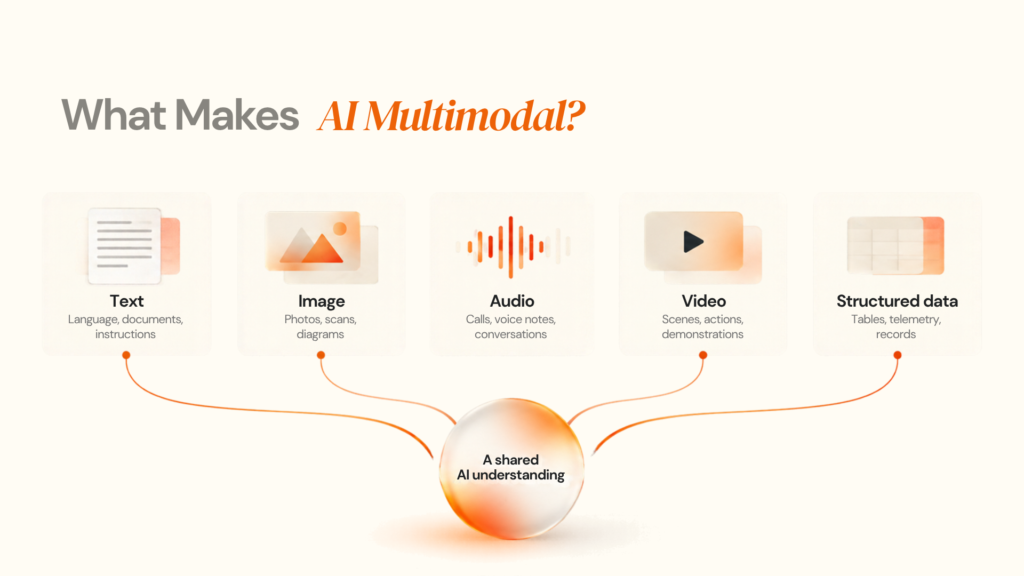
Multimodal AI is artificial intelligence that can process, relate, and generate information across multiple types of data, or “modalities,” within a single workflow.
Instead of working with only text, a multimodal AI system can work with combinations of:
- Text
- Images
- Audio
- Video
- Documents
- Structured data such as tables, databases, and sensor information
This allows the system to understand a situation using more of the information that people naturally use when making decisions.
For example, a traditional text-based support system may receive:
“My washing machine is making a strange noise.”
A multimodal system could receive the same description along with a photo of the machine, a short video of the sound, and the product model number. It can then combine those inputs to identify relevant information, retrieve supporting documentation, and recommend the next step.
How Multimodal AI Differs From Text-Only AI
Text-only AI primarily works with language. Multimodal AI expands that capability by allowing different types of information to contribute to the same task.
For example:
Text-only AI:
Customer message → AI → Response
Multimodal AI:
Customer message + Image + Audio → AI → Contextual understanding → Response or action
The important advantage is not simply that the system can “see” images or “hear” audio. It is that the application can connect information from different sources to build a richer understanding of the problem.
Common Modalities in Multimodal AI
| Modality | Typical business data | Example AI capability |
|---|---|---|
| Text | Emails, contracts, tickets, descriptions | Classification, reasoning, generation |
| Images | Photos, diagrams, screenshots, scans | Visual understanding, OCR, classification |
| Audio | Calls, meetings, voice notes | Transcription, intent analysis, voice interaction |
| Video | Training footage, CCTV, product demonstrations | Scene understanding, event detection, summarisation |
| Documents | PDFs, forms, reports | Extraction, question answering, knowledge retrieval |
| Structured data | Tables, databases, telemetry | Analysis, forecasting, decision support |
A multimodal model does not necessarily treat every modality identically.
Text is represented differently from an image. Audio has temporal structure. Video adds both visual and temporal dimensions. Documents may contain text, tables, diagrams, and page-level relationships.
The engineering challenge is therefore to establish useful representations, relationships and interactions between those forms of data. IBM highlights heterogeneity, connections, and interactions as fundamental characteristics of multimodal AI.
Multimodal AI is broader than multimodal LLMs
A multimodal LLM is one implementation of multimodal AI, not the definition of the entire field.
A single multimodal model might handle:
Text + Image → AI → Text response
But a business application can also combine specialised components:
Image → Vision model → Structured result → LLM → Business workflow
This cascaded approach can be useful when a business needs more control over individual components, specialist accuracy, observability, or model replacement.
The same architecture can extend further:
Image + Audio + Text → Multimodal processing → RAG → Business logic → AI agent → Action
That can support workflows such as equipment diagnostics, insurance claims, product discovery, or field-service assistance.
Why Multimodal AI Matters for Business
The business value of multimodal AI comes from reducing the amount of information people need to manually convert into a form that software can understand.
Instead of asking a customer, employee or technician to describe everything in text, the system can work with the information they already have available.
That can make applications more:
- Context-aware
- Natural to interact with
- Efficient
- Accessible
- Useful across complex workflows
The goal, however, should not be to add more modalities simply because the technology allows it.
Use multimodal AI when combining different types of information creates a better business outcome.
The right architecture depends on the workflow, the data involved, the required accuracy, latency, security and the value the additional modality creates.
03
How Multimodal AI Works
At a high level, a multimodal AI workflow has five layers:
-
1
Input
-
2
Representation
-
3
Fusion
-
4
Reasoning
-
5
Action
1. Input
The application captures or receives data.
Examples include:
- a photograph
- a voice recording
- a product video
- a PDF
- a typed question
- sensor telemetry
2. Representation
The system converts each input into a representation the downstream architecture can use.
Depending on the design, this may involve:
- tokenisation
- image embeddings
- audio features
- visual features
- OCR
- transcription
- document parsing
- metadata extraction
3. Fusion
The system determines how different representations should interact.
This is where multimodal architecture becomes particularly important.
4. Reasoning
A model or group of models interprets the combined context.
For example:
“This component appears damaged in the image. The customer says the device began overheating yesterday. Which troubleshooting step should be recommended?”
The answer requires both visual and textual context.
5. Action
The system converts reasoning into a useful outcome:
- answer the user
- retrieve documentation
- create a support ticket
- recommend a product
- trigger an approval
- call an API
- escalate to a human
That final layer is frequently overlooked.
Multimodal understanding is not the business outcome.
The business outcome comes from connecting that understanding to a workflow.
Three common approaches to multimodal fusion
IBM identifies early, mid, and late fusion as common ways of combining modalities. IBM’s overview of multimodal AI provides additional context on how these approaches combine different data types.
| Approach | How it works | Useful when | Main trade-off |
|---|---|---|---|
| Early fusion | Inputs are combined close to the representation stage | Cross-modal relationships are central | Greater architectural complexity |
| Mid fusion | Modalities are processed before being combined | Different encoders need some independence | More orchestration |
| Late fusion | Specialist models produce outputs that are combined later | Predictability and modularity matter | Cross-modal interaction may be weaker |
There is no universal winner.
For example, a regulated inspection workflow may favour specialist models because each component can be tested independently.
A conversational product assistant may benefit more from a unified multimodal model because natural interaction is central to the experience.
Multimodal AI Architecture Patterns
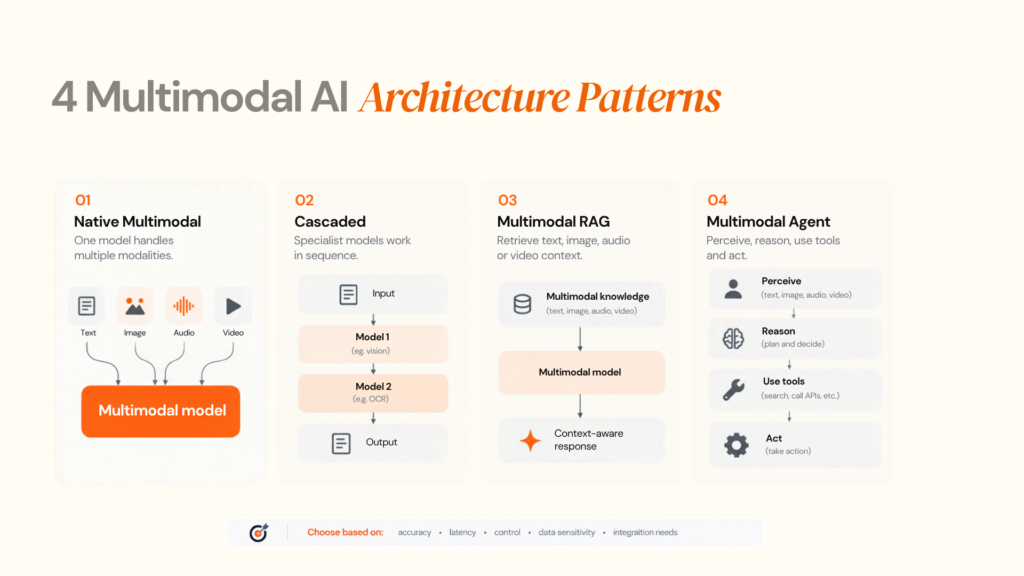
Choosing the architecture is one of the most important decisions in a multimodal AI project.
Pattern 1: Native multimodal model
A single model handles several modalities.
Example:
Text + Image + Audio → Multimodal Foundation Model → Response
This approach can simplify the application layer and create natural interactions.
OpenAI's GPT-4o launch demonstrated the direction of end-to-end processing across audio, vision, and text, while current developer platforms continue to expose multimodal input and real-time capabilities.
Best suited for:
- conversational assistants
- visual question answering
- interactive voice experiences
- product discovery
- general-purpose reasoning
Trade-off:
The model can become a large dependency. Cost, latency, privacy controls and behaviour can vary with provider and model version.
Pattern 2: Cascaded architecture
Instead of one model doing everything, several specialised systems perform different steps.
Example:
Audio → Speech-to-Text → LLM → Text-to-Speech
or
Image → Vision Model → Structured Data → LLM → Business Workflow
This architecture is still highly relevant because each stage can be optimised independently.
It also gives engineering teams more control over:
- error handling
- observability
- model replacement
- specialist accuracy
- data governance
Pattern 3: Multimodal RAG
Multimodal RAG combines multimodal inputs with enterprise knowledge retrieval.
A simplified flow is:
User Query
↓
Query Understanding
↓
Text/Image/Audio Retrieval
↓
Reranking
↓
Multimodal Context
↓
LLM
↓
Grounded Answer / Action
The importance of this architecture is growing rapidly.
AWS documents multimodal Knowledge Bases that can index and retrieve information from text, images, audio, and video. AWS’s multimodal Knowledge Base documentation details retrieval across multimedia content. Azure AI Search documents pipelines that extract images and page text, describe or embed visual information, and combine keyword, vector, and semantic retrieval. NVIDIA similarly describes enterprise RAG architectures designed around multimodal enterprise data.
This matters because enterprise knowledge is rarely text-only.
A maintenance manual may contain a diagram.
A legal document may contain a scanned signature.
A training library may be mostly video.
A product catalogue may contain images that communicate attributes not captured in text.
A text-only RAG system can miss that information.
Pattern 4: Multimodal AI agent
A multimodal agent can observe information across different modalities and then use tools.
For example:
Customer voice request
→ Image uploaded
→ Multimodal reasoning
→ Retrieve product information
→ Check inventory
→ Create service request
→ Ask for human approval
→ Complete action
This is where multimodal AI begins to overlap with agentic AI.
The multimodal layer provides perception.
The agent layer provides planning and action.
Designoweb's AI capability set explicitly includes both multimodal AI and autonomous agents, making the distinction useful when discussing a broader production architecture. Explore Designoweb’s AI capabilities to see how multimodal systems can fit into a broader AI product or workflow.
Choosing an Architecture: A Practical Decision Matrix
| Requirement | Native multimodal | Cascaded | Multimodal RAG | Multimodal agent |
|---|---|---|---|---|
| Natural voice interaction | High | High | Medium | High |
| Specialist visual detection | Medium | High | Medium | High |
| Enterprise knowledge grounding | Medium | Medium | High | High |
| Strong component-level control | Medium | High | High | High |
| Simple prototype | High | Medium | Medium | Medium |
| Complex workflow execution | Medium | Medium | High | Very High |
| Independent model replacement | Medium | High | High | High |
| Governance complexity | Medium | Medium | High | Very High |
Need help choosing between a native multimodal model, specialist models, or multimodal RAG?
Designoweb can map your inputs, workflow, integrations, and performance requirements to a practical production architecture.
The decision should follow the workflow rather than the model.
A useful architecture question is:
Which parts of the problem require joint reasoning, and which parts are better solved independently?
Multimodal AI vs Generative AI, LLMs and AI Agents
These terms are related, but they describe different dimensions of an AI system.
| Technology | Primary question |
|---|---|
| Generative AI | Can the system create new content? |
| LLM | Can the model understand and generate language? |
| Multimodal AI | Can the system work across multiple information types? |
| RAG | Can the system retrieve external knowledge to ground responses? |
| AI agent | Can the system reason through tasks and take actions? |
They can be combined.
For example:
Multimodal AI + RAG + AI agent
could power a field-service assistant that:
- listens to the technician,
- analyses a photograph,
- retrieves the appropriate service manual,
- explains the likely issue,
- checks inventory,
- creates a work order.
That is much closer to an intelligent product workflow than a standalone chatbot.
04
Business Use Cases for Multimodal AI
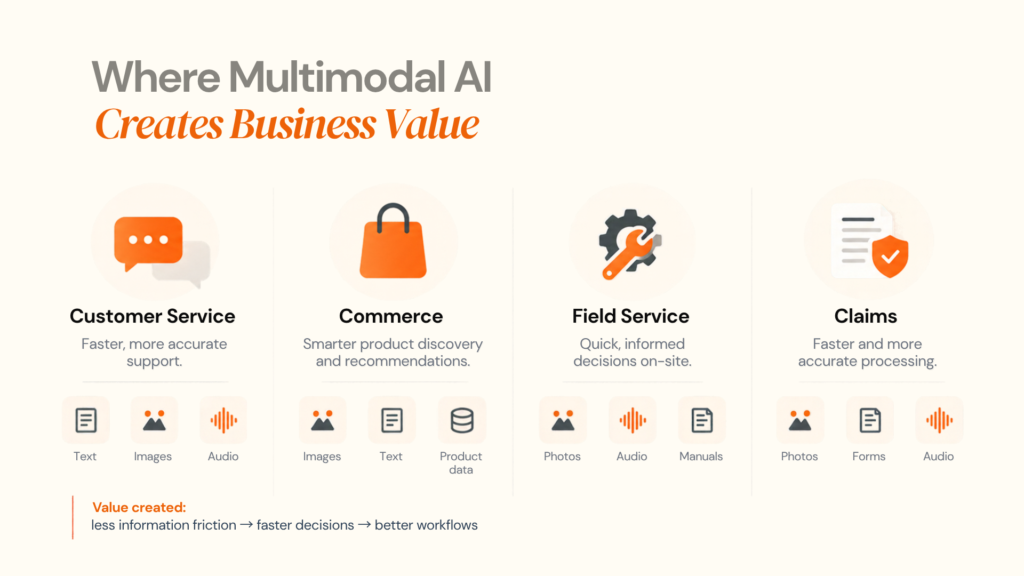
The strongest use cases are not necessarily the most futuristic.
They are the workflows where employees or customers already work across multiple information formats.
Customer service
A support system could combine:
- voice conversation
- screenshots
- uploaded photographs
- customer history
- product documentation
Instead of asking a customer to explain everything in text, the system can use the available evidence.
Business implication: shorter diagnostic paths and fewer context-switches for support teams.
Product discovery and commerce
A customer might upload an image and ask:
“Find something similar, but in a smaller size and under my budget.”
The system can combine:
- visual similarity
- catalogue metadata
- natural-language requirements
- customer preferences
- inventory
Multimodal search infrastructure is already being developed specifically for text-and-image search and vector retrieval. Google Cloud’s multimodal AI guidance provides an overview of current multimodal model capabilities.
Business implication: search becomes closer to how customers naturally describe products.
Healthcare
Healthcare applications can involve:
- medical images
- clinical notes
- laboratory information
- voice recordings
- patient questionnaires
However, high-stakes medical applications require substantially stronger validation, governance, and clinical oversight than ordinary consumer applications.
The correct objective is therefore not:
“Put a multimodal model into healthcare.”
It is:
“Design a validated workflow in which multimodal AI supports a defined clinical or operational task with appropriate human oversight.”
Manufacturing and field service
Multimodal AI can combine:
- equipment images
- technician voice notes
- maintenance manuals
- sensor data
- historical incidents
An inspection assistant could identify a component from an image, retrieve relevant documentation, and guide a technician through the next step.
This pattern is particularly valuable where information is difficult to capture through keyboards or structured forms.
Insurance and claims
A claims workflow may contain:
- photographs
- claim forms
- incident descriptions
- audio statements
- invoices
- policy documents
A multimodal system can help organise those inputs before a human makes the relevant decision.
The key design principle is decision support with traceability, rather than blindly automating high-impact decisions.
Education and training
Multimodal applications can understand:
- lecture recordings
- textbook pages
- diagrams
- student questions
- handwritten material
An AI tutor could explain a diagram, answer questions about a lesson and provide an audio response.
This moves educational AI from text chat towards richer instructional interaction.
Media and entertainment
Multimodal AI can support:
- video summarisation
- scene discovery
- metadata generation
- audio transcription
- content moderation
- multilingual localisation
- recommendation systems
NVIDIA, for example, now documents production-oriented video analytics and multimodal enterprise AI workflows.
See a multimodal use case worth building?
Designoweb can help translate the idea into a practical product architecture, from multimodal inputs and AI models to integrations, testing, and deployment.
Accessibility
Multimodal interfaces can reduce the amount of translation users need to perform between the physical world and digital systems.
Examples include:
- spoken descriptions of visual information
- automatic captions
- voice-driven navigation
- image understanding
- alternative forms of content interaction
The value here is not merely convenience. It can remove interface barriers for people who cannot or do not want to interact with conventional text-first interfaces.
05
A Better Way to Identify Multimodal AI Opportunities
Use this five-question filter before starting development.
The Modality Value Test
- What information does the current workflow ignore?
Example: support tickets contain text but ignore screenshots.
Does another modality materially improve the decision?
If the image does not improve the result, do not add computer vision.
Can the added modality be captured reliably?
A theoretically useful video workflow may fail if customers rarely upload usable videos.
What happens when the system is uncertain?
Define escalation before deployment.
Can the value be measured?
Examples include resolution time, conversion, inspection duration, search success, or human-review workload.
This prevents a common failure mode: building a multimodal demo because multimodal AI is technically impressive, without proving that it solves a meaningful business problem.
06
How to Build a Production-Ready Multimodal AI System
Building a prototype and building a production system are different exercises.
Stage 1: Define the business workflow
Start with:
- user
- problem
- input modalities
- decision
- action
- measurable outcome
Do not begin with model selection.
For organisations evaluating AI development services, the first useful discussion should be around the workflow and architecture that support the business objective.
Stage 2: Audit data readiness
Ask:
- What data exists?
- In what formats?
- Who owns it?
- Is it labelled?
- Is it representative?
- Does it contain personal or confidential information?
- How frequently does it change?
- Can it be used to evaluate the system?
For RAG systems, data readiness also includes retrieval quality.
A perfect model cannot compensate for incomplete or poorly indexed enterprise knowledge.
Stage 3: Choose the model strategy
Possible options include:
Foundation model API
Good when speed-to-market is important.
Open-weight model
Useful when greater infrastructure or deployment control is important.
Specialist models
Useful for narrow tasks such as OCR, speech recognition, or computer vision.
Hybrid architecture
Useful when different parts of the workflow have very different accuracy, latency, or governance requirements.
Model selection should consider:
| Criterion | Buyer question |
|---|---|
| Accuracy | Does it solve the actual task? |
| Latency | Can the user wait for the response? |
| Cost | What happens at expected volume? |
| Privacy | Where does sensitive data go? |
| Reliability | What happens when an input is poor? |
| Integration | Can it connect to existing systems? |
| Portability | Can another model replace it later? |
| Governance | Can behaviour be tested and monitored? |
Current cloud platforms expose different multimodal capabilities and pricing models. For example, Google's current API documentation prices text, image, audio, and video inputs differently depending on model and endpoint, illustrating why modality mix needs to be part of the economics rather than an afterthought.
Stage 4: Design the data and retrieval layer
For enterprise systems, this often includes:
Source Systems
→ Ingestion
→ Parsing
→ Chunking / Segmentation
→ Embeddings
→ Vector / Hybrid Index
→ Retrieval
→ Reranking
→ Multimodal Context
The retrieval layer should preserve provenance.
A useful system should be able to tell the user or operator where an answer came from, especially when the source is a document, image, diagram, or recorded conversation.
Stage 5: Build the orchestration layer
The application needs rules around the model.
For example:
Receive input
↓
Classify task
↓
Identify modalities
↓
Validate file/content
↓
Retrieve relevant context
↓
Call appropriate model
↓
Validate output
↓
Decide:
├── respond
├── request more information
└── escalate to human
This orchestration layer is often where much of the real product engineering happens.
Stage 6: Evaluate the complete system
Do not evaluate only the foundation model.
Build a test set representing real-world conditions:
- clear images
- poor images
- ambiguous questions
- multiple speakers
- accents
- background noise
- irrelevant documents
- contradictory information
- incomplete inputs
- adversarial inputs
- edge cases
Measure both component-level performance and workflow-level success.
Possible metrics include:
- visual classification accuracy
- transcription error rate
- retrieval precision
- grounded-answer rate
- hallucination rate
- latency
- escalation rate
- task completion
- human correction rate
- cost per successful task
NVIDIA's multimodal RAG guidance similarly emphasises retrieval, reasoning and query decomposition as architectural components rather than treating the foundation model as the entire system. AWS also documents multimodal RAG patterns, including retrieval from PDFs, images, and videos.
Stage 7: Add observability
Production AI needs more than conventional application monitoring.
Track:
- model latency
- token/input usage
- modality mix
- failed requests
- retrieval failures
- confidence signals
- human corrections
- policy violations
- model version
- prompt/version changes
- downstream business outcomes
This creates a feedback loop for continuous improvement.
Designoweb's published development process already emphasises iterative development, testing, monitoring and post-launch improvement. See Designoweb’s product development process.
07
Cost, Latency, Security and Governance
What drives multimodal AI development cost?
There is no meaningful single “multimodal AI development cost”.
The major variables are:
| Cost driver | Why it matters |
|---|---|
| Model usage | Different modalities have different inference economics |
| Input volume | Video and audio can create much more data than short text |
| Infrastructure | Self-hosted models may require GPU infrastructure |
| Data preparation | Labelling and cleaning can become substantial |
| Retrieval | Embeddings, indexing, storage, and reranking add infrastructure |
| Integrations | Enterprise APIs and legacy systems increase engineering effort |
| Evaluation | Real-world test datasets require ongoing maintenance |
| Monitoring | Production systems need observability and controls |
| Human review | Critical workflows may require escalation and QA |
The right business question is therefore:
What does it cost to complete one successful business task?
For example, a multimodal customer-support workflow should be measured against the cost and outcome of the existing support process, not against the price of a single model call.
Latency
Multimodal workflows can become slow when several services are chained together.
A typical request may involve:
Upload → preprocessing → OCR → transcription → retrieval → model → validation → response
Optimisation options include:
- streaming
- asynchronous processing
- caching
- smaller specialised models
- edge inference
- parallel model calls
- precomputed embeddings
- selective modality processing
For real-time applications, latency must be designed at the architecture level.
Building a production multimodal AI system?
A prototype proves the concept. Production requires secure data flows, evaluation, observability, and cost control.
→ Explore Multimodal AI Development
Security and privacy
Multimodal systems can process significantly richer information than text-only applications.
Potential sensitive inputs include:
- voices
- faces
- locations
- documents
- screenshots
- video recordings
- customer conversations
- workplace footage
Security should cover the entire lifecycle:
Capture → Transport → Storage → Processing → Retrieval → Output → Deletion
NIST's Generative AI Risk Management Framework profile provides lifecycle-oriented guidance for managing risks in generative AI systems.
Controls may include:
- encryption
- access control
- data minimisation
- retention policies
- audit logs
- consent mechanisms where applicable
- output filtering
- human review
- tenant isolation
- model/provider governance
UK and European deployment considerations
The regulatory environment should be part of architecture planning.
The UK continues to use a principles-based, regulator-led approach to AI governance, with principles including safety, transparency, fairness, accountability and contestability.
In the EU, the AI Act entered a major enforcement phase on 2 August 2026, with transparency provisions applying from that date and additional high-risk obligations scheduled for later milestones.
For a multimodal product, this means teams should identify the regulatory context before deciding how data is collected, processed, retained, and exposed to users.
08
A Production Readiness Checklist
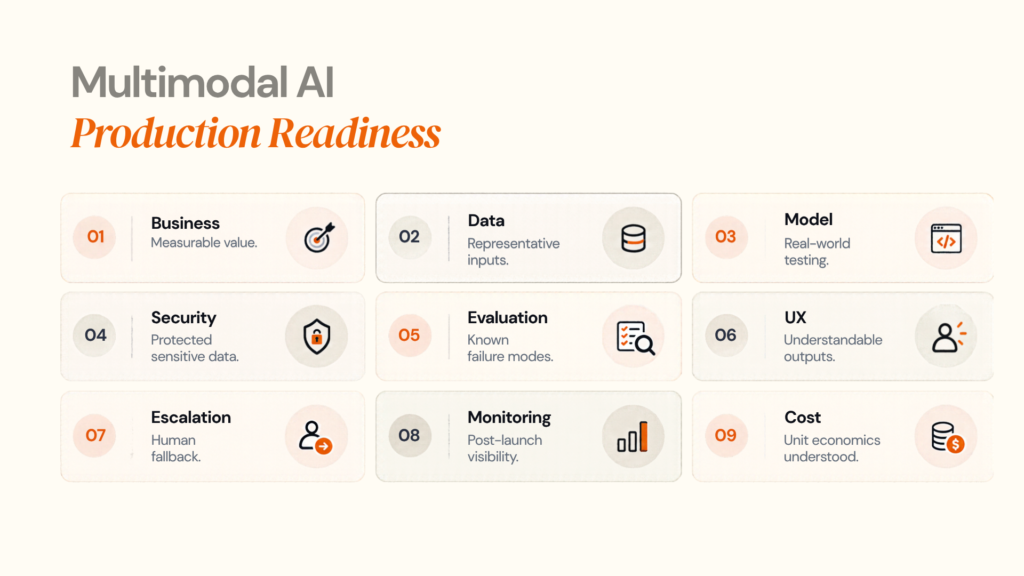
Before moving from proof of concept to production, check:
| Area | Minimum question |
|---|---|
| Business | Is there a measurable reason to use multiple modalities? |
| Data | Are representative datasets available? |
| Model | Has the model been tested against real inputs? |
| Retrieval | Can source information be retrieved reliably? |
| Security | Are sensitive inputs protected? |
| Evaluation | Are failure modes documented? |
| UX | Can users understand or correct AI output? |
| Escalation | Is human review available where needed? |
| Monitoring | Can failures be detected after deployment? |
| Cost | Is unit economics understood at expected scale? |
09
When Multimodal AI Is the Wrong Choice
Adding more modalities is not automatically an improvement.
A text-only workflow may be preferable when:
- users already have structured inputs
- visual information does not change the decision
- latency is extremely sensitive
- the available image/audio data is poor
- compliance restrictions make additional data capture undesirable
- the additional modality creates marginal value
Example
Suppose an internal HR assistant receives structured employee policy questions.
Adding computer vision may sound innovative, but it does not solve the actual problem.
Now consider an equipment-support application where technicians photograph machines while describing faults verbally.
There, vision + voice can directly reduce the amount of manual description required.
The lesson is simple:
Multimodal AI should remove information friction, not create technological complexity for its own sake.
10
How to Evaluate a Multimodal AI Development Partner
A vendor should be evaluated beyond its ability to demonstrate a model.
Ask these questions
| Evaluation area | Question to ask |
|---|---|
| Discovery | How will you determine whether multimodal AI is actually needed? |
| Architecture | Which parts should use one model versus specialist services? |
| Data | How will multimodal data be ingested and governed? |
| RAG | How will diagrams, images, audio, and video become retrievable? |
| Evaluation | What real-world test set will be used? |
| Security | Where is sensitive data processed and stored? |
| Reliability | How does the system handle uncertainty? |
| Integration | Which enterprise systems will be connected? |
| Cost | How will inference and infrastructure costs behave at scale? |
| Operations | Who monitors and improves the system after launch? |
Evaluating a multimodal AI project or vendor?
Start with the workflow, data, risk, and expected business outcome. Designoweb can help assess the architecture before development begins.
→ Explore AI Development Services
One useful signal is whether the partner can explain why not to use a particular model or architecture.
That demonstrates engineering judgment rather than technology enthusiasm.
11
How Designoweb Builds Multimodal AI Solutions
At Designoweb, we build multimodal AI solutions around real business workflows—not around a model or a technology trend.
Our capabilities span multimodal AI, AI product development, RAG and vector database systems, autonomous agents, custom AI solutions and edge AI, allowing us to design the right architecture for each use case.
Our approach connects the complete technology journey:
Business Problem → AI Strategy → Multimodal Architecture → Product Engineering → Integration → Deployment → Optimisation
We help businesses move from an initial AI opportunity to a production-ready solution by handling the architecture, AI models, data pipelines, integrations, user experience, security, testing and ongoing optimisation required to make multimodal AI work in the real world.
Whether you are adding multimodal capabilities to an existing product or building a new AI-native application, our AI development services are built to turn complex AI requirements into scalable business solutions.
Our product engineering approach is equally important. Through our development process, we bring together product strategy, UX, engineering, testing and deployment to ensure the AI capability fits naturally into the wider product and business workflow.
Why Work With Designoweb?
Multimodal AI requires more than connecting an API to an application.
It requires the ability to bring together:
- Multiple AI models and modalities
- Enterprise data and knowledge
- RAG and retrieval systems
- APIs and business integrations
- Product and UX engineering
- Security and governance
- Evaluation and monitoring
- Scalable cloud infrastructure
At Designoweb, we engineer these components as part of one connected system—so multimodal AI does not remain a standalone feature, but becomes a meaningful part of the product or workflow.
Designoweb Case Study: VASD
A strong example of our multimodal AI capabilities is VASD.
VASD uses image-based AI to help users identify home-maintenance issues from uploaded photographs. The system analyses the image, provides AI-driven diagnosis and recommendations, and connects the user with professional assistance.
The workflow goes beyond image recognition:
Image → AI Diagnosis → Guidance → Service Request
We also engineered the supporting product experience around that AI capability, including AI integration, accuracy testing, recommendations and service-booking workflows.
This is the approach we take with multimodal AI at Designoweb:
We don't build AI that simply understands more types of data. We build AI-powered products that turn richer data into useful business outcomes.
The same principle can be applied across customer service, field operations, product discovery, healthcare, manufacturing, insurance, education and enterprise applications—wherever combining text, images, audio, video or structured data can improve the way work gets done.
The Future of Multimodal AI
The next phase of multimodal AI is less about adding one more input format and more about connecting perception with reasoning and action.
The progression increasingly looks like:
See → Hear → Understand → Retrieve → Reason → Act
That architecture can support applications such as:
- intelligent field-service assistants
- visual commerce
- video knowledge systems
- industrial inspection agents
- voice-enabled enterprise software
- multimodal customer service
- immersive AI interfaces
- robotics and physical AI
At the infrastructure level, major technology providers are already moving toward multimodal retrieval, real-time interaction, and agentic workflows.
The strategic question for businesses is therefore changing.
It is no longer simply:
“Can AI understand an image?”
It is:
“What business process becomes possible when our software can understand everything the user, employee, or environment is already communicating?”
That is where multimodal AI becomes commercially meaningful.

Conclusion
Multimodal AI is moving AI beyond the text box.
It allows software to work with the same mixture of information people use every day: language, images, voice, video, documents, and structured data.
But the technology itself is only part of the equation.
The strongest multimodal AI products will be designed around a specific workflow, use the simplest architecture capable of solving it, ground responses in trustworthy data, evaluate real-world failure modes, and connect model intelligence to measurable business outcomes.
For some products, that will mean a native multimodal model.
For others, it will mean specialist models, multimodal RAG, agent orchestration, or a hybrid architecture.
The right choice depends on the problem.
The opportunity is to build software that requires less translation between the real world and the digital system, and that can turn richer context into better decisions, faster workflows and more intuitive experiences.
For organisations planning such a product, the next step should not be selecting a model from a technology list.
It should be defining the workflow, the modalities, the architecture and the outcome.
That is the foundation of production-ready multimodal AI.
Author

Frequently Asked Questions
01
What is multimodal AI?
Multimodal AI is artificial intelligence that can process, relate or generate information across multiple modalities such as text, images, audio, video and documents. Its value comes from using those different information types together within a task.
02
What is an example of multimodal AI?
A customer could photograph a damaged product, describe the problem by voice and receive troubleshooting guidance based on both inputs. A more advanced system could also retrieve relevant product documentation and initiate a service workflow.
03
What is the difference between multimodal AI and generative AI?
Generative AI describes systems that create new content or outputs. Multimodal AI describes the types of information a system can understand or work across. The two can overlap: a multimodal generative-AI system can accept an image and generate text, for example.
01
How does multimodal AI work?
A typical system captures different inputs, converts them into machine-readable representations, combines or relates those representations, performs reasoning and then produces an answer or action. Architecture can be native, cascaded or hybrid.
02
What is a multimodal LLM?
A multimodal LLM is a large language model capable of processing additional modalities such as images or audio rather than operating only on text. Some modern systems can support combinations of text, images, audio and video.
03
What is multimodal RAG?
Multimodal RAG retrieves relevant information from multiple data types and provides that context to an AI model. It can allow an enterprise assistant to retrieve information from text, images, audio and video rather than relying on text-only documents. AWS and Microsoft both document multimodal retrieval architectures, while NVIDIA describes multimodal enterprise RAG patterns.
04
Does multimodal AI require a single model?
No. A production system can use one multimodal foundation model, several specialist models, or a hybrid architecture. The architecture should be selected according to accuracy, latency, cost, privacy, integration and operational requirements.
01
Which industries use multimodal AI?
Common opportunities include healthcare, retail, manufacturing, logistics, financial services, customer service, education, media and entertainment, field service and accessibility-focused products.
02
How do I know whether my business needs multimodal AI?
Identify whether the workflow currently loses important information because it is visual, audio, video-based or otherwise difficult to express as text. Then test whether incorporating that information materially improves an outcome that can be measured.
03
How much does multimodal AI development cost?
There is no universal price. Cost depends on model usage, modality volume, data preparation, infrastructure, retrieval, integrations, evaluation, monitoring and human review. Unit economics should be assessed at expected production volume rather than from prototype API cost alone.
04
Can multimodal AI be integrated into an existing application?
Yes. Multimodal capabilities can be added through APIs, specialist models, retrieval systems and application-layer orchestration without necessarily rebuilding the entire product.
01
Is multimodal AI secure?
It can be engineered securely, but multimodal systems introduce additional data considerations because applications may process voices, images, documents and video. Security architecture should include access control, encryption, data minimisation, retention, auditability and appropriate governance. NIST's Generative AI Risk Management Framework provides lifecycle-oriented risk-management guidance.
02
What should European companies consider when deploying multimodal AI?
The applicable regulatory requirements depend on the use case, system role, and deployment context. The EU AI Act reached a significant enforcement milestone on 2 August 2026, including transparency requirements for certain AI systems.
03
Is human oversight still necessary?
For many consequential or uncertain workflows, yes. A production design should define which cases AI can handle automatically, which require additional information, and which must be escalated to a human.
01
What should I look for in a multimodal AI development company?
Look for demonstrated capability across AI architecture, product engineering, data integration, retrieval, evaluation, security, deployment and ongoing monitoring. A strong partner should be able to explain trade-offs and tell you when multimodal AI is not the appropriate solution.
02
Can Designoweb build multimodal AI solutions?
Designoweb's published AI capabilities include multimodal AI, custom AI solutions, RAG and vector database systems, autonomous agents and edge AI, alongside broader AI product engineering.