
Key Takeaways
01
Start with a measurable workflow, not a fashionable AI tool.
02
High-volume, repetitive, data-rich processes are often strong starting points.
03
AI can improve customer service, sales, administration, marketing, forecasting, finance, knowledge management, and operations.
04
Buy existing AI when it solves the problem; integrate when systems are fragmented; build when the workflow is unique or strategic.
05
RAG is suited to current or proprietary knowledge; fine-tuning changes behaviour and is not a substitute for live business data.
06
Agents require stronger permissions, approvals, logging, and monitoring than ordinary automation.
07
Measure time, cost, conversion, accuracy, response time, and task completion, not “AI usage.”
08
For UK/EU use cases, classify the system early and build applicable privacy and AI governance requirements into the design.
For a small business, AI doesn't need to mean a huge transformation programme, a private model, or a team of machine-learning engineers.
Sometimes the highest-value AI project is much smaller: answering customer enquiries faster, qualifying leads before they reach sales, extracting information from documents, spotting unusual transactions, forecasting demand or giving employees instant access to company knowledge.
The shift is already visible in business data. The UK Office for National Statistics reported 35% AI use among businesses with 10+ employees in June 2026, while San Francisco Fed research found nearly 40% of small-business respondents in the US were using or planning to use AI. The surveys differ, but both show AI moving into everyday business operations.
But using AI is not the same as creating value with AI.
A general-purpose assistant may help an employee write faster. A well-designed AI workflow can connect business data, apply rules, retrieve trusted information, prepare an action, and hand control back to a person when risk is higher.
That is where the business case begins.
At Designoweb, we start with the workflow—not the model. The right answer may be a ready-made AI feature, an API integration, RAG, predictive ML, or a controlled agent. For businesses evaluating AI software for small businesses, the goal is not to add another tool to the stack; it is to choose technology that improves a real workflow and produces a measurable outcome.
In this guide, we will explore the most practical AI use cases for small businesses, how to choose between ready-made tools and custom AI, what the technology architecture looks like, how much implementation can cost, how to measure ROI, and how to build AI securely without overcomplicating your business.
01
Why AI for Small Businesses Is Moving Into Operations
The value of AI for a small company rarely comes from having a more advanced model than a larger competitor. It comes from completing useful work with less friction.
A support team can respond faster. Sales can qualify leads before a rep spends time on them. Operations can extract fields from supplier documents instead of rekeying them. Finance can prioritise anomalies. Management can ask questions against current business data.
ONS reported AI use at around 35% among UK businesses with 10+ employees in June 2026, while its data also showed text-generation tools and visual-content generation among common AI applications. Read the ONS findings
San Francisco Fed research found applications across productivity, marketing, customer service, analytics and forecasting, alongside barriers such as cost, staff capacity and training. Read the Fed analysis
Capture messy inputs. Interpret them. Retrieve trusted business context. Apply rules and judgment. Trigger an approved action. Measure the outcome.
That is the difference between an AI feature and an AI-enabled workflow.
02
Start With the Workflow, Not the AI Tool
The wrong sequence is: choose an AI model, then find a problem.
The better sequence is: map the workflow → find friction → baseline the KPI → choose the technology → pilot.
Imagine a business receiving 200 enquiries a week:
Website form → inbox → qualification → CRM → assignment → follow-up → booking
Not every step needs AI. An LLM can classify free-text enquiries. Rules can enforce territory logic. CRM software can update records. A scheduling tool can book meetings.
The practical design principle is:
AI handles ambiguity. Traditional software handles certainty. Humans handle accountability.
Opportunity test
| Criterion | Question |
|---|---|
| Business value | What changes if this becomes faster or better? |
| Frequency | How often does it happen? |
| Data readiness | Is the required information available? |
| Repetition | Is there enough structure for a useful pattern? |
| Risk | What happens if AI is wrong? |
| Reviewability | Can a person verify the result? |
| Integration | Which systems must be connected? |
A strong first project usually has high business value and frequency, usable data, and manageable risk.
For example, a document workflow can be:
Read → extract → validate → flag uncertainty → send to ERP → human approval for exceptions
That creates clear KPIs: processing time, extraction accuracy, review rate, exception rate, and cost per document. IBM similarly recommends starting with defined business needs, high-value use cases, data readiness, limited pilots, and measurable outcomes. IBM
Want to take one workflow from idea to MVP?
Designoweb can baseline the process, define the success metric, and select the appropriate AI architecture before development begins.
→ Start an AI strategy discussion
03
10 Practical AI Use Cases for Small Businesses
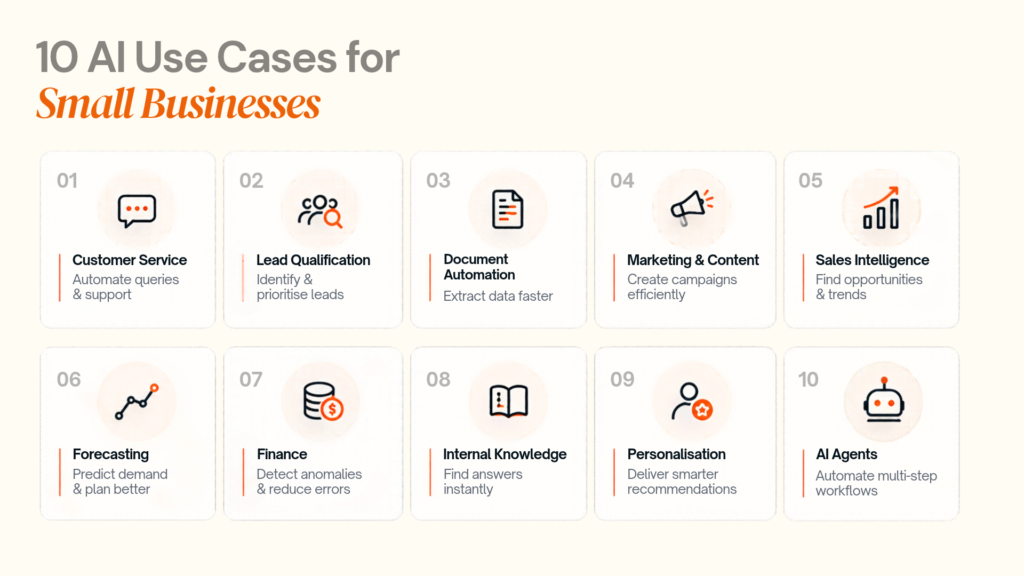
10 AI Use Cases for Small Businesses
- Customer Service — Automate queries & support
- Lead Qualification — Identify & prioritise leads
- Document Automation — Extract data faster
- Marketing & Content — Create campaigns efficiently
- Sales Intelligence — Find opportunities & trends
- Forecasting — Predict demand & plan better
- Finance — Detect anomalies & reduce errors
- Internal Knowledge — Find answers instantly
- Personalisation — Deliver smarter recommendations
- AI Agents — Automate multi-step workflows
AI can automate the work. Your team focuses on the decisions.
AI does not have to mean a chatbot on the homepage. Some of the strongest use cases sit inside existing operations.
1. Customer service and enquiry handling
AI can classify messages, retrieve policy information, summarise customer history, draft responses, and route unusual cases.
Workflow: Message → intent detection → retrieval → response → approval/escalation
Measure response time, resolution time, escalation rate, satisfaction and incorrect-answer rate. High-impact cases such as refunds or regulated advice should retain stronger human review.
Designoweb AI development services
2. Lead qualification and sales follow-up
AI can extract company, sector, requirement, urgency, and product interest from inbound enquiries, enrich CRM records, and prepare follow-up.
Workflow: Form/email → AI extraction → CRM → rules → assignment → follow-up
Keep business-critical rules deterministic, including territory, ownership, and mandatory fields.
3. Document and back-office automation
AI can extract information from invoices, purchase orders, contracts, onboarding forms, CVs, and compliance documents.
PDF/document → parser/OCR → extraction → validation → ERP/CRM → exception queue
Validation is essential before financial or operational data is written into a system of record.
4. Marketing and content operations
Generative AI can accelerate briefs, email drafts, social posts, product descriptions, repurposing and research summaries. The real value comes from context: approved product data, brand guidelines, customer segments, performance history, and prohibited claims.
Use AI to accelerate production; keep human editors responsible for accuracy, positioning and publication.
5. Sales intelligence and CRM analysis
AI can surface quiet opportunities, declining customer activity, slow deals, repeated objections and higher-performing lead sources.
The system should retrieve underlying CRM evidence rather than generate unsupported explanations.
Designoweb product development services
6. Forecasting, inventory and demand planning
Structured forecasting problems may suit predictive ML better than an LLM.
Historical data → model → forecast → confidence range → business rule → action
Applications include replenishment, staffing and capacity planning. The prediction matters when it changes a decision.
7. Finance and anomaly detection
AI can flag duplicate invoices, unusual payments, unexpected supplier activity, and spending anomalies.
For higher-risk finance workflows, use detect → prioritise → review rather than automatic rejection.
8. Internal knowledge assistants with RAG
Employees can ask questions about current pricing, policies, suppliers, onboarding or contracts. RAG retrieves approved information at query time and provides it to the model as context. AWS describes RAG as a way to extend an LLM with external knowledge without retraining the underlying model. AWS: RAG
RAG flow: BUSINESS DATA → PREPARE → INDEX → RETRIEVE → GENERATE → VERIFY → ANSWER
9. Personalisation and recommendations
AI can power product recommendations, service suggestions, personalised onboarding, offers and next-best actions.
Designoweb's Hollywood Hair case study combines AI-powered recommendations with appointments, customer profiles, automation and analytics.
Pattern: AI recommendation → customer experience → business action
10. AI agents for multi-step operational work
An agent can interpret a goal, select approved tools, and perform several steps within defined constraints.
Enquiry → account lookup → research → retrieve service information → draft → CRM update → human approval
OpenAI's agent guidance describes agents as systems that accomplish tasks using models, tools, and guardrails. OpenAI Agents
The rule is simple: do not use an agent when a deterministic workflow will do the job.
04
Should You Buy, Connect or Build AI?
Custom development is not automatically better. Existing CRM, finance, support and collaboration platforms may already solve the problem.
| Situation | Typical approach |
|---|---|
| Customer enquiries | AI + retrieval |
| Lead handling | Classification + automation |
| Documents | Extraction + validation |
| Marketing | GenAI + context |
| Sales intelligence | Analytics + LLM interface |
| Forecasting | Predictive ML |
| Finance | Anomaly detection |
| Knowledge | RAG |
| Personalisation | Recommendation models |
| Complex operations | Agents + tools |
Custom AI is easier to justify when the process is frequent, commercially important, data-rich, integrated with internal systems, or central to the customer experience.
When an existing product already solves the problem, the custom build may simply add cost and maintenance.
Designoweb's product development services are relevant when AI needs to become part of a wider software product rather than remain a standalone experiment.
05
The Technical Architecture Behind Small-Business AI
A practical production system usually separates five concerns:
- Business interface — web, mobile, CRM, email or dashboard.
- Integration/orchestration — APIs, webhooks and workflow services.
- Intelligence layer — LLMs, predictive models, vision or recommendation models.
- Business data — databases, documents, CRM records and knowledge sources.
- Control/observability — identity, permissions, logging, evaluation, monitoring and approvals.
Architecture: User/workflow → application → orchestration → AI layer → data/tools → validation → action → monitoring
Designoweb's product engineering process emphasises API-first architecture, cloud-native development, iterative delivery and security by design.
RAG vs fine-tuning
RAG: give the model current or proprietary information at runtime.
Fine-tuning: change model behaviour using examples.
Use RAG for live business knowledge; consider fine-tuning for repeatable behaviour or task patterns; combine RAG and tools when the system needs both knowledge and action.
Agent controls
Agents should have least-privilege access, explicit tool permissions, output validation, approval gates, logging, retry limits, escalation paths, monitoring, and a stop mechanism.
Deloitte's 2026 research found only 21% of surveyed organisations reported mature governance for agentic AI, reinforcing the need to design controls alongside capability. Deloitte
Evaluate before launch
A good demo is not production evidence. Test real or safely anonymised scenarios for task success, factual accuracy, groundedness, escalation, latency, cost, and failure rate.
Building an AI agent that can access business systems?
Designoweb can architect the agent, tool boundaries, approvals, and monitoring as one production system. → Discuss AI agent development
06
How to Implement AI Without Overbuilding
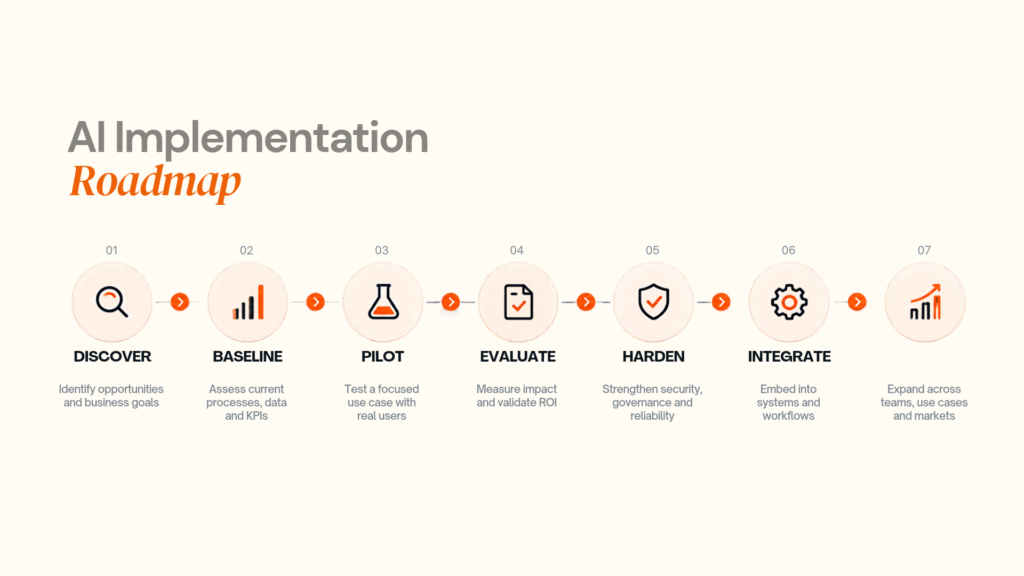
Phase 2: Define the smallest useful outcome
Replace “AI transformation” with a measurable goal such as “reduce lead-qualification time” or “cut invoice-processing time.”
Phase 3: Build the smallest viable workflow
Use existing components first. CRM + AI classification + automation + human approval may be enough.
Phase 4: Run beside the existing process
Compare AI-assisted work with the baseline to find edge cases, latency, false positives, unexpected costs, and user resistance.
Phase 5: Harden and scale
Add regression tests, stronger validation, permissions, logging, monitoring, and training before expanding the scope.
Adoption can mature as Assist → Automate → Integrate → Act → Productise. Not every small business needs the final stage.
07
AI Development Cost and ROI
There is no useful universal price for “AI implementation.” Integration, data, security, evaluation, UX, infrastructure, and maintenance can cost as much as, or more than, the model API itself.
Main cost drivers
| Driver | Higher complexity means |
|---|---|
| Data integration | More systems/APIs |
| Model usage | More volume or reasoning |
| Workflow | More branches and exceptions |
| RAG | More content preparation/evaluation |
| Agents | More tools, permissions and approvals |
| Security | Sensitive data and auditability |
| Infrastructure | Hosting, databases and monitoring |
| Maintenance | Model/prompt changes and regression testing |
Indicative 2026 planning ranges
These are planning bands, not fixed quotes.
| Project type | Indicative range |
|---|---|
| AI-assisted workflow/API integration | 10,000–25,000+ |
| Internal RAG assistant | 20,000–50,000+ |
| AI-integrated business application | 40,000–100,000+ |
| Multi-step AI agent workflow | 50,000–150,000+ |
| Custom AI-enabled product | 100,000–250,000+ |
A focused pilot can cost far less than taking the same concept directly to enterprise scale.
ROI model
Monthly value = time/labour savings + error reduction + attributable gross-margin improvement − technology and operating costs
Track baseline versus post-launch performance. For sales and conversion, use controlled cohorts where possible rather than attributing every improvement to AI.
08
Security, Privacy, Governance and Failure Modes
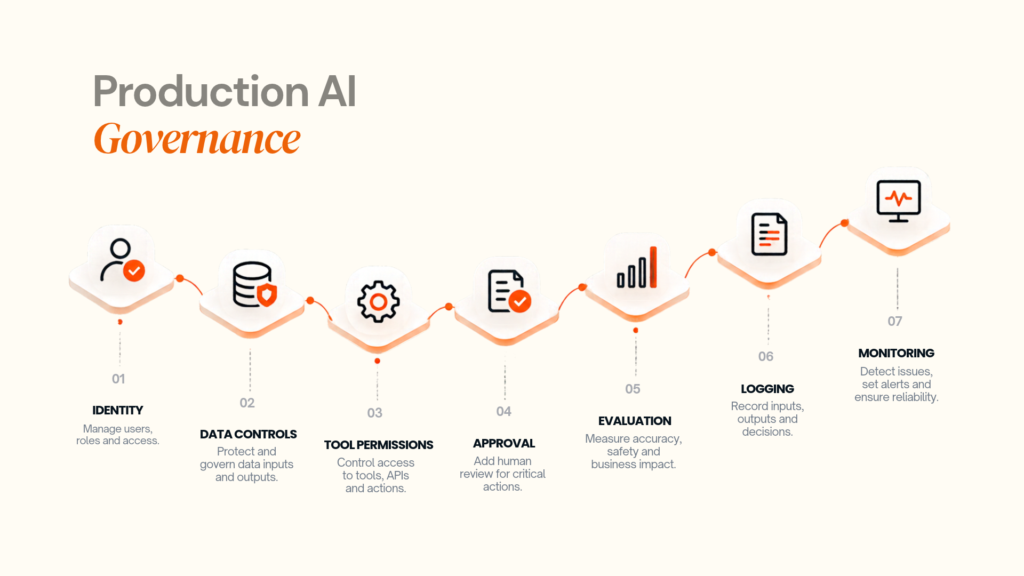
An internal writing assistant is very different from an AI system that accesses customer records or changes financial data.
Five controls to design from the start
Data access: expose only the data required.
Permissions: use role-based and least-privilege access.
Human review: approve high-impact or irreversible actions.
Evaluation: test before release and after material changes.
Observability: monitor important inputs, outputs, actions, failures and cost.
The NIST AI Risk Management Framework provides a structured approach to AI risk management.
Common failure modes
Automating a broken workflow: fix the process first.
Over-permissioned agent: grant only necessary tools.
Treating the LLM as a database: retrieve fresh business data instead.
Skipping the baseline: ROI becomes opinion.
Ignoring model changes: use regression testing.
UK and EU considerations
The European Commission states that Article 50 transparency obligations under the EU AI Act apply from 2 August 2026 for systems within scope. Not every small-business AI application is high risk, but businesses serving European users should classify the use case early and assess applicable privacy, transparency and sector requirements. European Commission
AI Patterns in Real Products
Nexlead: AI inside a business platform
Designoweb's Nexlead case study combines AI-driven functionality with campaign setup, approvals, screen management, analytics, payments and moderation. The published case study reports more than 3,000 advertisements, more than 20,000 in-store interactions and a 60% increase in lead conversions during its initial rollout.
Pattern: AI → workflow → customer interaction → reporting
VASD: visual AI connected to service action
The VASD case study analyses an uploaded home-maintenance image, recommends solutions and connects the user to professional assistance.
Pattern: Image understanding → recommendation → service action
Hollywood Hair: personalisation inside the customer journey
The Hollywood Hair case study combines AI recommendations with appointments, customer profiles, marketing automation, loyalty and analytics.
Pattern: AI recommendation → experience → workflow → action
The lesson across all three is the same: AI becomes more valuable when it is connected to the next business action.
09
How to Evaluate an AI Development Partner
Evaluate the partner as a product engineering team, not simply an API integrator.
| Area | What to ask |
|---|---|
| Strategy | Can they define the business problem and KPI? |
| Architecture | Can they explain why the pattern fits? |
| AI engineering | Can they work across GenAI, ML, RAG, and agents? |
| Data | Can private data be integrated safely? |
| Evaluation | How will quality be tested? |
| Security | How are leakage and unsafe tool use handled? |
| Integration | Can the AI work with current systems? |
| Operations | Who monitors quality, cost, and changes? |
| Ownership | Who owns code and deliverables? |
| Scaling | What happens at 10x usage? |
At Designoweb, the approach is:
Business strategy → AI use case → data → architecture → product engineering → integrations → evaluation → deployment → optimisation
Relevant capabilities include AI development services, product development services, our product engineering process, and our portfolio.
Looking for an AI development partner?
Bring the workflow, KPI, and systems involved. Designoweb can translate them into a practical architecture and phased delivery plan. → Talk to Designoweb
10
What a Sensible First AI Project Looks Like
A strong first release is usually narrow enough to learn from.
One workflow → one owner → one KPI → limited users → existing-system integration → human fallback → cost monitoring
For example, a sales pilot can test whether AI reduces qualification time while preserving conversion quality with human approval for exceptions.
Author

Frequently Asked Questions
01
What is AI for small businesses?
AI for small businesses means applying artificial intelligence to specific business tasks such as customer support, document processing, lead qualification, forecasting, personalisation, content operations and decision support.
The important distinction is that useful AI is connected to a process and a measurable business outcome.
02
How can AI help a small business compete with larger companies?
AI can reduce specific capability gaps by helping small teams handle more customer interactions, process more information, respond faster, automate repetitive workflows and make better use of existing data.
It does not remove every advantage larger businesses have. Its value is more specific: increasing the capacity and consistency of a small team.
03
What are the best AI use cases for small businesses?
Common starting points include customer service, lead qualification, document processing, sales intelligence, internal knowledge search, forecasting, marketing operations and workflow automation.
The appropriate first use case depends on the company's process volume, available data, risk and business objectives.
01
Should a small business use ChatGPT or build its own AI?
For simple tasks such as drafting, summarisation or brainstorming, an existing AI product may be sufficient.
Custom development becomes more relevant when AI must access private business data, connect multiple systems, operate inside a customer-facing application or perform a workflow that existing software cannot represent.
02
Should a small business use ChatGPT or build its own AI?
For simple tasks such as drafting, summarisation or brainstorming, an existing AI product may be sufficient.
Custom development becomes more relevant when AI must access private business data, connect multiple systems, operate inside a customer-facing application or perform a workflow that existing software cannot represent.
03
What is RAG and when should a small business use it?
RAG, or Retrieval-Augmented Generation, connects an LLM to external information such as company documents, databases or APIs. The system retrieves relevant information and provides it to the model before generating an answer.
It is particularly useful when information changes regularly and the AI needs access to current or proprietary knowledge.
04
Does every AI project need fine-tuning?
Fine-tuning is useful for some specialised behaviour and task patterns, but it is not the default solution for giving a model access to company information.
For current business knowledge, RAG or direct access to authoritative systems is often a more appropriate architecture.
05
What is an AI agent?
An AI agent is a system that can use an AI model to manage a workflow, select tools, perform actions and adapt to the state of the task within defined controls.
A chatbot that only answers questions is not automatically an agent.
01
How much does AI development cost for a small business?
There is no meaningful single price.
The cost depends on data integration, workflow complexity, model usage, interfaces, security, infrastructure, testing and ongoing maintenance.
A simple workflow using existing software can have a very different cost structure from a custom AI application connected to multiple business systems.
02
Is custom AI worth it for a small business?
It can be when the AI capability affects an important workflow, relies on proprietary data, differentiates the product or cannot be handled well by existing software.
It is usually harder to justify when an existing product already solves the problem adequately.
03
How should a small business calculate AI ROI?
Start with a baseline and measure a specific outcome.
A useful first-pass calculation is:
Time/labour savings + error reduction + attributable business impact − AI operating and implementation costs
Choose metrics that match the use case.
01
Is AI safe for handling business data?
That depends on the AI provider, architecture, data classification, access controls and use case.
Businesses should understand where data is processed, what is retained, who can access it, whether it can be used for model training, and how actions are logged.
02
What should small businesses do about AI governance?
Start with a simple policy covering approved use cases, restricted data, user permissions, human review requirements, monitoring and incident handling.
For higher-risk applications, governance should become part of the technical design rather than an afterthought.
The NIST AI Risk Management Framework is a useful voluntary reference for structuring that work.
03
Does the EU AI Act affect small businesses?
Potentially, depending on the AI system and how it is used or supplied.
The EU AI Act follows a risk-based model. Certain transparency requirements apply from 2 August 2026, while some high-risk obligations apply later. Businesses operating in the EU should assess the specific use case rather than assuming every AI application carries the same obligations.
01
How should a small business start using AI?
Start by identifying one recurring process with measurable cost, time or quality problems.
Document the workflow, establish the baseline, test a narrow AI-assisted version, measure the results and expand only after the workflow proves reliable.
02
Should AI completely replace human employees?
The useful question is usually which parts of a process require judgment and which are repetitive.
AI can take over classification, summarisation, extraction and other repeatable steps while people handle exceptions, approvals, relationships and high-impact decisions.
03
How do I know whether I need an AI development company?
Consider external engineering help when the project requires custom integrations, proprietary data, customer-facing AI, advanced evaluation, AI agents, machine learning or production infrastructure that your internal team does not have the capacity to build and maintain.
01
What should I ask an AI development company before hiring them?
Ask how they approach discovery, data readiness, architecture, model selection, evaluation, security, integrations, monitoring, ownership and post-launch maintenance.
Also ask for examples of relevant systems rather than generic AI capability claims.
The strongest proof is usually a project where the technical architecture is clearly connected to a business problem.