
Key Takeaways
01
Generative AI can accelerate mobile product exploration, but human product judgment remains essential.
02
AI-assisted prototyping is most useful for exploring and testing alternatives, not for replacing final UX design.
03
The right AI architecture depends on the workload. Some features should run on-device, some in the cloud, and others through a hybrid design.
04
RAG, prompting, fine-tuning, and AI agents solve different problems and should not be bundled together simply because an app uses an LLM.
05
Personalization is valuable when it improves a meaningful user decision or workflow, not merely because screens can be dynamically rearranged.
06
AI interfaces need explicit loading, uncertainty, retry, edit, confirmation and fallback states.
07
Privacy and accessibility should influence the product experience from the beginning.
08
Production AI needs evaluation, observability, security, cost controls and model-change management.
09
The best AI mobile app development company should be able to connect UX decisions with architecture, integrations and measurable product outcomes.
Mobile app design has always been about reducing friction between what a user wants to do and what the product lets them do. Generative AI is changing that equation by making the interface itself more adaptive, conversational, and responsive to context.
Designers can now use AI to explore user flows, generate prototype directions, test microcopy, analyse feedback and create early interface concepts. Developers can bring AI into the product through cloud models, on-device models, retrieval systems and tool-enabled workflows. On Apple platforms, the Foundation Models framework now provides access to on-device language models, while Android supports on-device generative AI through Gemini Nano and AICore for suitable use cases. Apple Foundation Models and Android Gemini Nano both reflect the shift toward intelligence becoming part of the application stack rather than a separate chatbot experience.
But there is a catch.
Generating an interface is not the same as designing a useful product. A generated screen can look convincing while having the wrong information hierarchy, poor accessibility, unclear error states, or a workflow that does not match how people actually work. The same is true inside the product: a powerful model can still create a poor experience when the surrounding architecture has weak data, slow inference, uncontrolled permissions, or no fallback path.
That is why the real opportunity is not simply adding generative AI to mobile apps. It is using intelligence to rethink how users discover, decide, create, search, and complete tasks while keeping the experience predictable and controlled.
In this guide, we will explain how generative AI is changing mobile app UX, where it fits across the design process, how AI prototyping works, how to choose between on-device and cloud AI, where RAG and AI agents fit, how to design for privacy and accessibility, what AI can add to development cost, and how to choose the right AI mobile app development partner.
Planning an AI-powered mobile app or redesigning an existing product?
Designoweb can help define the right AI use case, UX approach, and technical architecture before development begins.
01
What Generative AI Changes in Mobile App Design
Generative AI changes mobile product design in two ways. It changes how teams create the product, and it changes what the finished product can do.
On the design side, AI can summarise research, generate alternatives, explore interface directions, draft UX copy and create early prototypes. On the product side, AI can understand natural language, interpret images or voice, retrieve business information and adapt the next step around user intent.
The old design loop looked like:
Research → requirements → wireframes → UI → prototype → development → testing
With generative AI, teams can add faster cycles:
Prompt → generate → critique → refine → test → learn
The important point is that AI increases the number of ideas a team can explore; it does not remove the need to decide which ideas are useful.
A polished generated screen can still have poor hierarchy, inaccessible interaction, unclear error handling or a workflow that does not match the user's goal. That is why AI UX design should be treated as product design with an additional generation layer, not as automated screen production.
For businesses considering UI/UX design services, the useful question is not “Are you using AI?” It is “How does AI improve the quality and speed of the decisions your design team makes?”
02
Where Generative AI Fits in the Mobile UX Process
Generative AI can contribute across the mobile UX lifecycle, but the responsibility at each stage remains human-led.
| Stage | AI can help with | Human responsibility |
|---|---|---|
| Discovery | Summaries, themes, feedback clustering | Validate findings |
| Ideation | Alternative journeys and concepts | Choose what to test |
| IA | Navigation and content options | Validate comprehension |
| Wireframing | Initial layouts | Fix hierarchy and flow |
| Prototyping | Testable concepts | Test interactions |
| UI design | Visual exploration and copy | Maintain design system |
| Accessibility | Potential issue discovery | Perform real testing |
| Post-launch | Feedback and usage analysis | Decide what changes |
The best use is usually repeated exploration. For example, a product team can generate several onboarding approaches, prototype the strongest two and test them with users rather than spending the full design cycle polishing one unvalidated direction.
This is why generative AI works best alongside product development services, where research, product decisions, design, engineering and validation remain connected.
03
AI Prototyping: From Prompt to Testable Product Flow
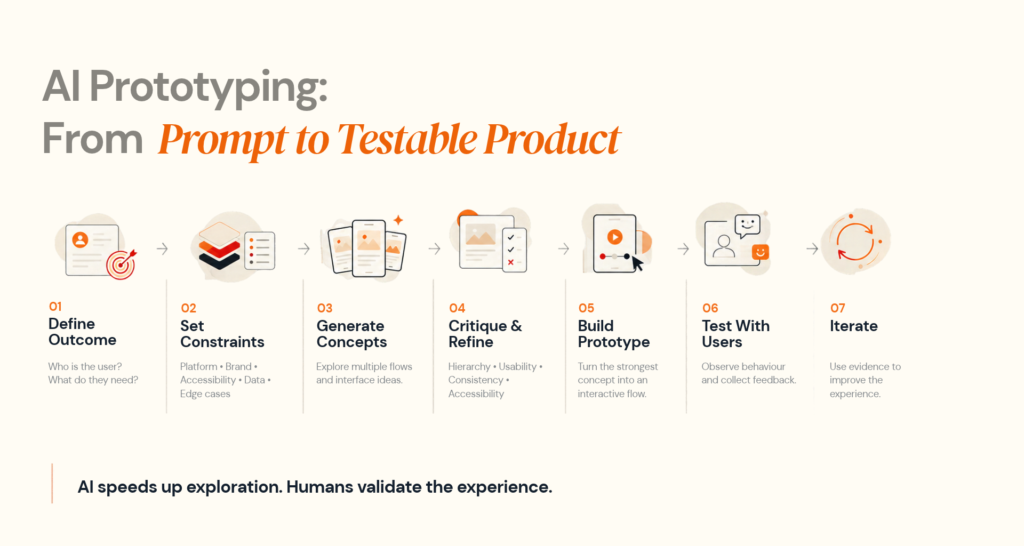
Prompt-to-prototype is one of the clearest applications of generative AI in mobile app design. It can turn a description into an initial flow quickly, reducing the cost of exploring alternatives.
However, current research shows that AI-assisted prototyping tools still differ in usability, structural fidelity and user control, and generated output often needs manual refinement. Research on AI-assisted prototyping tools provides useful evidence for this distinction.
04
Designing the Architecture Behind an AI-Powered Mobile App
The AI interface is only one layer of a production mobile product.
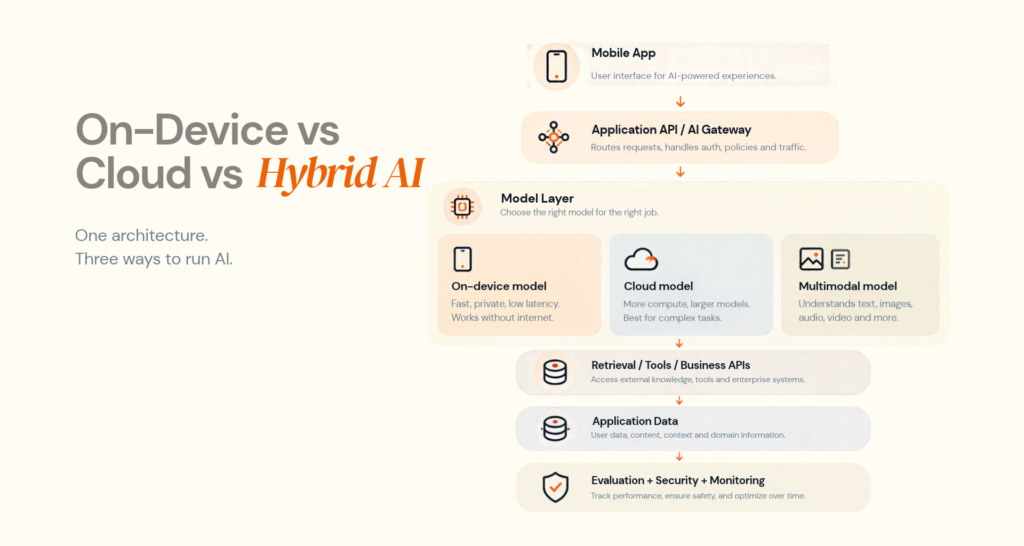
On-device AI
On-device processing is useful when low latency, offline access or privacy is important. Android's Gemini Nano runs through AICore for suitable local generative AI workloads. Android Developers documents the approach.
Cloud AI
Cloud models are more suitable when the app needs larger models, large context windows, complex reasoning or centralised enterprise data. The safer pattern is generally:
Mobile → authenticated backend → AI service → validated response
rather than embedding unrestricted credentials in the client.
Hybrid AI
Hybrid architecture combines local and server-side intelligence. A device can perform a fast initial task locally and send only more complex cases to the cloud.
Apple's current generative AI guidance also recommends choosing model types according to capability, privacy and performance, with data minimisation for server-based processing. Apple Generative AI guidance
Where RAG fits
RAG is useful when an application needs answers grounded in private or changing information such as manuals, policies, product documentation or internal knowledge.
Question → retrieval + permissions → relevant context → model → validated response
Do not add RAG just because a product contains AI. A conventional database query is better for exact structured lookup.
RAG vs fine-tuning
| Need | Better starting point |
|---|---|
| Current private knowledge | RAG |
| Consistent format | Prompting + structured output |
| Specialised behaviour | Evaluation + prompting, potentially fine-tuning |
| Multi-step action | Tools / agent orchestration |
The architecture should follow the product requirement, not the model trend.
05
Personalization, Multimodal UX and AI Agents
AI personalization
Generative AI can make personalization more contextual by combining user information, behaviour and product data into recommendations, explanations or next-best actions.
The product should first define:
What data is needed → why it is needed → where it is processed → how long it is retained → what the user controls
The goal is not a more complicated interface. It is a more useful one.
Designoweb's AI development services include generative AI, predictive analytics, conversational AI, computer vision and AI agents, allowing personalization to be engineered as part of the product rather than added as a visual layer.
Multimodal UX
Mobile already combines text, voice, images, video, location and sensors. AI can bring those inputs into one workflow.
For example:
Photo → visual understanding → spoken question → contextual response → recommended action
Designoweb's VASD case study demonstrates this pattern through image-based home-maintenance diagnosis, product recommendations, repair guidance and professional service booking.
AI agents
An assistant answers. An agent can execute approved steps.
A mobile agent may check availability, retrieve account context, prepare an action and request confirmation before changing a record or transaction.
That requires authentication, permissions, tools, state, validation, confirmation and auditability. The closer an agent gets to an irreversible action, the stronger the control layer should become.
06
Privacy, Accessibility and Responsible AI UX
AI changes the interaction model, so responsible AI is also a UX requirement.
Make AI visible
Users should understand when they are interacting with AI, what the feature can do and where limitations exist. Apple's guidance explicitly recommends transparency, clear expectations and privacy-aware model selection. The European Commission's Article 50 transparency guidance applies from August 2, 2026 for systems within scope. European Commission guidance
Design for recovery
Generated output can be wrong or incomplete. Good AI UX makes recovery obvious:
Generate → Review → Edit → Retry → Accept → Undo
For consequential actions:
Generate → Explain → Confirm → Execute
Accessibility still needs real testing
AI can help identify possible accessibility problems, but teams still need to test the interface itself. Use WCAG 2.2 as a baseline for text, contrast, interaction and alternatives to gesture-only actions.
Add an engineering control layer
NIST's AI Risk Management Framework and its Generative AI Profile provide a useful risk-management baseline.
| Dimension | Practical response |
|---|---|
| Hallucination | Grounding + evaluation |
| Prompt injection | Input controls + tool permissions |
| Data leakage | Minimisation + access control |
| Unsafe action | Confirmation + least privilege |
| Model change | Versioning + regression tests |
| High cost | Limits + routing + monitoring |
For Firebase AI Logic, current Firebase guidance recommends App Check, API-key restrictions, authentication controls, rate limits and monitoring. App Check enforcement is scheduled to become required for Firebase AI Logic on November 2, 2026. Firebase security checklist
07
How to Build and Evaluate Generative AI Features
A production AI feature should move through a controlled loop.
1. Define the product problem
Ask:
What becomes materially easier because AI exists?
2. Select the simplest viable capability
Use rules for deterministic tasks, predictive ML for prediction, computer vision for visual interpretation, RAG for changing knowledge and agents only where multi-step actions justify the added complexity.
3. Design the AI interaction
Define input, output, latency, uncertainty, fallback, retry, escalation and user control before implementation.
4. Build an evaluation set
Include normal, ambiguous, unsupported, sensitive and adversarial inputs. Measure accuracy, groundedness, task completion, latency, consistency, cost and user corrections.
5. Monitor production
Track response time, token usage, failure rates, tool calls, fallback frequency, retrieval quality and user feedback. Firebase AI Logic supports monitoring for AI request health and usage.
6. Keep the model replaceable
Where practical, keep the model behind an application abstraction so the team can change the provider, model, prompts or retrieval configuration without redesigning the mobile experience.
08
When Generative AI Is the Wrong Choice
AI should not be added just because it is possible.
Use conventional software when the task is deterministic, such as calculations, fixed validation or exact database lookup.
Avoid AI when it makes a simple interaction slower without adding meaningful value, when reliable data is unavailable, or when the risk of an incorrect result cannot be controlled.
Personalization can also be unnecessary. A clear, stable interface may outperform a constantly changing experience that adds complexity without improving task completion.
The strongest rule is:
AI-generated exploration + governed design system + human validation.
09
Generative AI Mobile App Development Cost
There is no useful fixed price for adding generative AI to a mobile application. The cost depends on how deeply the feature changes the product architecture.
| Cost driver | Lower complexity | Higher complexity |
|---|---|---|
| AI capability | Basic text generation | Multimodal / agentic workflows |
| Model | Managed API | Multiple or specialised models |
| Data | Static/public | Private enterprise data |
| Retrieval | None | RAG + permissions + evaluation |
| Mobile AI | Cloud only | Hybrid / on-device + cloud |
| Integrations | One API | Multiple business systems |
| Security | Standard | Sensitive or regulated workflows |
| Evaluation | Small test set | Continuous evaluation |
| Operations | Basic monitoring | Full AI observability |
Budget for more than model usage. Typical cost areas include product discovery, UX, prototyping, mobile engineering, backend work, AI integration, data preparation, retrieval, evaluation, security, QA, monitoring and post-launch optimisation.
A practical investment model is:
Discovery → Feasibility → Prototype → MVP → Production hardening → Scale
That lets the business validate the highest-risk assumption before committing the full production budget.
10
How to Choose an AI Mobile App Development Company
Many vendors can connect a mobile app to an LLM. Fewer can design the complete product around it.
Evaluate the partner across seven areas:
Product: Can they explain the problem AI is solving?
Architecture: Can they justify on-device, cloud, hybrid, RAG, fine-tuning or agents?
UX: Can they design loading, uncertainty, editing, retry, confirmation and fallback states?
Mobile engineering: Can they handle platform behaviour, performance, offline scenarios and native integrations?
Evaluation: Do they define a real test set and production KPIs?
Security: Can they explain data handling, permissions, secrets, monitoring and abuse controls?
Ownership: Who owns the code, prompts, evaluation assets, data and infrastructure, and who maintains the product after launch?
A strong partner should be willing to say when AI is not the right choice.
Designoweb combines mobile solutions with AI development services, so the AI layer, UX and product engineering can be considered together.
Where Designoweb Fits
At Designoweb, we build intelligent mobile products around the user workflow, product goal and technical constraints—not around a model or a trend.
Our approach connects:
Product strategy → UX/UI → AI architecture → Mobile engineering → Backend & integrations → Evaluation → Deployment → Optimisation
Relevant capabilities include design solutions, product development services, mobile solutions and AI development services.
VASD: Intelligence connected to action
VASD uses AI-based image analysis for home-maintenance diagnosis, recommendations and service booking. The value comes from the complete workflow rather than image analysis alone.
Hollywood Hair: AI inside the customer journey
Hollywood Hair combines AI-powered transformation visualisation with booking and personalised interactions.
Mental Healthy: Personalisation as a product capability
Mental Healthy combines AI-driven personalisation with mood tracking, programmes, resources and progress monitoring.
ArcX: AI plus connected context
ArcX combines AI-driven music personalisation with a smart ring, Spotify integration and biometric context.
These projects reinforce a simple principle: AI creates value when it changes what the user can accomplish.
Final Takeaway
Generative AI is changing mobile app design, but the biggest opportunity is not faster screen production.
It is the ability to create products that understand context, support natural interaction, personalise useful experiences and help users complete tasks with less friction.
That requires more than connecting an LLM to a mobile interface.
It requires:
User problem → UX → AI capability → architecture → data → controls → evaluation → measurable outcome
The strongest AI-powered mobile apps will not be the ones with the most AI features. They will be the ones where intelligence makes the product genuinely easier, faster or more useful while the experience remains clear and controlled.
At Designoweb, we bring AI development, mobile engineering, UX, product strategy and production delivery together to build that kind of experience.
Have an AI-powered mobile product idea?
Let’s turn the use case into a practical product and engineering roadmap.
Author

Frequently Asked Questions
01
What is generative AI in mobile app development?
It means integrating generative models into a mobile product or its development workflow to generate or transform text, images, voice, code or other content and to support intelligent interactions.
02
How is generative AI changing mobile app UX design?
It helps teams explore more concepts, prototype faster, personalise experiences and design interfaces around natural-language, voice and multimodal interaction. Human validation remains essential.
03
Can generative AI design a complete mobile app?
Design for variable output and latency. Useful patterns include progress states, edit, retry, regeneration, feedback, confirmation and fallback.
04
How much does generative AI add to mobile app development cost?
There is no universal amount. Cost depends on AI capability, data, model usage, retrieval, integrations, mobile architecture, security, evaluation and ongoing operations.
05
When should a mobile app not use generative AI?
Do not use it when deterministic software is more reliable, when latency worsens without meaningful value, when data is not available, or when the risk cannot be controlled.