
Key Takeaways
01.
Start with the product problem, not a model.
02.
Use AI where interpretation, prediction, generation or ambiguity creates measurable value.
03.
Use deterministic software where rules produce a reliable answer.
04.
Foundation Models supports on-device intelligence, Private Cloud Compute and language-model interoperability. Apple Foundation Models documentation
05.
Core AI supports custom on-device model execution on Apple silicon. Apple Core AI documentation
06.
Hybrid architectures are often the practical choice for enterprise products.
07.
RAG solves a knowledge problem; tool calling solves an action problem; fine-tuning addresses specialised behaviour.
08.
Production AI needs evaluation, validation, monitoring and fallback logic
09.
Privacy must be designed into the data path before model requests are made.
10.
The real cost includes UX, backend, data, testing, security, operations and maintenance.
AI in iOS app development is no longer limited to adding a chatbot to an existing application.
An iOS product can now use AI to summarise information, understand images, personalise recommendations, retrieve enterprise knowledge, trigger actions and support users inside workflows they already understand.
The bigger opportunity is not simply adding a model. It is deciding where intelligence should sit inside the product and how it should behave when the model is uncertain, unavailable, slow or wrong.
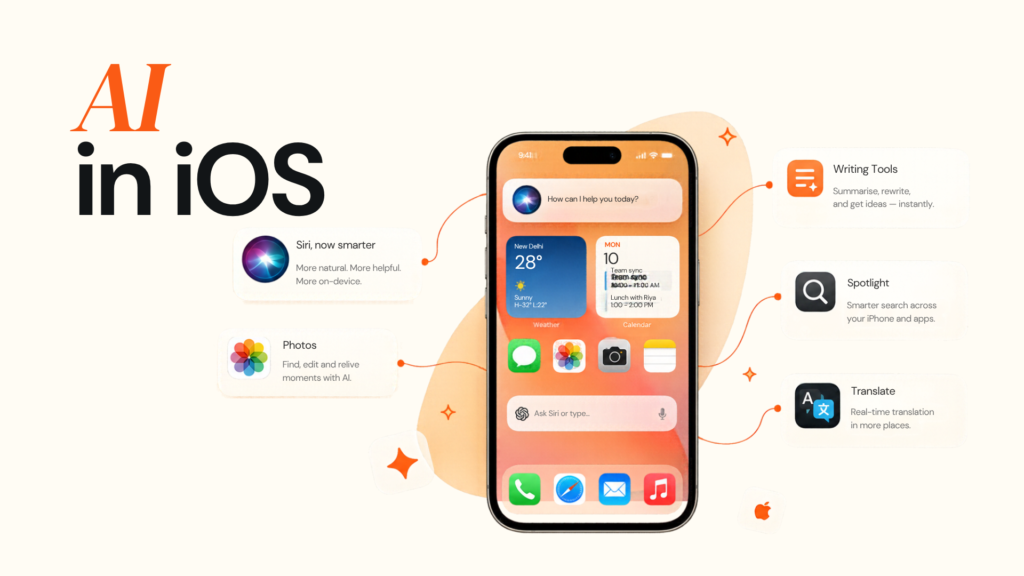
Apple’s current AI stack makes that architecture more flexible. The Foundation Models framework provides native Swift access to Apple’s on-device foundation model and can also work with other language models. Current Apple tooling supports multimodal prompts, tool calling, model-provider interoperability, and systematic evaluation of AI features. Core AI provides a route for running custom models directly on Apple silicon. Apple Foundation Models and Core AI documentation
In this guide, we are going to talk about which AI features are worth building in an iOS application, how to choose between on-device, Private Cloud Compute and cloud AI, how RAG and tool calling fit into the architecture, how to integrate AI safely, what actually drives AI development cost, and how to choose the right iOS development partner.
01
What AI in iOS App Development Actually Means
“iOS app + AI API” is not a production architecture.
A feature such as “Summarise this report” still raises questions about data location, model choice, validation, latency, cost, privacy and fallback behaviour.
That is why the real challenge is not connecting an LLM. It is engineering the product around probabilistic behaviour.
Apple’s current Foundation Models framework supports Apple Foundation Models and other models that conform to its LanguageModel protocol. Private Cloud Compute can provide more capable reasoning, while Core AI supports custom on-device models. Apple Foundation Models and Core AI documentation
Start with the product problem
| Product problem | Useful AI capability | Example metric |
|---|---|---|
| Users spend too long reading | Summarisation | Time saved |
| Customers struggle to choose | Recommendation | Conversion |
| Staff search manuals | Semantic retrieval | Resolution time |
| Users upload photos | Visual analysis | First-time resolution |
| Teams re-enter records | Extraction | Processing time |
| Users need workflow help | AI-assisted action | Task completion |
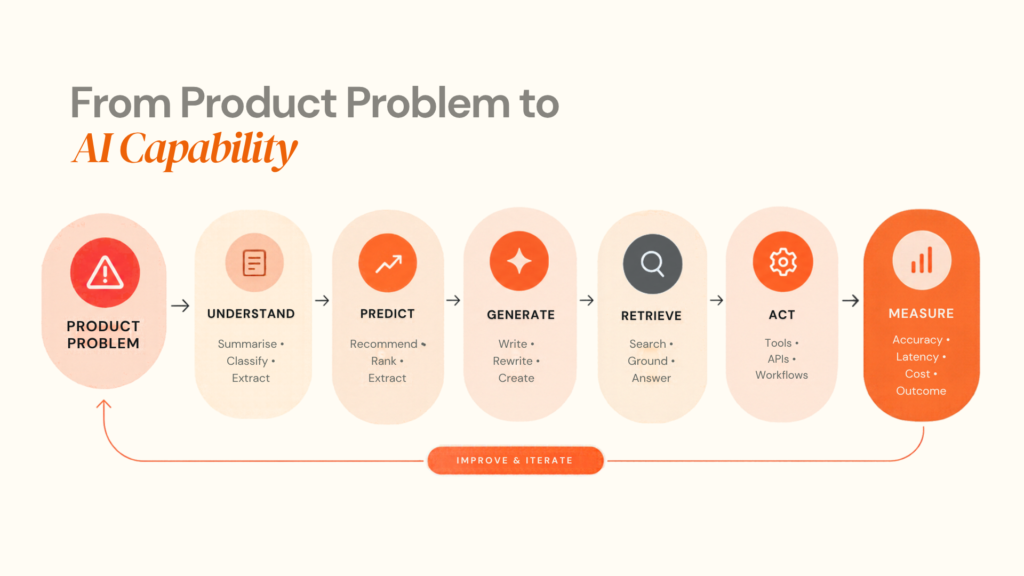
AI is also the wrong choice when deterministic software already solves the problem reliably. Payment totals, hard validation rules and fixed permission checks should generally remain rule-based.
02
Which AI Features Are Worth Building in an iOS App?
The strongest AI features usually sit inside an existing workflow instead of creating a separate “AI mode.”
1. Generative text
Foundation Models supports language tasks such as summarisation, extraction, refinement and generation, including structured output. Apple Foundation Models documentation
Useful examples:
- Summarising reports or claims
- Rewriting messages
- Extracting entities
- Classifying support requests
- Generating structured notes
- Contextual assistance
A CRM feature such as “Create a follow-up task for Thursday and mention the pricing discussion” can be more useful than a generic chat screen.
2. Image and multimodal AI
iOS applications can combine text and visual input for document understanding, OCR, product identification, defect detection, visual search and image classification. Apple’s current Foundation Models tooling supports multimodal prompts and can use Vision framework tools such as OCR and barcode reading. Apple Foundation Models updates
Designoweb’s VASD case study demonstrates this kind of workflow, combining AI-driven image analysis with guidance, product recommendations and service booking.
3. Personalisation
Personalisation does not automatically need an LLM.
It can use behavioural signals, product metadata, ranking models, embeddings, contextual signals and business rules. For many commerce and SaaS products, a smaller predictive model can be cheaper and more consistent than generative AI.
4. Natural-language search
A user may prefer:
“Show me the maintenance procedure for the 2024 hydraulic pump after a pressure drop.”
over navigating several document categories. Enterprise implementations typically combine semantic retrieval with permissions and structured metadata.
5. AI agents and tool calling
An assistant answers. An agent can perform a controlled sequence of actions.
Apple’s Foundation Models framework supports tool calling, allowing models to retrieve current data, ground responses in trusted sources or trigger application-side actions. Apple tool calling documentation
A field-service workflow could:
- Read current telemetry
- Retrieve the relevant manual
- Identify the service procedure
- Check part availability
- Prepare a service request
- Ask for approval
6. App Intents
Apple’s App Intents framework exposes app capabilities to broader system experiences, including Apple Intelligence, Siri and Shortcuts. Apple App Intents documentation
The opportunity is to design actions AI can understand, not only screens users can tap.
03
Choosing the Right iOS AI Architecture
The key question is:
Where should inference happen?
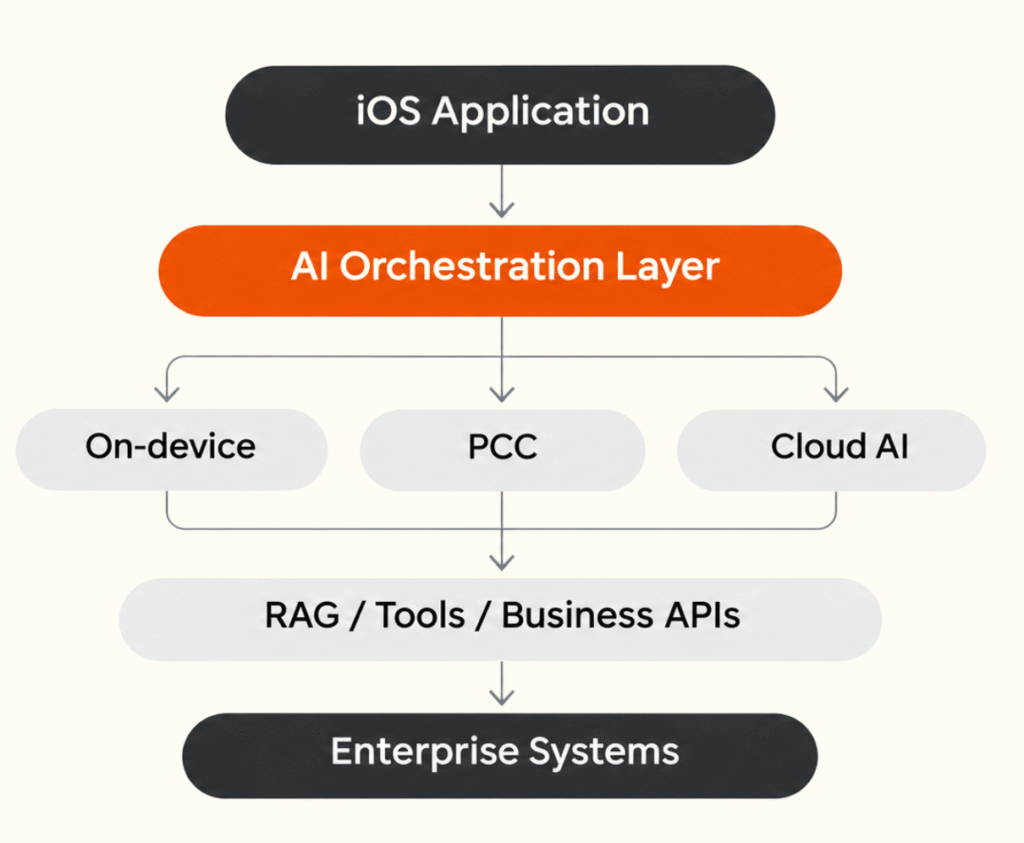
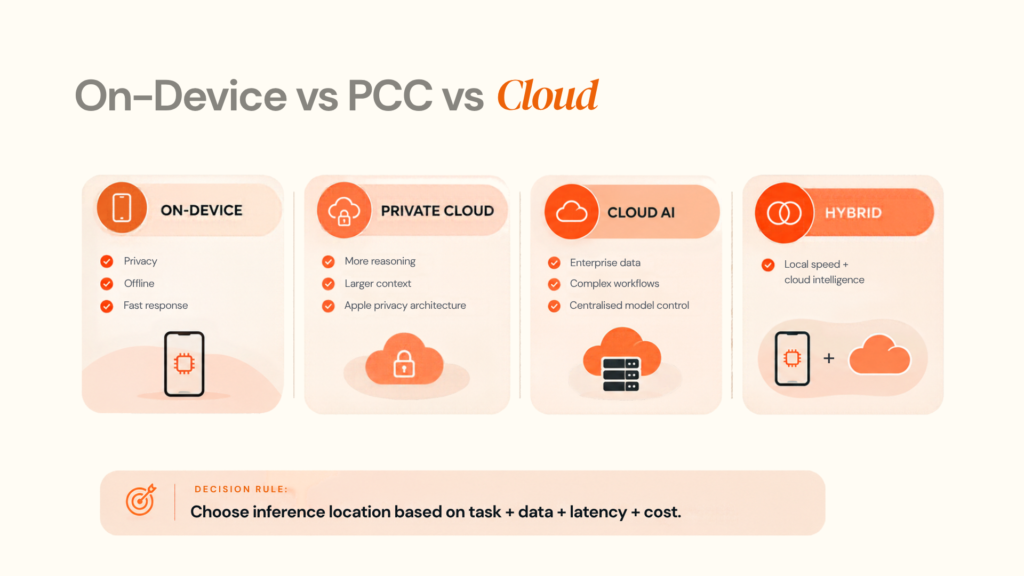
The three practical routes are on-device AI, Private Cloud Compute and cloud AI. Many serious products use more than one.
On-device AI
Foundation Models provides on-device language models, while Core AI is built for custom on-device models on Apple silicon.
Best fit:
- Low latency
- Offline use
- Privacy-sensitive processing
- Lightweight generation or classification
Private Cloud Compute
Private Cloud Compute provides a route to stronger model capabilities within Apple’s privacy architecture. Current Foundation Models APIs expose PrivateCloudComputeLanguageModel for tasks that need more reasoning and larger context. Eligibility and programme conditions should be checked against the intended product distribution.
Cloud AI
Cloud models are often appropriate for:
- Large context
- Heavy reasoning
- Complex multimodal tasks
- Enterprise data
- Centralised control
- Multiple model providers
Apple now supports a common language-model protocol, making it easier to change the underlying model without redesigning the entire experience.
The practical answer is often hybrid
The application does not need one model for everything. It needs a routing strategy.
| Requirement | Strong starting point |
|---|---|
| Lightweight summarisation | On-device |
| Sensitive local processing | On-device |
| Large enterprise knowledge base | Cloud + RAG |
| Complex reasoning | PCC or Cloud |
| Custom on-device model | Core AI |
| AI-driven action | Foundation Models + tools |
| System-level action | App Intents |
| High-impact decision | AI + controls + human review |
Apple also provides model-availability APIs so applications can adapt when the required system model is unavailable.
04
How to Integrate AI Into an iOS Application
A reliable integration process controls the system around the model.
Step 1: Define the AI task
Document the input, output, next action, success metric, acceptable failure rate, latency target and data sensitivity.
Example:
Input: Customer complaint
Output: Category + summary
Action: Route to support queue
Metric: Correct routing
Fallback: Human review
Step 2: Decide where inference belongs
Ask:
- Can it run on-device?
- Does it require external data?
- Does it need large context?
- Does it need tools?
- Is offline support important?
- What happens when the model is unavailable?
Step 3: Design the data path
A typical enterprise pattern is:
iOS → authenticated backend → permissions → retrieval → model → structured response → iOS
The model is only one part. Identity, retrieval quality and business rules often determine whether the output is useful.
Step 4: Build an orchestration layer
Keep model selection, prompts, tools, retries, fallbacks, telemetry and versioning outside the mobile UI where practical.
Step 5: Use structured outputs
Instead of free-form text, define product-ready fields:
issue:
priority:
confidence:
recommended_action:
requires_human_review:
source_reference:
Foundation Models supports guided generation for structured types. Apple Foundation Models documentation
Step 6: Add validation and fallback logic
Define what happens when the AI is wrong.
Possible controls include:
- Deterministic validation
- Rule-based guardrails
- Human approval
- Source references
- Restricted tools
- Output filters
- Safe default states
Step 7: Evaluate before launch
Apple’s Evaluations framework is designed for model-driven features where unit tests alone are not sufficient. It supports datasets, metrics and evaluators. Apple Evaluations documentation
Test common, ambiguous, incomplete, adversarial and unsupported inputs.
For tool-calling applications, evaluate the selected tool, arguments and call order as well. Apple tool-call evaluation documentation
Step 8: Monitor production behaviour
| Metric | Business question |
|---|---|
| Task completion | Is AI solving the job? |
| Accuracy / groundedness | Can outputs be trusted? |
| p95 latency | Does it feel responsive? |
| Fallback rate | How often does it struggle? |
| Human override | How often is output rejected? |
| Cost per success | Is the feature economical? |
Apple’s Foundation Models tooling also supports runtime inspection of prompts, outputs, tools, latency and token usage.
Step 9: Roll out gradually
Start with internal users, selected accounts, feature flags or human review for higher-risk features. Expand when quality evidence is strong.
05
RAG, Embeddings and Tool Calling: What They Actually Change
These concepts solve different problems.
Embeddings
Embeddings make semantic similarity possible. A user can ask:
“How do I restore system pressure?”
and retrieve a document titled:
“Hydraulic pressure reset procedure.”
Vector databases
Vector storage is useful for manuals, policies, catalogues, support content, contracts and internal procedures.
RAG
Retrieval-Augmented Generation gives the model relevant information at runtime.
Missing knowledge → Retrieval
That is usually better than expecting a general model to memorise changing enterprise information.
Tool calling
Tool calling allows the model to interact with software.
Need to know → RAG
Need to act → Tools
Apple’s tool-calling architecture supports retrieving current information and triggering controlled application-side actions. Apple tool calling documentation
Use typed parameters, narrow permissions, logging and explicit confirmation for consequential actions.
Fine-tuning
Fine-tuning is not a default solution for missing company knowledge.
A practical rule is:
Missing knowledge → RAG
Missing behaviour → Prompting / fine-tuning
Need to act → Tools
06
Security, Privacy and AI Governance for iOS Apps
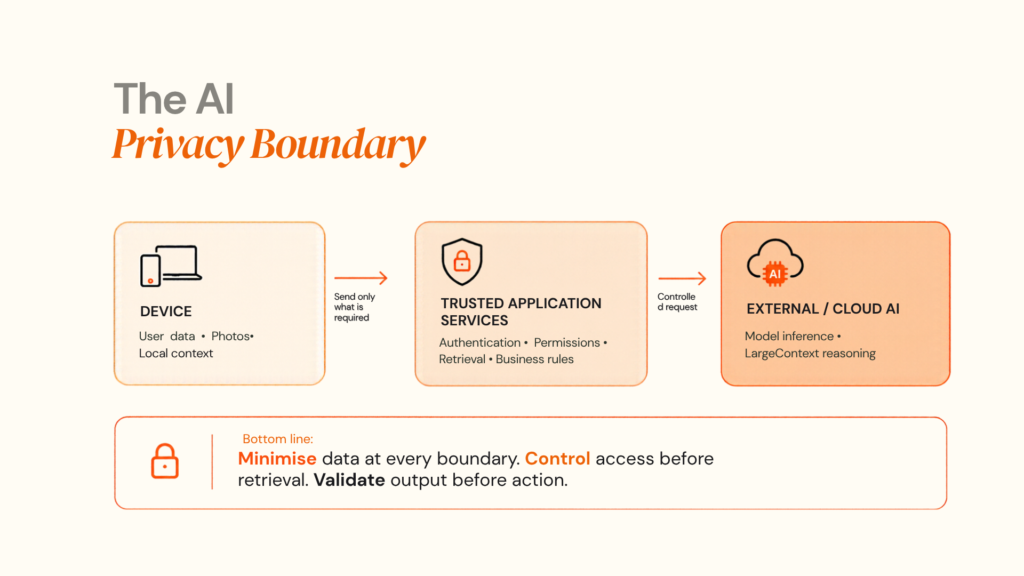
AI can expand the data path across:
Device → Backend → Model Provider → Retrieval → Logs → External APIs
The full path matters.
Privacy starts before the model call
Define:
- What data enters the model
- Where it is processed
- Whether it is retained
- Who can access it
- How logs are handled
- What happens when permission is withdrawn
Apple’s privacy manifest system helps document app and third-party SDK data practices. Apple Privacy Manifest documentation
Review cloud providers
Check processing terms, retention, geographic handling, security controls, model-change policies, availability and contractual commitments.
Europe and AI governance
The EU AI Act has transparency obligations that apply from August 2, 2026 to certain AI systems and scenarios. Teams serving European users should determine whether disclosure, labelling or additional governance controls apply to their product. European Commission AI Act
The NIST AI Risk Management Framework is also useful for structuring AI risk management across the lifecycle.
Security checklist
| Area | Control |
|---|---|
| Data | Minimise model input |
| Identity | Check permissions before retrieval |
| Tools | Allow only required actions |
| Secrets | Keep provider credentials out of the app |
| Logs | Redact sensitive content |
| Output | Validate before actions |
| Human review | Required for high-impact operations |
| Fallback | Maintain a valid product state |
07
AI in iOS App Development Cost: What Actually Drives the Budget?
There is no useful single price for AI integration.
A simple on-device summarisation feature is very different from an enterprise assistant that uses RAG, calls APIs and manages permissions.
| Cost driver | Lower complexity | Higher complexity |
|---|---|---|
| Model | Small / on-device | Large cloud / multi-model |
| Data | Local | Enterprise sources |
| Retrieval | None | RAG + vector database |
| Actions | Read-only | Multi-step tools |
| Backend | Existing APIs | New orchestration |
| Privacy | Low sensitivity | Highly sensitive |
| Testing | Small evaluation | Large evaluation suite |
| Scale | Limited | High concurrency |
| Operations | Basic | Full monitoring and governance |
Budget the feature in five layers
- iOS experience — UI, state, permissions, native integrations
2. AI layer — Model, prompts, routing, fallbacks
3. Data layer — Retrieval, embeddings, permissions
4. Platform layer — APIs, identity, observability
5. AI operations — Evaluation, monitoring, updates
On-device inference can reduce model-API usage, but engineering, QA, security, support and maintenance remain part of the product cost.
The better metric is:
Total AI operating cost ÷ successful user outcome
08
How to Evaluate an AI iOS Development Partner
A strong partner should explain the architecture before selling a model.
| Question | What to look for |
|---|---|
| Why this model? | Capability, latency and cost reasoning |
| Why on-device or cloud? | Data, context and performance trade-offs |
| What happens if AI fails? | Fallbacks and deterministic controls |
| How is quality measured? | Evaluation datasets and success metrics |
| How is data protected? | Explicit data-flow design |
| Can AI trigger actions? | Scoped tools and permissions |
| How does it scale? | Capacity and observability plan |
| How can models change later? | Abstraction and regression testing |
| What happens after OS model updates? | Prompt re-evaluation |
| What is handed over? | Source, architecture and documentation |
Red flags
“We can add ChatGPT to the app.”
That describes an API connection, not a production architecture.
“Fine-tuning will solve accuracy.”
First determine whether the actual issue is missing data, retrieval, prompts or validation.
“The model is 95% accurate.”
Ask: accurate at what task, on which dataset, and what happens to the remaining 5%?
Designoweb’s capabilities combine iOS app development, AI development, mobile solutions and broader product development.
Its VASD case study also demonstrates an AI-driven mobile workflow rather than a generic AI demo.
The AI feature is only the visible part. The architecture decides whether it becomes a reliable product.
Designoweb can assess the workflow, data path, AI capability and production requirements before implementation.
Plan an AI product with Designoweb
09
Common AI Integration Mistakes
1. Starting with the technology
“Let’s use an LLM” is not a product requirement. Start with the workflow.
2. Making everything conversational
Chat is useful when natural language reduces friction. It is usually a poor fit for deterministic workflows, structured forms and repetitive operations.
3. Sending every request to the cloud
Some tasks are better handled on-device for privacy, latency or offline operation.
4. Ignoring model and context limits
Apple exposes token-counting and context information for Foundation Models, and current model behaviour can change with OS updates. Prompts should therefore be re-tested when model versions change.
5. Giving AI broad permissions
Use narrowly defined tools and explicit permissions.
6. Testing only the happy path
Test wrong inputs, missing information, adversarial prompts, stale data, model failures and invalid tool arguments.
7. Treating the model as permanent infrastructure
Model behaviour evolves. Build version-aware evaluation rather than assuming today's output will remain unchanged.
8. Measuring vanity metrics
More AI calls do not necessarily mean more value.
9. Forgetting the UX
The interface should explain what AI is doing, what information it used, whether the result can be edited and what happens when the model is uncertain.
Apple’s Human Interface Guidelines provide current guidance for generative AI interactions. Apple Human Interface Guidelines
Final Decision Rule
The best AI-powered iOS application is not the one with the largest model.
It is the one where intelligence is placed in exactly the part of the product where it improves the user’s outcome.
That may mean Foundation Models, Core AI, Private Cloud Compute, a cloud model, RAG, a custom vision model, tool calling, App Intents, a hybrid architecture—or no AI at all.
Product problem → AI capability → architecture → UX → evaluation → production → measurement → iteration
That is how AI becomes part of a durable iOS product instead of a feature added for the sake of having AI.
Author

Frequently Asked Questions
01
What is AI in iOS app development?
AI in iOS app development means integrating machine learning, language models, computer vision, recommendation systems or AI-assisted workflows into an application built for Apple platforms. The AI can run on-device, through Apple’s Private Cloud Compute, through a cloud provider or through a combination of these architectures.
02
Can an existing iOS app be upgraded with AI?
Yes. AI can usually be added to an existing application without rebuilding the entire product. The right approach depends on the current iOS codebase, backend architecture, available data, user workflows and the AI capability being introduced.
03
Can iOS apps run AI on-device?
Yes. Apple provides native technologies for on-device AI, including the Foundation Models framework for language-based intelligence and Core AI for running AI models on Apple silicon. Availability and capabilities depend on the device and supported operating system environment.
01
Should an iOS app use Apple Foundation Models or a cloud AI model?
It depends on the task. On-device models are attractive for low latency, privacy and offline scenarios, while cloud models are useful when the application needs larger context, heavier reasoning or centralised access to enterprise data
02
Can AI work offline in an iOS app?
Some AI features can. On-device models are the strongest fit for offline-capable experiences, while cloud-dependent features will require connectivity. Production applications should provide an explicit fallback when the required AI capability is unavailable.
03
Do I need RAG for an AI-powered iOS app?
Not always. RAG is useful when the AI must answer from changing, organisation-specific or large volumes of external information. For simple text generation or local summarisation, RAG may add unnecessary complexity.
01
How much does AI integration into an iOS app cost?
There is no single meaningful number. Cost depends on model choice, data complexity, backend integration, RAG, tool calling, security requirements, testing, scale and ongoing AI operations.
02
Does on-device AI make an iOS project free to run?
No. On-device inference can reduce cloud model costs, but the product still has engineering, testing, infrastructure, monitoring and maintenance costs.
01
How should businesses protect data used by AI features?
Minimise the data sent to models, keep access controls before retrieval, protect credentials, avoid putting API secrets in the app, review model-provider terms and maintain clear retention and logging policies. Apple also provides privacy manifests and App Store privacy documentation to help teams document data practices.
02
How should AI features be tested?
Create evaluation datasets that represent real user behaviour and measure task completion, accuracy, latency, safety, fallback frequency and human override rates. Apple’s Evaluations framework is designed specifically to evaluate model-driven app experiences.
01
Can an AI development company integrate AI into an existing iOS product?
Yes. A capable product engineering partner should be able to work across the existing mobile codebase, backend, data layer and AI integration rather than treating AI as an isolated feature. The key is to assess the existing architecture before choosing the model.