
Key Takeaways
01
AR creates value when it solves a spatial, visual, or contextual learning problem, not simply because it adds interaction.
02
3D visualisation can make complex concepts easier to explore, but AR itself is not the learning outcome.
03
The right approach may be marker-based AR, markerless AR, WebAR, native mobile AR, location-based AR, or wearable AR.
04
Device strategy comes before feature strategy. The actual school, university or workforce device estate should shape the experience.
05
Production AR education products may require 3D content, curriculum alignment, LMS integration, analytics, accessibility, privacy, and content management.
06
Research is promising but heterogeneous, so pilots should measure learning or operational outcomes rather than downloads alone.
07
AR is not always the right answer. Sometimes a strong 2D lesson, video, or interactive model solves the problem more efficiently.
Education often asks learners to understand things they cannot easily see, touch or experience. A textbook can explain the heart. A diagram can show a machine. A video can demonstrate a procedure. But some concepts become easier to understand when digital information is placed directly into the learner's physical environment.
That is where augmented reality (AR) in education becomes useful.
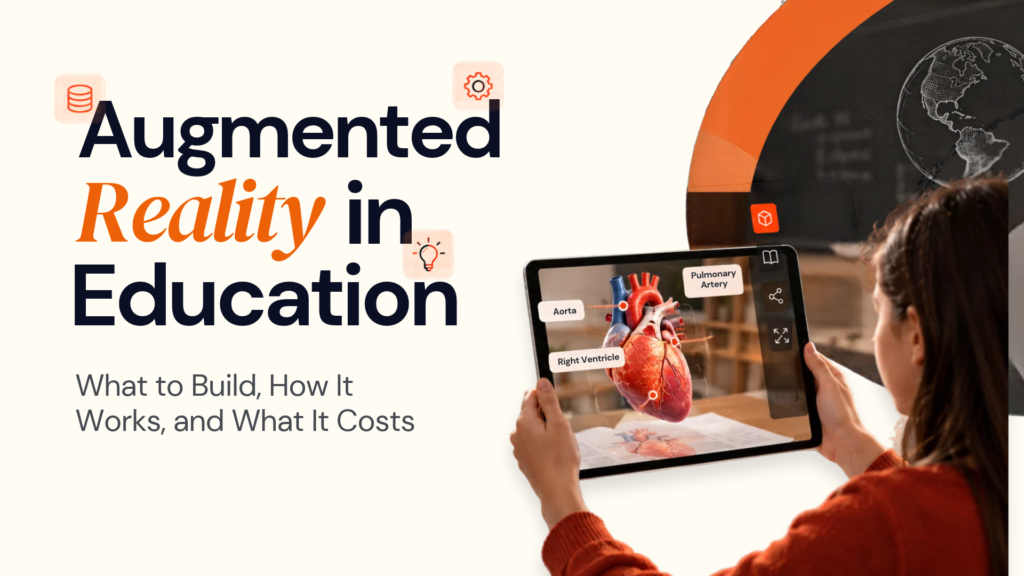
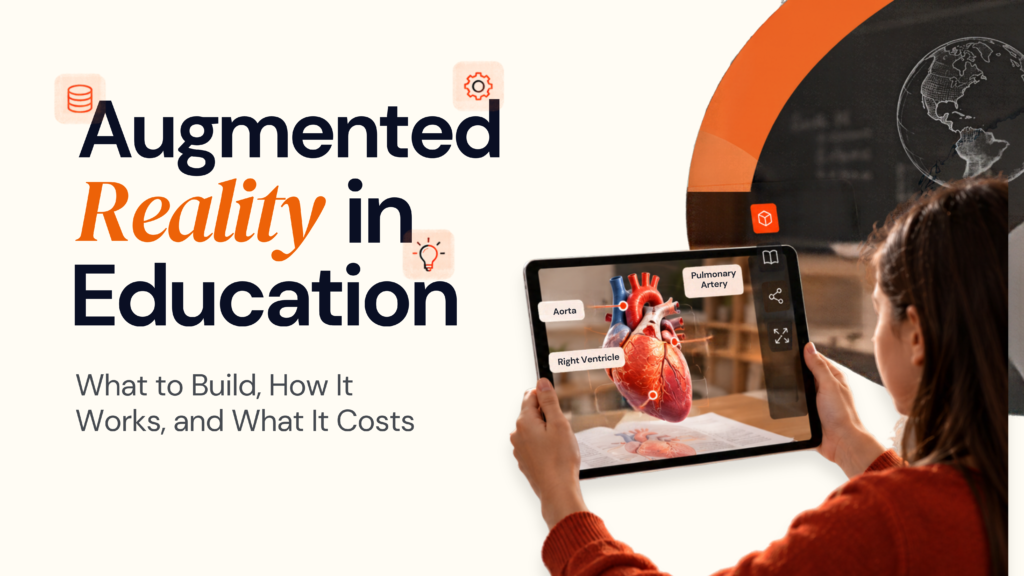
AR can place 3D models, labels, animations, instructions, and interactive content into the learner's surroundings through smartphones, tablets, headsets, and other supported devices. A student can explore a 3D heart on a desk, an engineering learner can inspect a machine component, or a trainee can receive contextual guidance while working around real equipment.
The opportunity is real, but AR is not automatically a better teaching method. A January 2026 meta-analysis of 27 experimental and quasi-experimental studies found a small-to-moderate significant effect of AR on reducing learners' cognitive load, while also reporting very high variation between studies. The research therefore supports a measured view: instructional design and implementation conditions matter alongside the technology.
So the question is not:
“How can we add AR to this lesson?”
It is:
“What learning problem becomes easier to solve when digital information is anchored to the physical world?”
At Designoweb, we use that question to define the experience, technology, content architecture, and product roadmap before development starts.
01
What Is Augmented Reality in Education?
Augmented reality in education overlays digital information onto the learner's physical environment.
That information can include:
- 3D models
- Labels and annotations
- Animations
- Interactive diagrams
- Step-by-step instructions
- Audio and video
- Assessments and feedback
A student might point a tablet at a textbook and explore a 3D model of the solar system. An engineering student could inspect a machine assembly. A vocational learner could see instructions anchored to a physical component.
AR keeps the physical environment visible. VR replaces it with a largely simulated environment.
| Technology | Learner experience | Typical use |
|---|---|---|
| AR | Real world + digital overlays | Anatomy, science, engineering, fieldwork |
| VR | Fully simulated environment | Safety training, simulation, virtual labs |
| MR | Physical and digital elements interact spatially | Advanced technical training |
| WebAR | AR delivered through a browser | Demonstrations, modules, exhibitions |
| Native AR | Device-specific AR application | Richer interaction and long-term products |
Apple's ARKit uses motion sensing and scene analysis to understand the device's position and environment, while Google ARCore provides capabilities such as motion tracking and environmental understanding.
For an education provider, however, the technology is only the delivery mechanism. The real product is:
Learning objective → AR interaction → Practice → Feedback → Assessment
That is what should shape the architecture.
02
Where AR Creates Real Learning Value
The strongest educational AR experiences make something easier to see, manipulate, understand, or practise.
Visualising abstract concepts
Some subjects are difficult because learners cannot observe the underlying structure directly. AR can make anatomy, molecular structures, geometry, geological formations, electrical systems and mechanical assemblies more tangible.
A 3D model becomes educationally useful when it supports an action. “Rotate a 3D heart” is a feature. “Identify the chambers, trace blood flow and answer a question after exploring the model” is a learning activity.
Making practical learning safer
AR can help learners prepare for physical tasks before they perform them in real environments. This can support equipment assembly, laboratory orientation, maintenance, engineering procedures, clinical learning, and workplace safety.
The value comes from contextual guidance: identify the part → show the instruction → guide the action → confirm completion.
Connecting learning to the real world
AR can make information relevant to a specific place or object. A campus application can support orientation. A museum can add digital context to an artefact. A fieldwork application can identify a biological or geological feature. A technical training product can surface information when a learner points at a machine component.
Supporting active learning
AR is more useful when the learner has to do something with the content:
Inspect → Manipulate → Decide → Solve → Receive feedback → Explain
That is why instructional design matters as much as visual quality.
What the research tells us
The evidence is encouraging, but it does not support a blanket claim that AR improves every learning outcome.
The 2026 meta-analysis on cognitive load found a statistically significant small-to-moderate effect across 27 studies, but the studies were highly heterogeneous.
A separate meta-analysis of 17 studies involving 1,256 participants found a positive overall effect of AR on higher-order thinking, with stronger effects reported for 3D visualisation and skills than for some other dimensions. The authors also found meaningful variation across studies.
The practical takeaway is simple:
Design the learning outcome first. Use AR where it improves the path to that outcome.
03
AR Use Cases Across Education
AR can support much more than classroom demonstrations. The strongest use cases connect the technology to a real part of the learner journey.
AR in K–12 education
Common applications include interactive textbooks, science visualisation, geometry, historical reconstruction, geography, language activities and project-based learning.
For younger learners, simplicity matters. A short experience that teachers can launch quickly is often more practical than a visually complex scene with a long setup process.
AR in higher education
Universities can use AR where physical access, specialist equipment or spatial complexity creates a learning constraint.
Examples include:
- Anatomy and medical education
- Engineering and architecture
- Laboratory learning
- Archaeology
- Healthcare training
- Field research
- Campus navigation
Designoweb's Pharmatop case study demonstrates EdTech delivery experience with course enrolment, interactive learning content and progress monitoring. It is best positioned as education-product proof, not as an AR case study.
AR for professional and vocational training
This is a strong business use case because the learner is working with a real object. Instead of relying only on a PDF or video, AR can provide:
Part identification → Contextual instruction → Safety guidance → Procedure → Validation
That can support technicians, operators, field workers and other hands-on roles.
AR for museums and cultural learning
AR can add digital layers to physical exhibits through historical reconstruction, object annotations, translation, interactive timelines and supporting media.
WebAR can be particularly effective here because a QR code can launch the experience without requiring a dedicated app.
AR for inclusive and blended learning
A well-designed AR product can offer multiple ways to receive information:
- Visual labels
- Audio narration
- Captions
- Adjustable text
- Simplified controls
- Step-by-step instructions
- Non-AR alternatives
The objective is not simply to make the AR feature accessible. It is to make the lesson accessible.
04
Which AR Technology Should You Choose?
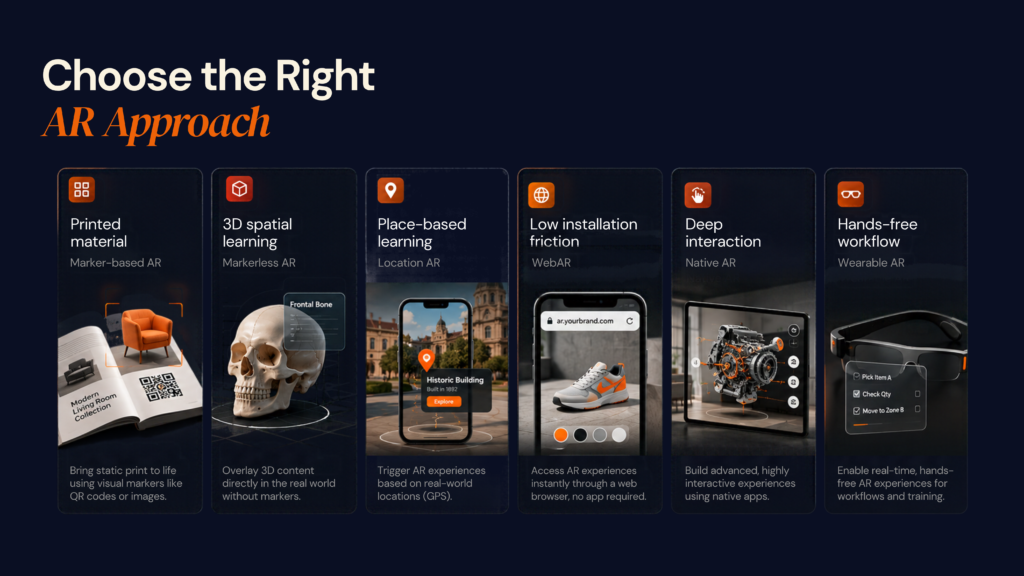
There is no universal best AR technology for education. The decision depends on the learning task, device estate, environment, content, and product lifecycle.
Marker-based AR
Marker-based AR uses a recognised image, card, illustration or visual trigger.
Best for: textbooks, worksheets, flashcards, exhibitions and structured classroom activities.
Strengths: predictable triggers, controlled experiences and clear content mapping.
Trade-offs: the marker must remain visible, and the interaction can feel constrained.
Markerless AR
Markerless AR uses spatial understanding to place digital objects on physical surfaces.
Best for: anatomy models, engineering objects, science demonstrations, and spatial exploration.
Strengths: more natural interaction and flexible placement.
Trade-offs: greater device dependency and more real-world testing.
Location-based AR
Location-based AR uses location and sensor information to make content relevant to a physical place.
Best for: campuses, museums, field trips, geography and cultural heritage.
Trade-offs: GPS variability, environmental conditions, and location privacy.
WebAR
WebAR delivers AR through a browser and can reduce installation friction. The W3C WebXR Device API continues to define web access to supported AR and VR devices, sensors, and head-mounted displays.
Best for: demonstrations, curriculum supplements, museums, recruitment and lightweight learning modules.
Trade-offs: browser and device variability and less control than some native approaches.
Native AR
Native mobile AR provides greater control over device capabilities.
Best for: long-term learning products, advanced tracking, offline use, deeper LMS integration, and richer interaction.
Designoweb's AR/VR App Development Services cover native, hybrid, wearable, and enterprise immersive applications.
Wearable AR
Smart glasses can make sense when learners need hands-free information, especially in industrial training, field service, medical training, laboratory work, and vocational instruction.
A 2026 peer-reviewed study involving 84 Grade 1/2 children across five classes in an Australian school reported high engagement across behavioural, academic, cognitive and social dimensions in an AR smart-glasses learning environment. The study also highlighted the importance of shared visual experiences and coordinated teaching design. Journal of Science Education and Technology
That is useful evidence, but it does not make smart glasses the default. For many education products, smartphones and tablets remain the more practical starting point.
05
How an AR Education Product Works
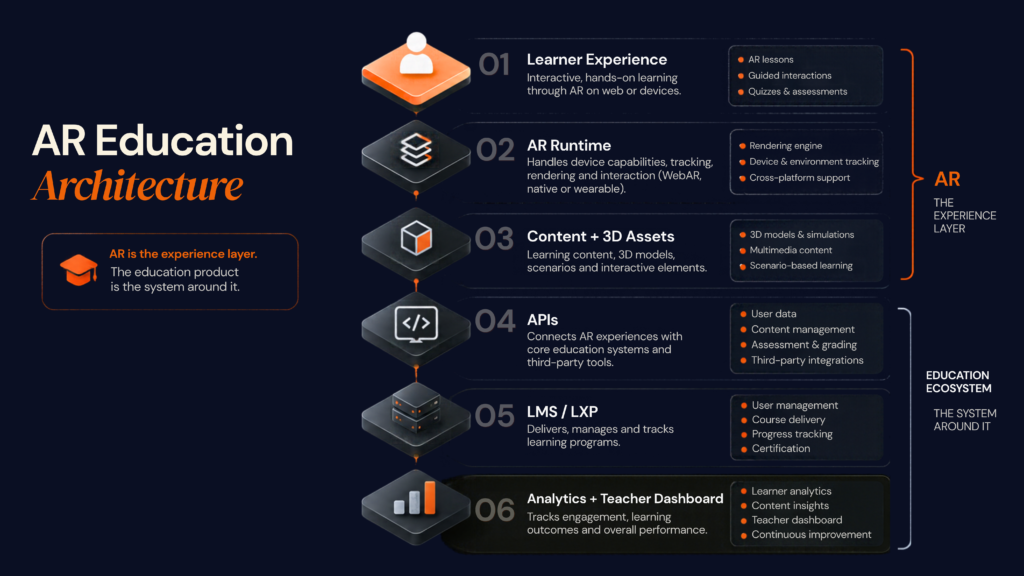
A production AR learning product is more than a camera experience. It is a connected system.
A practical architecture
Learner device → AR experience → AR runtime → Content engine → 3D/media assets → APIs → LMS/LXP → Analytics
Experience layer
This is what the learner or educator interacts with: iOS, Android, WebAR, tablets or supported wearables. The interface should make it obvious where to point, what to tap, and what the learner is expected to do.
AR runtime
This layer manages capabilities such as motion tracking, plane detection, anchors, image recognition, environmental understanding, and spatial placement.
Content layer
A scalable education product may require 3D models, textures, animations, audio, video, lesson metadata, assessments, teacher notes, curriculum mapping, and multiple languages.
The content system should allow educators or administrators to update lessons without rebuilding the application.
Backend and LMS integration
The backend may manage:
Accounts + classes + permissions + assignments + progress + assessments + analytics + content versions
Larger products may also connect with LMS/LXP platforms, identity providers, student information systems, and assessment tools.
Analytics
Downloads are not the success metric. Measure what matters to the learning journey:
- Lesson completion
- Task completion time
- Assessment performance
- Retries and errors
- Learner drop-off
- Teacher intervention
- Repeat use
06
AI, Accessibility, Privacy & Device Strategy
Where AI fits
AI can make an AR education product more adaptive, but it should have a clear purpose.
Useful applications include adaptive learning, personalised recommendations, automated feedback, natural-language tutoring, computer vision and teacher analytics.
For example, computer vision could recognise a physical component and load the relevant lesson. An AI tutor could answer questions about the lesson.
At Designoweb, we add AI when it improves the learning workflow—not simply because an AI model is available. Our AI Development Services can support conversational interfaces, computer vision, and intelligent product workflows where they are justified.
Accessibility
Consider accessibility from the beginning:
- Text alternatives
- Captions
- Audio support
- Readable labels
- Reduced motion
- Simple navigation
- Colour accessibility
- Non-AR alternatives
The goal is to make the learning objective accessible even when the immersive feature is not.
Device strategy
Education environments rarely have identical hardware. A sensible support model is:
Device capability
- Low capability
- Standard
- High capability
- Unsupported
Experience
- 2D or reduced 3D
- Core AR
- Richer effects and interaction
- Non-AR alternative
Do not promise universal support. Define a device matrix that reflects the real deployment environment.
Student data and privacy
Education products can process identity, performance, behavioural data, camera or microphone data, location, class membership and assessment information.
For UK schools, the Department for Education's current EdTech guidance says schools should ensure data processing complies with data protection law and build data protection by design and by default into EdTech procurement.
The ICO Children's Code addresses data minimisation, geolocation, profiling and other protections for services likely to be accessed by children.
For U.S. deployments, FERPA can apply to education records handled by covered institutions and their contractors, while COPPA can apply to covered online services directed to children under 13.
The architecture should answer five questions:
What is collected? → Why? → Where is it processed? → Who can access it? → How long is it retained?
07
AR Education Development Cost
One of the first questions schools, universities, EdTech companies, and training organisations ask is:
“How much does it cost to build an AR education app?”
There is no single fixed price because an AR education product can range from a simple 3D learning module to a complete platform with multiple subjects, interactive simulations, LMS integration, assessments, analytics and support for different devices.
For a practical 2026 planning range, AR education applications can typically start around 30,000–50,000 for a focused experience and move towards 100,000–150,000+ as the product becomes more advanced and integrated. Some specialist providers publish wider ranges reaching $200,000 or more for complex education AR products. These figures are indicative planning ranges rather than fixed market prices, because scope, content, and platform requirements can change the budget significantly.
Typical AR Education Development Cost
| Project Type | Indicative Cost | Typical Scope |
|---|---|---|
| Basic AR learning module | 30,000–50,000 | A focused subject, limited 3D assets, basic AR interaction and simple content delivery |
| Mid-level AR education product | 50,000–100,000 | Multiple lessons, interactive 3D, assessments, analytics and broader device support |
| Advanced AR learning platform | 100,000–150,000+ | LMS integration, teacher/admin dashboards, content management, offline support and advanced interactions |
| Enterprise / multi-platform solution | 150,000–200,000+ | Multiple platforms, large content libraries, advanced analytics, AI, integrations and long-term scalability |
The final budget should be based on the product you actually need to operate, not simply the number of AR features you want to include.
What Actually Drives AR Education App Cost?
The AR technology itself is only one part of the investment. The surrounding product requirements often have a much larger impact on cost.
| Cost Driver | Lower Complexity | Higher Complexity |
|---|---|---|
| 3D Content | Existing optimised models | Custom modelling, animation and complex assets |
| AR Interaction | Marker detection / basic placement | Advanced spatial interaction and object recognition |
| Platforms | One device class | iOS + Android + WebAR + wearables |
| LMS Integration | Limited data exchange | Deep API, identity and learning-data integration |
| Assessment | Basic quizzes | Adaptive assessment and detailed performance tracking |
| Offline Support | Not required | Local content, progress storage and synchronisation |
| Analytics | Basic usage events | Learner, teacher and administrator dashboards |
| Security | Standard app controls | Enterprise identity, permissions, audit and governance |
| Content Management | Developer-managed content | Teacher/admin-managed content platform |
| AI | No AI layer | AI tutoring, recommendations, feedback or computer vision |
| Maintenance | Limited post-launch support | Continuous device, OS, content and platform updates |
The Hidden Cost: Educational Content and 3D Assets
For AR education products, software development is only part of the work.
The learning experience may require:
3D modelling → optimisation → animation → instructional content → assessments → localisation → versioning
This becomes especially significant when the product covers multiple subjects, age groups or languages.
For example, building ten interactive anatomy models for a pilot is very different from creating a complete medical education library with hundreds of structures, animations, assessments and curriculum mappings.
The same applies to engineering and vocational training. A single machine model may be manageable, but a platform covering dozens of machines and procedures needs a proper content pipeline.
At Designoweb, we treat 3D content as part of the product architecture, not as an afterthought. The assets should be accurate enough for learning, optimised for the target devices, and structured for reuse across future lessons and experiences.
Development Cost vs. Total Product Cost
The initial application build is not the entire investment.
A production AR education platform may also require:
Development + 3D content + cloud infrastructure + LMS integration + analytics + testing + security + maintenance
There can also be recurring costs for:
- Adding new lessons
- Creating new 3D models
- Updating curriculum content
- Supporting new devices and operating systems
- Maintaining APIs and integrations
- Monitoring application performance
- Managing student and teacher accounts
- Improving the product based on usage data
This is why we recommend looking at AR development as a product lifecycle, rather than treating it as a one-time application build.
A Better Investment Model
At Designoweb, we do not recommend committing the full budget before the core learning experience has been validated.
We typically structure the investment into four stages:
1. PROOF OF CONCEPT
Validate the most technically challenging interaction.
For example: Can students accurately place, manipulate, and explore a 3D model on a supported classroom device?
The objective is to prove technical feasibility before expanding the product.
2. PILOT
Build one complete learning journey.
This could include one subject, selected lessons, interactive 3D content, assessment, analytics, and a defined device set.
The objective is to determine whether learners and educators actually gain value from the experience.
3. PRODUCTION
Once the pilot proves the concept, connect the product to the systems the organisation already uses.
This may include LMS/LXP integration, authentication, teacher dashboards, content management, analytics, reporting and enterprise security.
4. SCALE
Expand the product based on evidence.
Add more subjects, lessons, schools, users, languages, devices, AI capabilities and advanced AR interactions only when the product demonstrates a clear reason to do so.
How to Control AR Education Development Costs
The best cost optimisation decisions happen before development starts.
Start with one learning problem.
Do not build an entire AR education ecosystem before proving that the core experience improves the learning process.
Reuse your 3D assets.
Create production-ready models that can support multiple lessons, platforms and future immersive experiences.
Choose the simplest suitable AR approach.
A marker-based experience may be enough for a textbook. A complex spatial application may require native AR or advanced computer vision.
Define the device strategy early.
Supporting every smartphone, tablet, and wearable can significantly increase engineering and QA requirements.
Prototype the highest-risk interaction first.
Test tracking, object recognition, spatial interaction, or real-time 3D before spending heavily on the surrounding platform.
Build content management into the product.
If teachers or administrators need to update lessons regularly, they should not have to depend on developers for every content change.
What Should an AR Education Budget Actually Prove?
A good budget should answer more than:
“Can we build the application?”
It should help determine:
Can learners use it successfully?
Does it improve the intended learning outcome?
Will teachers actually adopt it?
Can the organisation manage the content?
Can the product scale across users and devices?
That is how we approach AR education development at Designoweb.
We define the learning objective, identify the right AR interaction, scope the 3D and engineering requirements, and build the product in stages so the investment grows with validated value.
08
How to Implement an AR Education Product
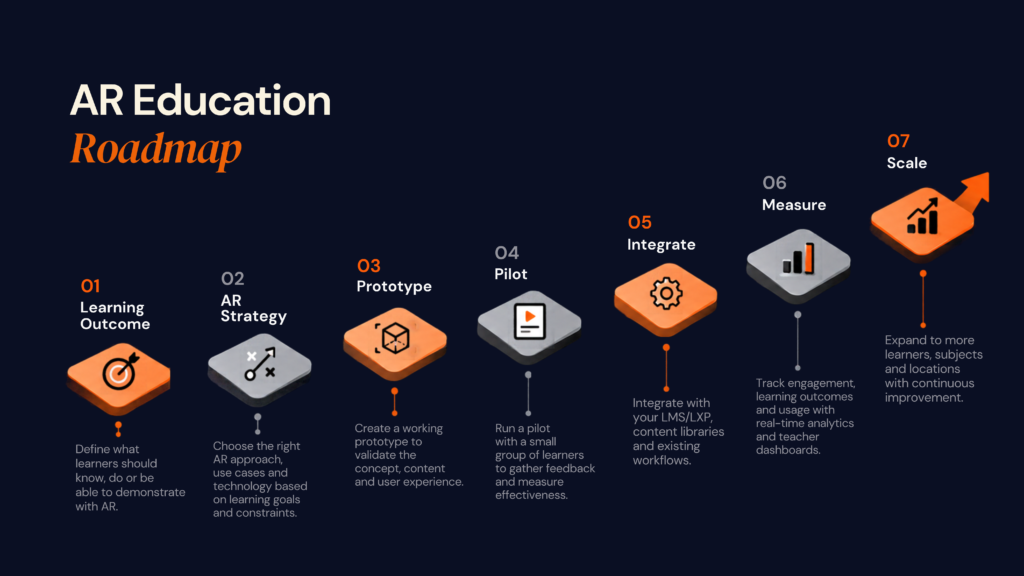
Step 1: Define the learning outcome
Start with one measurable objective such as improving spatial understanding, reducing equipment-identification errors, accelerating procedural recall or improving assessment performance.
Step 2: Decide why AR is necessary
Ask:
What can AR enable here that a 2D interface, video or interactive diagram cannot deliver well enough?
This prevents the technology from becoming the objective.
Step 3: Define users and devices
Identify learners, teachers, and administrators, then document devices, operating systems, minimum specifications, connectivity, and accessibility requirements.
Step 4: Prototype the highest-risk interaction
Do not start by building every screen. Test the difficult part first: spatial tracking, accurate object placement, computer vision, real-time 3D or offline behaviour.
Step 5: Build one complete learning journey
For example:
Lesson → AR exploration → Guided activity → Quiz → Result → Teacher visibility
That gives the team something real to test.
Step 6: Instrument the product
Measure task success, completion time, retries, assessment results, drop-off, teacher effort, and repeat use.
Step 7: Test in real environments
Test actual classroom or training conditions, not only development devices. Check lighting, connectivity, device performance, setup time, user movement, and tracking.
Step 8: Scale what works
Only after the pilot proves value should you expand content, users, platforms, AI, or advanced hardware.
09
How to Evaluate an AR Development Partner
Do not choose an AR development company based only on a visual demo. For education, you need a partner that can connect learning design, immersive technology, and product engineering.
| Evaluation area | What to ask |
|---|---|
| AR engineering | Can the team handle tracking, anchors, and spatial interactions? |
| 3D content | Can they create, optimise and maintain production-ready assets? |
| UX | Can they design for learners, teachers and administrators separately? |
| Education integration | Can they connect LMS/LXP, identity and assessment systems? |
| Performance | How does the experience perform on lower-end devices? |
| Accessibility | What alternatives exist when AR cannot be used? |
| Privacy | What learner data is collected and why? |
| Analytics | How is usage connected to learning outcomes? |
| AI | Where does AI add measurable value? |
| Maintenance | Who handles OS, device, content and platform updates? |
A strong partner should also be willing to say when AR is not the right solution.
The real question is not:
“Can you build AR?”
It is:
“Can you build the education product around the learning problem?”
10
Where Designoweb Fits
At Designoweb, we build AR education experiences around the learning objective, learner journey, and real deployment environment.
Our capabilities bring together immersive engineering, mobile product development, 3D content, backend integration, and AI where it has a clear role. That matters because a production education AR product is rarely just an AR application. It may need learner and teacher workflows, interactive 3D content, authentication, LMS integration, analytics, privacy controls, accessibility, and a content-management system that educators can actually manage.
Our approach is:
Learning Objective → User Journey → Device Strategy → AR Architecture → 3D Content → Product Engineering → Integration → Testing → Optimisation
For some projects, that means WebAR. For others, native mobile AR or wearable AR may be the better fit. The technology follows the learning problem—not the other way around.
A Designoweb Education Case Study: Pharmatop
A good example of our wider education-product engineering capability is Pharmatop, a medical education platform built for healthcare professionals and learners.
The platform brings together course discovery and enrolment, secure payments, structured learning content, assessments and learner progress tracking. This is important because it demonstrates the type of product foundation an AR education experience can sit within: content delivery, learner journeys, assessment, and measurable progress.
Pharmatop is not an AR case study, and we would not position it as one. Instead, it demonstrates our experience building the education infrastructure around the learning experience.
Immersive Learning Proof: Eye Anatomy
Our portfolio also includes Eye Anatomy, a VR experience designed to let users explore the human eye in 3D.
The project demonstrates how immersive technology can make complex anatomical structures easier to explore visually by moving beyond flat diagrams into an interactive 3D environment.
Together, these examples reflect the broader capabilities an education AR product requires:
Education Platform Engineering + 3D Content + Immersive Interaction + Progress Tracking
That is the combination we bring to AR learning products—not simply an AR camera experience.
Final Takeaway
The opportunity for augmented reality in education is not about turning every lesson into a 3D experience.
It is about making specific learning problems easier to understand, practise, or solve.
The strongest projects start with:
Learning problem → Learning objective → AR interaction → Assessment → Evidence
From there, the technology can be selected around the real environment: WebAR for low-friction access, native AR for deeper device capabilities, or wearable AR where hands-free guidance is genuinely useful.
At Designoweb, we build around that principle. The objective is not simply to create an AR experience that looks impressive. It is to engineer an education product that learners can use, educators can manage, and organisations can measure.
Build for learning. Use AR where it creates a real advantage.
Frequently Asked Questions
01
What is augmented reality in education?
Augmented reality in education overlays digital information such as 3D models, labels, animations or instructions onto the physical environment. It can support visualisation, practical learning, fieldwork, training and interactive lessons.
02
What are the benefits of AR in education?
AR can make spatial or abstract concepts easier to explore, connect digital information with physical objects, support active learning and provide contextual guidance. Results depend on the learning design and implementation.
03
How is AR different from VR in education?
AR keeps the physical environment visible and adds digital content. VR places the learner inside a simulated environment and is generally more appropriate when full immersion or controlled simulation is needed.
04
What AR technologies are used in education?
Common approaches include marker-based AR, markerless AR, location-based AR, WebAR, native mobile AR and wearable AR. Platforms can include ARKit, ARCore and WebXR depending on the device strategy.
05
Is WebAR suitable for education?
WebAR can be useful when low installation friction and broad distribution matter, especially for demonstrations, museums, QR-led learning and lightweight modules. Browser and device support still need to be tested.
06
How much does it cost to build an AR education app?
There is no universal cost. The budget depends on 3D content, AR complexity, platforms, LMS integration, assessment, analytics, accessibility, offline support, security and ongoing content management.
07
Does an AR education product need LMS integration?
Not always. A simple standalone learning module may not need one. Larger products often benefit from LMS/LXP, identity, assessment, and progress integration.
08
Can AI be added to an AR education app?
Yes. AI can support adaptive learning, tutoring, feedback, computer vision, recommendations, and teacher analytics. It should be added where it improves a defined learning workflow.
09
How do you measure AR education success?
Measure the learning objective rather than downloads alone. Useful indicators include task completion, assessment performance, completion time, retries, learner drop-off, teacher effort, and repeat use.
10
Should every education app use AR?
No. AR is most useful when spatial context or real-world interaction creates value that a simpler digital experience cannot provide efficiently.