
Key Takeaways
01.
The strongest AR/VR use cases solve a defined business problem, such as reducing training risk, clarifying complex products or helping field technicians complete unfamiliar tasks.
02.
Spatial computing does not automatically mean buying a headset. A smartphone, browser experience, mixed-reality device or fully immersive application may be better.
03.
AI can make immersive applications more context-aware, but adds requirements for accuracy, latency, privacy and testing.
04.
Apple visionOS, Android XR, mobile AR and WebXR have different capabilities and constraints.
05.
Training, remote assistance, product configuration and complex product visualisation are useful starting points when outcomes can be measured.
06.
Costs depend on 3D assets, tracking, device support, integrations, content management and maintenance.
07.
Establish a measurement plan before development begins.
08.
Validate one high-value workflow before investing in a broad immersive platform.
AR/VR trends in 2026 are less about adding another immersive experience to a product and more about deciding where spatial technology can make work, shopping, learning or collaboration measurably better.
Consider two businesses exploring augmented reality. One wants to add a 3D animation because competitors are experimenting with immersive content. The other sells complex equipment and wants customers to understand dimensions, compare configurations and inspect components before requesting a quote.
Both could build an AR experience. Only the second has identified a clear decision the technology should improve.
That distinction matters. Immersive applications involve additional work around 3D content, device compatibility, tracking, performance, interaction design and ongoing support. A convincing demo is not necessarily a product people will use—or a business will benefit from.
The most relevant AR/VR trends in 2026 include AI and extended reality working together, evolving spatial computing platforms, interactive 3D data in business workflows, and immersive training and product evaluation. The right investment depends on the workflow, audience and outcome the business needs.
At Designoweb, we approach AR/VR as product engineering: identify the user problem, validate the experience, choose the right platform, integrate the systems behind it and measure whether it works in practice.
In this guide, we are going to explore the AR/VR trends that matter for business in 2026, practical use cases across industries, platform and architecture choices, development cost drivers, ways to evaluate ROI, and how to move from a prototype to a production-ready application.
01
What changed in AR/VR in 2026?
Spatial computing is a product and platform decision
Spatial computing describes systems that understand or use physical space as part of a digital experience. A user might place a 3D product in a room, inspect a machine component at life size or arrange application windows around a workspace.
Apple's visionOS developer documentation covers experiences ranging from conventional windows with 3D elements to immersive spaces. Google's Android XR developer documentation covers immersive and augmented experiences across compatible devices.
These platforms create more options, but they do not remove fragmentation. A touchscreen interface cannot automatically be assumed to work well with hand tracking, gaze input or a spatial interface. Platform selection should follow the task, device access and operating environment.
AI can make immersive experiences more context-aware
AI can introduce conversational guidance, visual recognition, contextual instructions and adaptive learning scenarios. A technician might ask for the next approved maintenance step; a trainee might receive an explanation of a virtual component; a customer could explore a product using natural-language instructions.
AI is useful only when it improves the task. A maintenance assistant that identifies a component incorrectly could misdirect a technician. An assistant that invents a procedure could introduce risk. AI-enabled experiences need trusted source data, validation, clear limits and human oversight where errors matter.
Enterprise value is a better test than novelty
AR/VR can support tasks that are difficult through a conventional screen alone: practising a hazardous procedure, reviewing a factory layout, comparing product geometry or guiding a technician through a repair.
The question is whether immersion improves the workflow enough to justify its additional cost. A straightforward information problem may not need a headset. A simulation that lets employees practise a risky procedure in a controlled environment may justify a larger investment.
The technology should follow the workflow—not the other way around.
02
Eight AR/VR trends businesses should understand
1. Outcome-led immersive applications beat novelty features
A visible 3D model can attract attention, but attention alone is a weak business case. Ask what decision or task becomes easier because the user can interact with digital content in space.
For an equipment manufacturer, that might mean understanding how a product fits inside a facility. For a field-service team, it might mean locating a component and following validated repair instructions. For training, it could mean practising procedures without using live equipment.
Start with the existing workflow and establish its performance. Useful baseline measures include task time, errors, support requests per job, training results and time to competency.
2. AI is making XR more interactive—but reliability still matters
An AI-enabled immersive application may combine computer vision or sensor input, an application layer that manages task state, a model, trusted content sources and monitoring with fallback behaviour.
AI should not automatically become the source of truth. Procedural guidance should come from approved documentation and system records. A model may explain that information, but the application should validate critical instructions against authoritative data. For safety-sensitive workflows, predefined logic and human confirmation may be more appropriate than unrestricted AI-generated instructions.
Designoweb's AI development services are relevant when a product needs to assess AI capabilities alongside the wider application architecture.
3. Spatial computing is expanding across device ecosystems
Businesses need to distinguish between an immersive experience designed for one headset and a spatial experience that works across different devices. Apple visionOS uses frameworks such as SwiftUI, RealityKit and ARKit; Android XR has its own development environment for compatible devices.
Shared backend services can support product data, accounts and configuration rules while front-end interactions adapt to each device. A high-fidelity training simulator may need device-specific interactions and optimisation. A 3D equipment viewer may be able to reuse more of its product logic. Reuse depends on what users do, not only on the rendering engine.
4. Interactive 3D and digital twins are becoming more operational
A 3D model is a visual representation. A digital twin can connect a digital representation of an asset to data about its real-world counterpart.
A product model might let customers rotate an object, inspect a component or configure a machine. A connected digital twin could display asset status, maintenance records or sensor information if those systems provide reliable data.
A digital twin is not simply a detailed 3D model with live data added. Businesses must define which data is authoritative, how often it updates, how components are identified and what users are allowed to change. Start with one asset or decision and expand only when the value is demonstrated.
5. VR training is useful when practice is difficult, expensive or risky
VR can provide a controlled environment to rehearse activities when real-world practice consumes materials, disrupts operations or introduces safety risks. Applications include equipment operation, emergency response, procedural training and scenario practice.
Compare the experience with a suitable alternative: classroom training, video instruction, desktop simulation or supervised practice. Measure task performance, mistakes, supervision required and whether the skill transfers to the real environment—not just course completion.
VR will not replace every training format. Some skills require physical tools, real-world conditions or qualified assessment. Use immersion where it improves learning and conventional methods where they remain more effective.
6. AR shopping is moving towards useful product evaluation
For retail and e-commerce, AR can help customers understand a product before buying it by showing dimensions, previewing an item in a room or enabling 3D configuration.
The experience needs more than a rendered asset. It requires accurate dimensions, appropriate materials, efficient 3D files, consistent product information and a clear route back to purchase. Useful measures include conversion, add-to-cart rate, return reasons and customer support queries.
Do not assume AR automatically increases sales or reduces returns. Establish a baseline and compare results where practical. Designoweb's design solutions can support product experiences that depend on carefully planned visual assets.
7. WebXR can reduce entry barriers, but browser support must be checked
Browser-based immersive applications can make access easier because users may not need a dedicated app. WebXR can be useful for product demonstrations, lightweight interactive experiences and selected training or visualisation scenarios.
However, device and browser support varies. The MDN WebXR Device API reference advises developers to check compatibility. Camera access, immersive-session support, tracking and performance can differ across platforms.
A responsive web page with interactive 3D may be enough for some product experiences. Full immersive AR/VR is not automatically available on every browser. Choose WebXR when its supported capabilities match the task.
8. Privacy, accessibility and comfort must shape the experience
Immersive applications can process camera input, environmental information, spatial maps, hand movements and interaction patterns. Define what is collected, why it is needed, where it is processed, who can access it and how long it is retained.
For EU deployments, the European Commission's virtual worlds policy and guidance is a useful starting point. Requirements in the UK, US, UAE and Australia should be assessed for the users, sector and data involved.
Accessibility and comfort matter too. Text must remain legible, controls need suitable alternatives, and users should be able to pause or exit. Motion-sensitive users may need
03
Where AR/VR creates business value
| Industry or workflow | Potential application | Useful measures | Main consideration |
|---|---|---|---|
| Manufacturing | VR procedure training, AR work instructions, 3D assembly review | Task time, error rate, training results, rework | Procedures and asset data must be current |
| Field service | Visual repair guidance and remote expert support | Resolution time, repeat visits, escalations | Guidance must match the correct equipment |
| Retail and e-commerce | Product preview, virtual placement, interactive configuration | Conversion, return reasons, customer queries | Models must represent products accurately |
| Real estate and architecture | Virtual tours, spatial walkthroughs, design reviews | Qualified enquiries, review cycles, decision time | Models must reflect actual dimensions |
| Education and training | Simulated tasks and scenario-based practice | Competency, mistakes, time to proficiency | Simulation results must relate to real performance |
| Healthcare | Simulation-based education and selected planning workflows | Assessment, completion time, usability | Clinical use needs appropriate validation |
| Automotive and engineering | Design review and interactive 3D prototypes | Review time, issues found before production | Models and revisions must stay in sync |
These are candidate use cases, not promises of commercial results. Suitability depends on the workflow, users, implementation and data quality.
04
Choosing the right AR/VR platform and architecture
Compare the main approaches
| Approach | Best suited to | Advantages | Limitations |
|---|---|---|---|
| WebXR or browser-based 3D | Product demos and accessible web experiences | Easier distribution for supported experiences | Browser and device constraints |
| Mobile AR | Shopping, product placement, field guidance | Uses familiar devices | Tracking and device capability affect results |
| Native headset app | Deeply immersive or specialised workflows | Platform-specific features and interactions | Platform dependence and device management |
| Unity-based development | Interactive 3D, simulation, training | Real-time 3D tooling and reusable components | Still needs platform-specific UX and optimisation |
| Connected 3D or digital twin | Engineering and data-rich asset visualisation | Links 3D interactions with operational data | Requires reliable integrations and data maintenance |
Designoweb's product development services can help teams plan the experience, architecture and delivery scope around the intended workflow.
A practical enterprise architecture
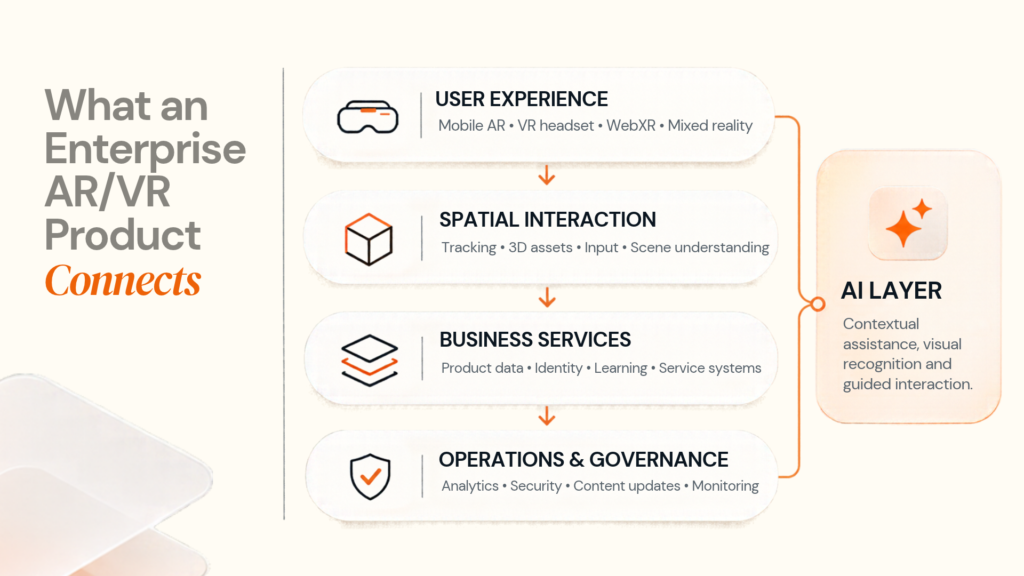
A production system may include an experience layer (mobile, web or headset), a spatial interaction layer (tracking, object placement and input), a content layer (optimised 3D models and approved procedures), a business service layer (identity, product, inventory, learning or service APIs), and an operations layer (analytics, monitoring and content updates). An optional AI layer can support visual recognition or contextual guidance with appropriate restrictions.
Not every project needs every component. A product-placement feature may need a small set of models and a product API. An industrial training system may need user management, learning records, assessment and content versioning. Build for the workflow and expected usage rather than adding every possible capability to the first release.
On-device, cloud or hybrid processing?
| Approach | When to consider it | Trade-off |
|---|---|---|
| On-device | Fast local interactions and unreliable connectivity | Limited by device performance and storage |
| Cloud-based | Centralised content, heavy processing and shared data | Depends on network and service availability |
| Hybrid | Responsive local interaction plus centralised data or processing | Requires careful caching and failure handling |
Tracking and essential interactions should remain responsive. If connectivity drops, define what continues to work. A training app may continue a preloaded lesson; a live equipment app may need to stop showing information that could be outdated.
05
AR/VR development costs and budget drivers
There is no single reliable cost for an AR/VR application. A small mobile product viewer, a multi-device training simulator and an enterprise digital twin have very different requirements. A precise price would be misleading without a defined project specification and comparable quotations. What drives cost?
| Cost driver | Why it affects the budget |
|---|---|
| Experience design | Spatial interactions require design and usability testing |
| 3D asset production | Accurate models and animation require modelling, optimisation and review |
| Device coverage | Each platform adds compatibility checks and potentially different interactions |
| Tracking and spatial features | Environment understanding, object recognition and persistent placement add complexity |
| AI integration | Data preparation, validation, latency and safety controls add work |
| Business integrations | CRM, ERP, product, learning or service APIs require mapping and testing |
| Content management | Teams may need tools to update models or instructions without app releases |
| Security and governance | Identity, permissions, retention and deployment controls must be addressed |
| Testing and deployment | Device testing, real-world trials, training and rollout affect effort |
| Maintenance | OS updates, new devices, content changes and fixes create recurring costs |
Plan by scope, not an arbitrary price
| Project scope | Relative investment | Typical requirements |
|---|---|---|
| Proof of concept | Lower | One narrow workflow, limited assets, one defined device |
| Focused production application | Moderate | Complete user journey, production content, analytics and essential integrations |
| Multi-device enterprise solution | Higher | Multiple platforms, identity, content administration, broader testing and support |
| Connected simulation or digital twin | Highly variable | Complex 3D assets, live data, advanced interaction, integrations and governance |
These are relative planning categories, not industry price benchmarks. For an initial estimate, specify the user group, task, target devices, asset complexity, integrations, expected users, offline needs, security requirements and post-launch support.
06
How to evaluate ROI before building
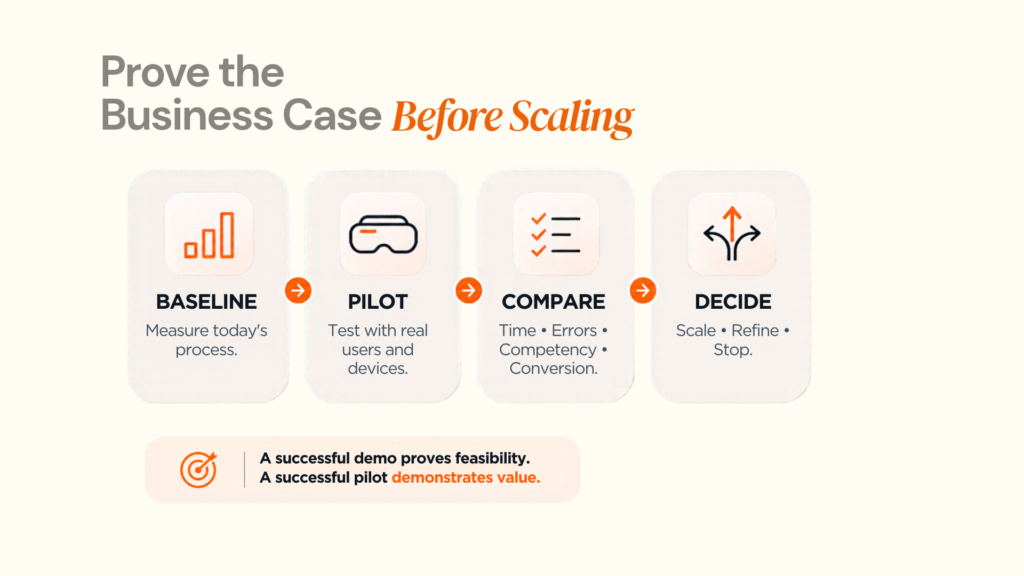
Start with one workflow and record how it performs today. Then define what the proposed experience is expected to improve.
A manufacturer considering VR onboarding should measure whether trainees perform the procedure with better competency, fewer errors or less instructor time than with the existing programme. The goal is not merely to prove the simulation looks realistic.
A six-part evaluation framework
- Define the problem. Identify the task that is expensive, risky, confusing or repeatedly misunderstood.
- Establish a baseline. Record task time, error rate, training results, support demand or another relevant measure.
- Identify the spatial advantage. Explain why 3D or immersion could improve the task over documents, video or conventional software.
- Estimate full cost. Include development, devices, content, integrations, deployment, maintenance and support.
- Pilot the experience. Test with representative users, real devices and realistic conditions, including failure cases.
- Compare and decide. Expand only when the pilot shows sufficient operational value and the solution can be maintained at scale.
A basic model compares measurable benefits with total costs over the same period:
[ ROI = frac{Measured benefits - Total cost}{Total cost} times 100% ]
Do not treat projected benefits as confirmed savings before testing them.
| Application | Useful success measures |
|---|---|
| Employee training | Time to competency, practical assessment, error rate, instructor time |
| Product visualisation | Conversion, add-to-cart rate, customer queries, return reasons |
| Remote assistance | Resolution time, repeat visits, travel avoided, escalation rate |
| Engineering review | Review cycles, issues found before production, revision time |
| Equipment guidance | Task completion, procedural mistakes, downtime, assistance required |
Choose a small number of meaningful measures. Headset usage or session duration alone can mistake engagement for business value.
07
A practical roadmap from pilot to production
| Stage | Work to complete | Gate before moving forward |
|---|---|---|
| Problem definition | Map workflow, users, constraints and current performance | A measurable problem is worth solving |
| Experience concept | Define interaction and compare AR, VR, web and conventional alternatives | Spatial technology has a clear reason to exist |
| Technical prototype | Test tracking, rendering, input and the riskiest integration | Core assumptions work on target devices |
| User pilot | Test with representative users in realistic conditions | Agreed measures improve sufficiently |
| Production integration | Add security, monitoring, content updates, integrations and support | The solution is maintainable and operationally ready |
| Controlled rollout | Deploy to a defined group and expand gradually | Value and performance remain acceptable at scale |
Teams sometimes build the whole experience before testing the hardest technical assumption. Tracking in a bright studio may behave differently in a factory. A detailed model may perform poorly on a standalone device. An AI assistant may work in a scripted demo but struggle with real requests. Test these risks early. 3D content also needs maintenance. Products change, equipment is revised and procedures are updated. Without an asset-update process, the experience can become inaccurate soon after launch. The application must fit how people work. A technician should not need to navigate a complicated interface during a physical task. A trainee should be able to recover from a mistake. A customer should be able to leave an AR preview and complete a purchase through a familiar journey.
08
How to evaluate an AR/VR development partner
A development company should explain the business case and engineering decisions behind the experience. A polished demo alone is not evidence of production readiness.
| Question to ask | What a strong answer should explain |
|---|---|
| Why is AR/VR appropriate? | The user task and advantage over a simpler alternative |
| Which platform would you choose? | Device access, capabilities, support needs and trade-offs |
| How will it perform on target devices? | Test devices, performance targets, tracking constraints and real-world testing |
| How will 3D assets be maintained? | Ownership, optimisation, version control and update procedures |
| How will it connect to existing systems? | APIs, identity, permissions, data sources and integration testing |
| What happens when AI or connectivity fails? | Fallback behaviour, escalation and human oversight |
| How will results be measured? | aselines, success thresholds, instrumentation and reporting |
| How will user data be handled? | Collection, consent where applicable, storage, access and retention |
| What happens after launch? | Updates, compatibility, monitoring and maintenance |
| Who owns the deliverables? | Source code, 3D assets, documentation, licences and tool access |
Ask for examples that match the project's technical and operational demands. Assess a general software portfolio on its own merits rather than treating it as proof of an XR deployment. At Designoweb, the starting point is the intended outcome and user requirements. From there, the team can define the experience, select a suitable platform, plan integrations, test key risks and determine what belongs in the first release.
When should a business avoid AR/VR?
A conventional web or mobile application may be better when users only need to read, search, compare or enter information; the spatial feature is decorative; the audience lacks compatible hardware; content changes too frequently to maintain accurate 3D assets; the experience introduces privacy, comfort or accessibility issues without clear benefit; or the gains cannot be measured.
A smaller interactive 3D feature, desktop simulation or redesigned mobile workflow may be a better first step. A good technology decision fits the business need rather than using the most advanced technology by default.
Author

Frequently Asked Questions
01
What are the biggest AR/VR trends in 2026?
The most relevant developments include AI-enabled immersive interactions, spatial computing across device ecosystems, connected 3D visualisation, VR-based training, AR product evaluation and browser-based immersive experiences. Their business value depends on whether they improve a defined task or customer decision.
02
What is the difference between AR, VR, MR and XR?
Augmented reality adds digital content to a view of the physical world. Virtual reality places users inside a computer-generated environment. Mixed reality combines physical and digital elements in an interactive spatial experience. Extended reality is the umbrella term commonly used for AR, VR and MR.
03
Is AR/VR only useful for gaming and entertainment?
No. Business applications include employee training, product visualisation, engineering review, remote assistance and simulation. These applications should be judged against the workflow they are intended to improve.
04
How much does AR/VR app development cost in 2026?
There is no single reliable price for every AR/VR project. The budget depends on the application scope, platform, 3D assets, interactions, integrations, testing, governance and ongoing support. A well-defined discovery exercise and pilot provide a more useful estimate than a generic market-wide figure.
01
Is WebXR better than a native AR/VR app?
Neither is universally better. WebXR can simplify access for compatible browsers and devices, while native applications may provide more suitable platform-specific capabilities. The choice depends on device support, interaction requirements, performance and distribution needs.
02
Can an AR/VR application integrate with existing business software?
Yes. Depending on the application, APIs can connect the experience to systems such as product catalogues, CRM platforms, enterprise resource planning software, learning management systems and service-management tools. The integration scope should be defined before development.
03
How does AI improve AR/VR applications?
AI can support object recognition, natural-language interaction, contextual guidance and adaptive learning. Its use needs appropriate data sources, validation, privacy controls and fallback behaviour. Safety-sensitive applications should retain suitable rule-based checks or human oversight.
01
How long does it take to build an AR/VR application?
The schedule depends on the project's complexity and the risks that need testing. A limited prototype may require substantially less work than a production application supporting multiple devices, enterprise integrations, content administration and ongoing operations. A timeline should be based on the defined scope and delivery stages.
02
How can a company measure the ROI of AR/VR?
Start with a baseline and choose measures that match the use case. Examples include training assessment results, task completion time, product conversion, repeat service visits and engineering review cycles. Compare the measurable benefits with the full cost of development, deployment and maintenance.
03
What should businesses check before hiring an AR/VR development company?
Check platform expertise, the team's approach to 3D assets and real-device testing, integration capabilities, privacy and security practices, measurement plans, maintenance arrangements and ownership of the final deliverables. Ask for directly relevant project evidence rather than relying on a demonstration alone.