

Key Takeaways
01.
AR creates value when spatial context improves a real user decision or task—not simply because a 3D effect looks impressive.
02.
Mobile AR and mobile VR solve different problems. AR can use a supported smartphone's camera and sensors, while immersive VR generally requires dedicated headset hardware.
03.
Tracking, device compatibility, 3D assets, onboarding, accessibility, and real-world testing can matter as much as application code.
04.
ARKit and ARCore should be selected according to platform requirements, while Unity AR Foundation can provide a cross-platform abstraction for many AR scenarios.
05.
WebXR can be useful when browser-based reach matters, but browser support and device capabilities still need to be validated.
06.
A production AR/VR application needs explicit performance, privacy, accessibility, fallback, and analytics strategies.
07.
The most useful immersive capabilities often sit inside an existing mobile product instead of becoming a completely separate application.
08.
Commercial success should be measured through task completion, conversion, confidence, engagement, and repeat use, not screen time alone.
AR and VR are moving from standalone experiments into practical features inside modern mobile products. For businesses, the opportunity is not simply to add a 3D object or create a more immersive interface. The real value comes when spatial technology helps customers make better decisions, employees complete tasks faster, learners understand complex subjects more easily, or users interact with products in a way that a conventional screen cannot match.
That is why successful AR/VR in mobile apps starts with the experience, not the technology. A product team needs to decide where AR genuinely improves the user journey, when VR or a companion experience makes more sense, which devices should be supported, how the 3D layer will perform, and what happens when tracking, hardware, or permissions fail.
This guide explains how AR and VR fit into mobile products, how the underlying architecture works, which technologies are commonly used, what drives development cost, and how to take an immersive concept from prototype to a production-ready experience. It also covers UX, accessibility, privacy, AI, and the practical questions businesses should ask before investing in an AR/VR mobile application.
At Designoweb, we build immersive experiences around clear product and business goals, connecting spatial UX, 3D development, mobile engineering, and backend systems into one production-ready solution.
01
What AR/VR in Mobile Apps Really Means
AR and VR are often grouped because both create immersive digital experiences. From a product-development perspective, however, they behave very differently.
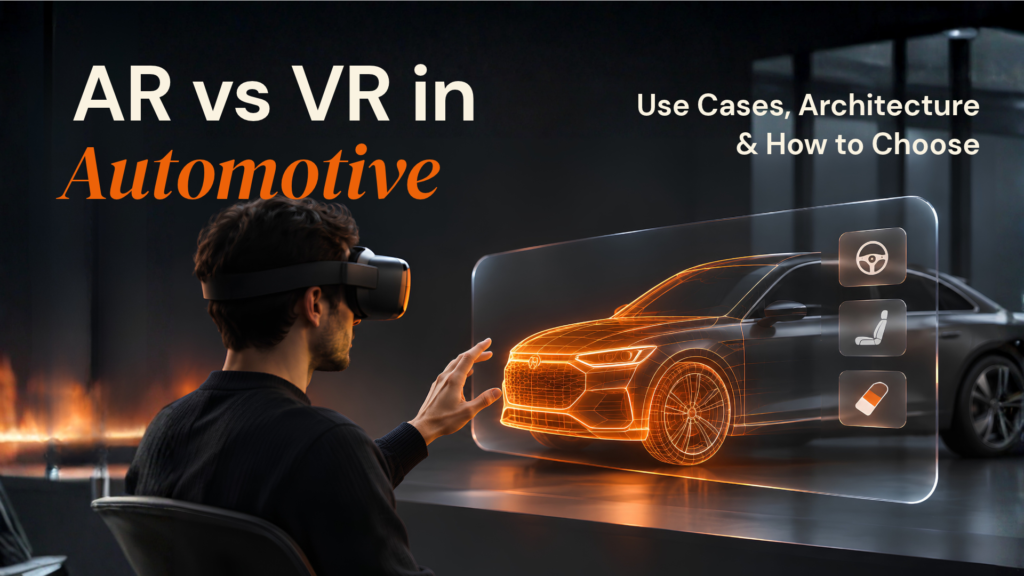
Augmented reality (AR) keeps the physical environment visible and places digital content into it. A supported smartphone can use its camera, motion sensors, and spatial capabilities to position digital objects, labels, directions, or effects within the user's surroundings. Apple's ARKit, for example, combines capabilities such as motion tracking, world tracking, scene understanding, and anchors for supported experiences. Google ARCore provides capabilities including motion tracking, environmental understanding, depth, and geospatial experiences.
Virtual reality (VR) takes a different approach. The user's visual environment is replaced by, or substantially immersed in, a computer-generated environment. For product teams, that usually means designing for dedicated VR hardware rather than treating a conventional smartphone screen as if it were a full VR environment.
That distinction matters because an “AR/VR mobile app” can mean several very different products.
In Q1 2026, Snap reported that its community used AR Lenses in the Snapchat camera more than 9 billion times per day on average. The figure is platform-specific, not a measure of the whole AR market, but it illustrates how familiar camera-based AR interactions have become at consumer scale.
| Product requirement | Likely approach | Typical interaction |
|---|---|---|
| Visualise a product inside a real room | Mobile AR | Camera + 3D model + placement |
| Try on a product virtually | Mobile AR | Face/body tracking + rendering |
| Show navigation over the physical world | Mobile AR | Camera + location + spatial positioning |
| Explore a simulated environment | VR | Headset + 3D environment |
| Let users manage VR content from a phone | Mobile companion app | Mobile UI + headset integration |
| Spatialise an existing mobile experience | XR / spatial computing | 2D UI + 3D content + spatial interaction |
| Deliver immersive content through a browser | WebXR, where supported | Browser + compatible immersive device |
So the first question is not:
“How do we add AR or VR?”
It is:
“Which part of the user's job becomes meaningfully easier, clearer or more valuable because the experience is spatial?”
That decision should shape the technology.
At Designoweb, we approach AR/VR app development as part of the wider product experience. The immersive layer may sit alongside mobile engineering, 3D content, backend services, analytics, and the rest of the product.
AR is not automatically better UX
A 3D object does not automatically create a better user experience.
AR introduces questions that do not exist in a conventional mobile interface:
- Where should the content appear?
- How does the user know where to point the camera?
- What happens when tracking is limited?
- What happens in poor lighting?
- What happens when the user's device does not support the required capability?
- What happens when the user declines camera permission?
- What is the fallback path?
A strong immersive product answers those questions before the user encounters them.
02
Where AR/VR Actually Improves Mobile UX

The strongest AR applications reduce uncertainty, improve understanding, or make an action possible that would otherwise be difficult.
Consider product visualisation. A traditional ecommerce page asks a customer to imagine whether a sofa, appliance or piece of furniture will fit into a room. AR can let the customer view a digital representation in the physical environment instead.
The experience is useful because spatial context replaces guesswork.
That same principle extends to training, navigation, field service, education, healthcare, industrial workflows and marketing.
1. Product visualisation
AR lets customers see products in context instead of relying entirely on photographs and descriptions.
Common examples include:
- Furniture placement
- Kitchen configuration
- Interior design
- Consumer electronics
- Industrial equipment
- Automotive visualisation
- Packaging and product demonstrations
The important KPI is not necessarily “minutes spent in AR.”
A better question is:
Did the experience increase confidence in the purchase decision?
Designoweb's portfolio includes an EGL Modular Kitchen AR app designed to let users visualise and customise a kitchen using augmented reality. That is the useful pattern: AR becomes part of the purchase journey rather than a novelty layer.
2. Guided tasks and field workflows
AR becomes more commercially interesting when digital information appears close to the task being performed.
A technician looking at a machine, for example, could receive contextual guidance over the physical equipment.
The product could surface:
- Component identification
- Maintenance instructions
- Safety information
- Step-by-step procedures
- Diagnostic information
- Relevant documentation
- Remote-assistance instructions
Here, the value is not immersion.
It is reducing the distance between information and action.
3. Navigation and location-aware experiences
AR can combine device orientation, geographic position, and spatial tracking to present information in the physical environment.
Google's ARCore Geospatial API uses device sensors, GPS, and Google's Visual Positioning System to support location-based AR experiences, including geospatial anchors. Possible applications include:
- Tourism
- Large venues
- Campus navigation
- Retail environments
- Events
- Museums
- Location-based entertainment
However, location-aware AR needs a clear accuracy model. GPS can establish geographic position, but a useful spatial experience may require additional visual or sensor-based localisation.
4. Education and training
VR can be particularly useful when the cost, danger or impracticality of real-world training is high.
Examples include:
- Medical anatomy
- Equipment operation
- Emergency response
- Safety training
- Industrial procedures
- Historical environments
- Laboratory simulation
Designoweb's immersive portfolio includes VR experiences such as Eye Anatomy, Human Body VR and Heart Education VR, alongside other immersive concepts. The broader lesson is that immersive technology is not limited to entertainment; it can support visual learning where spatial understanding matters.
5. Marketing and brand experiences
AR can turn packaging, print, physical locations, or products into interactive digital touchpoints.
VR can create simulated experiences around:
- Product launches
- Brand storytelling
- Virtual showrooms
- Events
- Training demonstrations
- Destination previews
Marketing teams should resist measuring success only through novelty.
A stronger model is:
Experience → user action → commercial outcome
For example:
- AR activation → product interaction → add-to-cart
- VR experience → training completion → certification
- Location-based AR → destination interaction → booking
A better framework for deciding whether immersive UX is worthwhile
Before adding AR or VR, ask four questions:
| Question | Strong signal | Weak signal |
|---|---|---|
| Does physical context matter? | Product must be seen in a room | Product already works as a standard image |
| Does spatial interaction reduce uncertainty? | Customer needs scale, fit, or placement | 3D adds little decision value |
| Does immersion improve the task? | Simulation is difficult or risky to recreate | It merely makes the interface “look modern” |
| Can the audience access it? | Target devices are known and supported | Hardware adoption is unknown |
If most answers are in the left column, immersive technology deserves serious consideration. If most are in the right column, improving the core 2D experience may create more value.
03
AR vs VR: Choosing the Right Experience
The biggest conceptual mistake in many AR/VR projects is treating the technologies as interchangeable. They are not.
| Factor | Mobile AR | VR | Mixed / Spatial Experiences |
|---|---|---|---|
| Physical world | Remains visible | Mostly replaced | Often combined with digital content |
| Typical hardware | Smartphone/tablet | XR headset | Headset, glasses, or supported mobile devices |
| Main strength | Contextual interaction | Deep simulation and immersion | Spatial interaction |
| Hardware barrier | Usually lower | Usually higher | Depends on target device |
| Best suited for | Visualisation, navigation, commerce, guidance | Training, simulation, immersive content | Advanced enterprise, collaborative and spatial workflows |
| Core UX challenge | Tracking and environmental variation | Motion, comfort and interaction | Spatial understanding and device complexity |
| Business question | “Can we help users act in the real world?” | “Can we simulate this effectively?” | “Can digital and physical environments work together?” |
The right choice depends on the problem rather than the technology label.

When mobile AR is usually a better fit
Choose mobile AR when the user's real environment is part of the task.
“Will this sofa fit here?”
AR.
“What does this kitchen look like in my home?”
AR.
“Which direction should I walk?”
Potentially AR.
“Which component am I looking at?”
Potentially AR.
When VR is usually a better fit
VR becomes more compelling when isolation from the physical environment is useful.
“How can we reproduce a hazardous industrial situation safely?”
VR.
“How can a student explore anatomy at a scale that is difficult in a classroom?”
VR.
“How can trainees practise a high-risk procedure repeatedly?”
VR.
The important middle ground: spatial computing
The product landscape is moving beyond a simple AR-versus-VR distinction.
Apple continues to develop spatial experiences through ARKit and RealityKit. RealityKit provides 3D simulation and rendering capabilities for AR experiences across Apple platforms. Android's current XR ecosystem also supports immersive experiences and the spatialisation of existing applications.
For product leaders, that means an existing mobile product can become part of a broader spatial architecture.
The long-term opportunity is therefore not necessarily:
“Build an AR app.”
It can be:
“Build a product that understands whether the user is operating in a screen, physical space, or immersive environment, and uses the appropriate interaction model.”
04
How Mobile AR Works Under the Hood
A polished AR experience may feel simple:
Open camera → find surface → place object → move around it.
Underneath, several systems are working together.
Step 1: Device and capability detection
The application needs to determine whether the device supports the requested AR configuration.
Apple explicitly recommends checking AR support before exposing unavailable AR functionality in the UI. ARKit also requires camera access. That means capability detection should happen before the user reaches a dead end.
Step 2: Permission and trust
Camera access is not simply a technical requirement.
It is a UX event.
On iOS, ARKit requires explicit camera permission and a suitable usage description. A good onboarding sequence explains:
Why the camera is needed → what the user should do → what happens next.
Step 3: Motion tracking
The device needs to understand how its position and orientation change as the user moves.
ARCore combines camera imagery with motion information to estimate device pose, while ARKit manages motion and world tracking through its session architecture. This is what lets a virtual chair remain approximately in the same physical position as the user moves around it.
Step 4: Environmental understanding
The application then needs some understanding of the environment.
Depending on the experience, that may include:
- Planes
- Depth
- Feature points
- Objects
- Faces
- Lighting
- Spatial anchors
ARCore's Depth API can create depth information from camera and motion data, and its Geospatial capabilities can support location-based spatial placement.
Step 5: Placement and anchoring
The application chooses where digital content should exist.
That could mean:
- A detected floor
- A wall
- A tracked image
- A face
- A geographic coordinate
- A known object
- A persistent spatial location
An anchor provides a spatial reference so digital content can remain stable relative to the tracked environment.
Step 6: Rendering
The 3D content is rendered from the device's current viewpoint and composited with the camera feed.
This is where visual quality and performance meet.
A model that looks excellent in a marketing screenshot may perform badly on a phone if it has excessive geometry, large textures, unnecessary animations, or inefficient materials. Apple's RealityKit guidance also emphasises profiling CPU/GPU utilisation and measuring performance rather than assuming that visual quality equals acceptable runtime behaviour.
Step 7: Interaction
Finally, the user needs a way to manipulate the content.
Common interactions include:
- Tap to place
- Drag to move
- Pinch to resize
- Rotate
- Gaze
- Gesture
- Voice
- Physical movement
The correct interaction depends on the context. More interaction does not automatically mean better UX.
A simplified mobile AR architecture
| Layer | Responsibility | Product implication |
|---|---|---|
| Mobile UI | Navigation, permissions, onboarding, fallback | Determines whether users reach the AR experience |
| AR session | Tracking and environment understanding | Determines spatial stability |
| Spatial interaction | Placement, anchors, gestures, object interaction | Determines usability |
| 3D rendering | Models, materials, lighting and animation | Determines visual quality and performance |
| Content layer | Product or instructional data | Determines commercial usefulness |
| Backend/API | Product data, accounts, analytics, content management | Determines scalability and control |
| Analytics | Activation, placement, interaction, conversion | Determines whether AR works commercially |
| Security/privacy | Permissions, minimisation and access control | Determines trust and compliance posture |
The key architectural lesson is simple:
AR is a product capability, not the entire product architecture.
05
Choosing the Mobile AR/VR Technology Stack
The technology decision should follow the required user experience.
ARKit and RealityKit
Apple's ARKit provides the foundation for AR experiences on supported Apple devices. ARKit combines hardware sensing and software frameworks for motion tracking, world understanding and AR session management. RealityKit provides 3D simulation and rendering capabilities for AR experiences.
Native Apple development becomes particularly relevant when the product depends heavily on Apple-specific capabilities or requires tight platform integration.
For broader mobile work, Designoweb's iOS app development services can sit alongside its immersive engineering capabilities.
ARCore
Google's ARCore provides APIs for supported Android devices and development paths across Android, Unity, and other supported environments. Its capabilities include motion tracking, environmental understanding, depth, and geospatial experiences.
Android is not a single hardware profile.
The project should define a supported-device matrix rather than assuming that a feature available on one handset behaves identically on another.
Unity AR Foundation
Unity AR Foundation provides a multi-platform abstraction for AR development. Unity documents AR Foundation as a framework for building multi-platform AR applications, with provider plug-ins for platform-specific functionality.
This is useful when a product needs:
- A shared 3D scene
- Cross-platform immersive logic
- Reusable interaction systems
- Rapid iteration across target platforms
- A larger real-time 3D component
But “cross-platform” does not mean “platform differences disappear.”
A production build still needs platform-specific validation.
Designoweb's Unity solutions practice is relevant for products where the 3D scene or simulation is a major component.
Native vs Unity: a practical decision
| Requirement | Native ARKit / ARCore | Unity + AR Foundation |
|---|---|---|
| Platform-specific capability | Strong | Strong, but abstraction may expose only shared capabilities |
| Shared 3D scene | More duplicated work | Strong fit |
| Platform-specific UI | Strong | Possible with integration |
| Advanced game-like interaction | Possible | Strong fit |
| Complex real-time 3D | Possible | Strong fit |
| Maximum platform control | Strong | Depends on integration |
| Cross-platform immersive development | More engineering duplication | Often more efficient |
| Best fit | Platform-focused products | Cross-platform spatial experiences |
What about Flutter or React Native?
Cross-platform application frameworks can be useful for the surrounding product experience.
The mistake is assuming every part of an AR experience needs to use exactly the same abstraction.
A product can use a cross-platform mobile shell for:
- Authentication
- Profiles
- Commerce
- Account management
- Content
- Notifications
while using native AR modules or an immersive engine for the spatial layer.
That hybrid architecture can be more practical than forcing the entire product into one technology.
What about WebXR?
WebXR is the web platform specification for accessing supported AR and VR devices through the web. The W3C published a Candidate Recommendation Draft on 9 June 2026, reflecting continued work on the standard.
WebXR can be useful when browser-based reach is important.
However, the browser should not automatically be treated as a replacement for native AR.
Ask:
- Which browsers must be supported?
- Which immersive modes are required?
- Does the product need deep device access?
- Is installation friction more important than native capability?
- Does the experience still work when immersive browser support is unavailable?
For high-value product functionality, define a device and browser compatibility matrix before development.
06
Designing AR/VR Experiences Users Can Actually Use
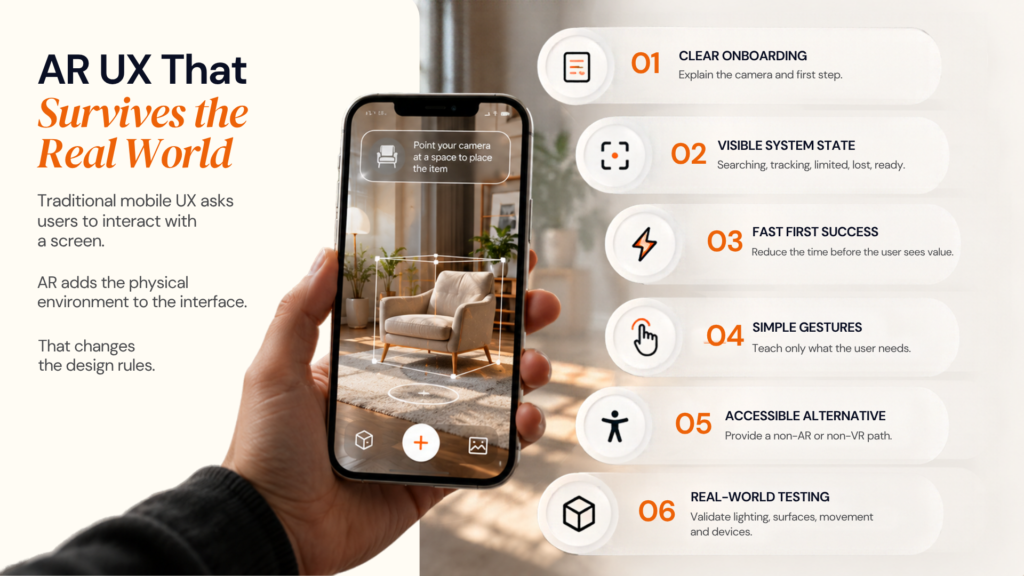
Traditional mobile UX asks users to interact with a screen.
AR adds the physical environment to the interface.
That changes the design rules.
1. Design for the environment, not only the screen
Environmental conditions can affect spatial tracking. Google's ARCore guidance discusses factors such as surfaces, lighting, and available visual features that can influence tracking quality.
So “place the object on a table” is not a sufficient UX specification.
The design also needs to explain what happens when the app cannot find a suitable surface.
A useful state might say:
Move your phone slowly across the floor or table until the surface is detected.
That is better than leaving the user staring at an empty camera view.
2. Make the first successful interaction fast
AR onboarding has a higher cognitive load than opening a standard mobile screen.
The user may need to:
- Grant camera permission
- Move the phone
- Wait for a surface
- Understand the placement gesture
- Position the object
The product should therefore optimise for time-to-first-success.
A useful internal KPI is:
Time from AR entry to successful completion of the first meaningful action.
3. Treat tracking loss as a normal product state
Tracking will not be perfect under every condition.
The application should recognise and communicate states such as:
- Searching
- Surface found
- Tracking limited
- Tracking lost
- Unsupported capability
- Camera denied
- Network unavailable
The user should know what happened and what action to take next.
4. Don't make gestures mysterious
A user should not have to guess that:
- Two fingers rotate the object
- Pinching changes its scale
- A tap confirms placement
Gesture education should be lightweight and contextual.
5. Give users a fallback
A strong AR experience can fail gracefully.
For ecommerce:
AR unavailable → 3D viewer → standard product images
For navigation:
AR unavailable → map view → turn instructions
For learning:
VR unavailable → interactive 3D model → standard lesson
The fallback protects both accessibility and conversion.
6. Design accessibility into the interaction model
Immersive interfaces can create barriers for users who cannot comfortably:
- Hold a device for long periods
- Move through a physical space
- Use precise gestures
- Wear a headset
- Interpret purely visual information
The alternative interaction should be designed alongside the primary experience, not added after launch.
7. Test the physical environment
AR cannot be properly validated only in a development studio. A useful environment matrix might include:
| Variable | Example test conditions |
|---|---|
| Lighting | Bright daylight, low light, artificial light |
| Surface | Carpet, wood, glass, glossy surfaces |
| Space | Small room, large room, cluttered environment |
| Movement | Slow, normal, rapid movement |
| Occlusion | People, furniture, objects entering the scene |
| Connectivity | Strong network, weak network, offline |
| Hardware | High-end, mid-range, supported lower-end devices |
| Session duration | Short interaction, sustained use |
The objective is not merely to confirm that the feature works.
It is to understand where it stops working and what the user experiences when it does.
07
Where AR/VR Makes Sense Across Industries
The business case becomes clearer when AR/VR is mapped to a specific workflow.
Ecommerce and retail
AR can support:
- Product visualisation
- Virtual try-on
- Room planning
- 3D product exploration
- In-store guidance
- Product demonstrations
For ecommerce, the core business question is often whether AR reduces uncertainty before purchase.
Manufacturing and industrial
AR can support:
- Assembly guidance
- Equipment visualisation
- Remote assistance
- Maintenance instructions
- Safety workflows
- Digital work instructions
VR can support:
- Operator training
- Safety simulation
- Equipment simulation
- Emergency drills
Healthcare and medical education
Immersive technology can support visual learning, anatomy exploration, simulation and patient-facing education.
For regulated or sensitive environments, the architecture needs to account for privacy, governance, and the specific evidence required for the intended use.
Education
AR can make physical learning materials interactive, while VR can provide simulated environments that are difficult to reproduce in a classroom.
The useful KPI is usually learning progress, completion, retention or task performance—not simply session duration.
Real estate and interior design
AR can let buyers or homeowners visualise spaces and products in context.
VR can support:
- Virtual property tours
- Off-plan visualisation
- Interior walkthroughs
- Architectural review
Travel and tourism
Location-aware AR can provide:
- Landmark information
- Walking guidance
- Historical overlays
- Museum experiences
- Contextual recommendations
Enterprise sales and marketing
Immersive product demos can help sales teams explain complex products that are difficult to communicate through static images alone.
The strongest implementations connect the experience to an actual commercial process such as lead generation, product configuration, sales enablement or customer education.
08
Performance, Compatibility, Accessibility & Privacy
Immersive applications expose performance problems faster than conventional mobile interfaces.
Performance starts with the 3D asset pipeline
A 3D model can consume resources through:
- Polygon count
- Texture resolution
- Number of materials
- Animation complexity
- Lighting calculations
- Shadows
- Transparency
- Particle effects
- Draw calls
The production pipeline should therefore be:
Create → optimise → validate → profile → deploy
not:
Create → export → ship
Designoweb's 3D product design services can be relevant when the project requires purpose-built 3D content rather than simply inserting existing assets into an application.
Use level of detail
A product viewed from three metres away does not need the same geometry as a product viewed from ten centimetres away.
Level-of-detail strategies can reduce rendering load by using simpler models when the object is further from the camera.
The principle is simple:
Render only the detail the user can actually perceive.
Optimise textures as aggressively as geometry
High-resolution textures can increase memory consumption and application size.
A practical asset review should ask:
- Is this texture resolution necessary?
- Can materials be shared?
- Is transparency required?
- Can detail be represented through more efficient material techniques?
- Can texture compression reduce memory usage?
- Can different assets be used for different device classes?
Don't confuse peak performance with sustained performance
A demo that runs well for 30 seconds may behave differently after several minutes.
Long sessions should be tested for:
- Thermal behaviour
- Battery consumption
- Memory growth
- Frame-rate stability
- Camera reliability
- Network activity
- Background/foreground transitions
This matters for enterprise training, navigation and extended product exploration.
Privacy is part of the product architecture
AR applications can work with camera data, location information, face tracking, environmental information or other sensor-derived signals.
Apple documents privacy requirements around camera access and specific face-tracking capabilities. The UK's ICO also explains that location information can be personal data when it relates to an identifiable person.
The architecture should therefore ask:
Do we need this data?
Do we need to store it?
Can it be processed locally?
How long should it persist?
Who can access it?
Can the feature function without it?
A useful privacy-by-design rule is:
Collect the minimum data required for the spatial experience and make its purpose understandable to the user.
Instead of assuming: AR available = true model capability explicitly.
| Capability | Possible states |
|---|---|
| Camera | Available / denied |
| AR framework | Supported / unsupported |
| Plane detection | Available/unavailable |
| Depth | Available/unavailable |
| Geolocation | Available / denied / unavailable |
| Network | Connected / weak / offline |
| 3D feature | Full / reduced / fallback |
This makes graceful degradation much easier.
09
AR/VR App Development Cost & Delivery Trade-offs
One of the most common questions from product teams is:
How much does it cost to develop an AR app?
There is no meaningful universal price because “AR app” can describe everything from a simple 3D placement feature to a large enterprise system involving custom 3D content, computer vision, multi-user persistence, backend integrations, and several device classes.
Published estimates vary widely because project scope varies widely. A better budgeting approach is therefore to model the technical decisions that actually change the work.
The major AR/VR cost drivers
| Cost driver | Lower complexity | Higher complexity |
|---|---|---|
| Experience type | Simple object placement | Full spatial workflow |
| Platforms | One mobile platform | iOS + Android + headset/web |
| 3D content | Existing optimised models | Custom high-fidelity asset pipeline |
| Tracking | Basic plane detection | Object, face, depth or geospatial tracking |
| Persistence | Session-only | Persistent/shared spatial anchors |
| Backend | Static content | Real-time APIs, accounts, commerce or enterprise systems |
| Multiplayer | None | Multi-user real-time collaboration |
| AI/computer vision | None | Custom recognition or intelligent interaction |
| Hardware | Standard supported phones | Phones + headsets + specialist devices |
| QA | Small device matrix | Large device/environment matrix |
| Compliance | Standard application | Enterprise, regulated or sensitive-data workflows |
What often gets underestimated
1. 3D content
The application can be technically correct while the models are unusable.
The asset pipeline needs its own delivery process, standards, and optimisation checks.
2. Real-world testing
The app behaves differently across environments.
A feature that works on a clean studio floor may struggle in a dark room or reflective environment.
3. Device compatibility
The number of test devices grows quickly when both Android and iOS are required.
4. Fallback experiences
The “non-AR” experience still needs to be designed, built, and tested.
5. Post-launch content
If the experience depends on products, models, locations, or learning material, the business may need an ongoing content-management workflow.
A better way to budget the project
Instead of estimating the entire product immediately, divide the scope into:
Phase 1 — Validate
Prove the core spatial interaction.
Phase 2 — Productise
Integrate authentication, content, backend services and analytics.
Phase 3 — Harden
Expand device coverage, performance testing, accessibility, security and failure states.
Phase 4 — Scale
Add additional content, platforms, locations, users, or immersive capabilities.
This reduces the risk of spending most of the budget before the most important product assumption has been tested.
The cheapest architecture is not always the lowest-cost product. The right architecture is the one that meets the business requirement without paying for unnecessary complexity.
10
How to Evaluate an AR/VR App Development Company
An immersive development partner should be evaluated differently from a conventional mobile agency. A team may be excellent at building standard mobile screens and still struggle with spatial UX, real-time rendering, or device-specific AR behaviour. Ask vendors for evidence across these areas:
| Evaluation area | Questions to ask |
|---|---|
| Spatial capability | Can the team explain tracking, anchors, scene understanding and limitations without relying on buzzwords? |
| 3D engineering | How are models, textures, animations and asset optimisation handled? |
| Platform strategy | How are ARKit, ARCore, Unity or WebXR decisions made? |
| UX | How are onboarding, tracking-loss and fallback states designed? |
| QA | How are physical environments and device matrices tested? |
| Product thinking | How will the AR feature connect to business KPIs? |
| Security | How are camera, location and sensor-derived data handled? |
| Post-launch | Who owns monitoring, updates, content and device support? |
A strong vendor should also be willing to tell you not to build AR when the use case does not justify it.
That is a useful procurement signal because the goal is not to deploy a technology label. The goal is to improve the product.
For Designoweb, the route is broader than “hire an AR developer.” We combine AR/VR development, mobile engineering, Unity solutions, 3D work, and product engineering as one delivery path.
11
A Practical Roadmap From Idea to Production
A production AR/VR product should not start with a technology selection meeting.
It should start with the user problem.
Validate the hardest assumption before scaling the rest of the product.
Step 1: Define the decision or task
Complete this sentence:
“The user currently struggles to ______, and spatial technology could help by ______.”
If the sentence cannot be completed clearly, the project probably needs more product discovery.
Step 2: Choose the experience type
Determine whether the product needs:
- Mobile AR
- VR
- Mixed/spatial experience
- WebXR
- A combination
Step 3: Define the target hardware
Create the initial device matrix.
Specify:
- Operating systems
- Minimum supported devices
- Required cameras/sensors
- Headsets, if applicable
- Browser requirements, if applicable
Step 4: Prototype the hardest interaction
Do not prototype only the home screen.
Prototype the technical risk.
That could be:
- Surface detection
- Object tracking
- Face tracking
- Geospatial placement
- Multi-user interaction
- Real-time rendering
- 3D manipulation
If the hardest interaction works, the rest of the product becomes substantially easier to scope.
Step 5: Build the 3D asset pipeline early
Define:
- Source of assets
- Ownership
- Modelling standards
- Texture standards
- Level-of-detail strategy
- Animation requirements
- Optimisation workflow
- Content versioning
Step 6: Design failure states
Before production, explicitly design:
- Unsupported device
- Permission denied
- Tracking lost
- Poor lighting
- No suitable surface
- Weak network
- Service unavailable
- Low battery
- User exits the immersive flow
This is where many AR prototypes become production products.
Step 7: Instrument the experience
At minimum, measure:
| Metric | What it tells you |
|---|---|
| AR entry rate | Whether users are interested enough to try |
| Permission acceptance | Whether onboarding creates trust |
| Successful placement rate | Whether the core experience works |
| Time-to-first-success | How much friction exists |
| Interaction completion | Whether users understand the controls |
| Conversion/task completion | Whether AR creates business value |
| Fallback usage | How often immersive functionality fails or is avoided |
| Crash/performance data | Whether technical reliability is limiting adoption |
| Repeat usage | Whether the experience has durable value |
Step 8: Test in the real world
A production AR experience should be tested across actual environments, not just development devices.
Step 9: Launch as a measurable product capability
AR should enter the product roadmap with:
- Ownership
- Analytics
- Support
- Content management
- Device compatibility policy
- Release process
- Performance monitoring
Step 10: Expand only after the core interaction proves itself
Once users demonstrate that the spatial capability provides value, add:
- More products
- More locations
- More devices
- Personalisation
- Social interaction
- AI assistance
- New business workflows
This makes the immersive roadmap evidence-driven rather than technology-driven.
12
Where AI Fits Into AR/VR
AI does not need to be part of every immersive application.
It becomes useful when intelligence improves the spatial experience.
Computer vision
AI or machine-learning models can support:
- Object recognition
- Image classification
- Scene understanding
- Product recognition
- Gesture interpretation
Personalised experiences
An AR shopping experience could surface different content according to user context.
A learning application could adapt explanations based on user progress.
A training application could provide more guidance when a user repeatedly makes an error.
Natural-language interaction
Instead of asking the user to navigate a complex menu:
“Show me how to remove this component.”
The application could interpret the request and surface relevant guidance.
The important rule is:
Add AI when it improves the job the user is trying to complete.
Do not add AI merely because the product already contains AR.
The value comes from connecting intelligence to an action, not from adding a chatbot beside a 3D object.
13
When You Should Not Use AR or VR
The strongest immersive strategy sometimes begins with a decision not to build an immersive experience.
AR may not be appropriate when:
- The physical environment adds little useful context.
- The product decision is already clear from standard 2D content.
- The target audience has limited access to required hardware.
- The interaction requires too much onboarding for too little value.
- The environment is too unpredictable for the desired accuracy.
- The feature cannot be made accessible or safely usable.
- The business has no clear KPI beyond “engagement.”
VR may not be appropriate when:
- A browser or mobile screen already solves the problem.
- The physical world must remain visible.
- The hardware requirement creates unacceptable friction.
- A simulation would cost more to maintain than the business value justifies.
The right product question is not:
“Can we build it?”
Modern platforms make many immersive experiences technically possible.
The better question is:
“Does the immersive capability improve the outcome enough to justify its additional product, engineering and operational complexity?”
14
How Designoweb Builds AR/VR Mobile Experiences
At Designoweb, we build AR/VR products around real business workflows, not around a technology trend.
That means we connect immersive development to the wider product system.
Our approach can combine:
- Product discovery and use-case definition
- AR/VR strategy
- Mobile UX and UI
- Native iOS and Android engineering
- ARKit and ARCore
- Unity and AR Foundation
- 3D product visualisation and asset pipelines
- Backend/API integration
- Computer vision and AI where useful
- Analytics and experimentation
- Performance engineering
- Device and environment testing
- Deployment, maintenance and optimisation
Our delivery path is:
Business Problem → Experience Strategy → Technical Architecture → UX → Spatial/3D Development → Mobile Engineering → Backend Integration → QA → Deployment → Optimisation
Designoweb's AR/VR app development services are designed to support both new immersive products and AR/VR capabilities that need to integrate into an existing application.
Our product development services provide the wider engineering layer needed when the immersive experience is part of a larger digital product.
The same product-thinking principle applies to our 3D work. Designoweb's 3D product design capability can support projects where assets, visualisation and interactive 3D content are central to the experience.
A Designoweb proof point
Our published portfolio includes the EGL Modular Kitchen AR app, alongside immersive experiences such as Eye Anatomy and other 3D/VR concepts.
The point is not simply that an AR app can be built.
It is that immersive functionality can be connected to a concrete customer or user outcome:
-
1
Product
-
2
Spatial Experience
-
3
User Confidence
-
4
Action
15
Build an AR/VR Experience Around a Real Product Goal
AR and VR become valuable when they change what users can understand, decide or accomplish.
The first deliverable does not need to be a huge immersive platform.
It may be:
- A focused AR capability inside an existing mobile product
- A validated 3D interaction
- A training prototype
- A location-aware experience
- A product visualisation workflow
- A device-specific immersive experience built around one high-value task
Designoweb can help move that decision from concept to technical blueprint, experience design and production engineering through its AR/VR development services, mobile solutions, Unity solutions and 3D product design.
Author

Frequently Asked Questions
01
What is AR in mobile app development?
Augmented reality in mobile app development adds digital content to a user's view of the physical world, typically using a camera, motion sensing and spatial understanding. Mobile AR can support product visualisation, navigation, education, training, commerce and contextual guidance.
02
What is the difference between AR and VR in mobile apps?
AR keeps the physical environment visible and adds digital content to it. VR creates a largely digital environment and generally requires dedicated headset hardware for full immersion. A mobile application can still act as a companion or content-management layer for a VR experience.
03
Why are AR apps different from normal mobile apps?
AR applications must account for physical environments, device sensors, tracking, 3D rendering, spatial interaction and real-world failure states. That makes capability detection, environment testing and fallback behaviour part of the product design.
04
How does AR work on a smartphone?
A smartphone AR experience typically combines camera input with motion sensing and spatial understanding. The device estimates its position and orientation, identifies relevant environmental features and renders digital content in relation to the physical environment.
05
What technology is used to build AR mobile apps?
Common technologies include Apple's ARKit and RealityKit, Google's ARCore, Unity with AR Foundation and, for appropriate browser-based experiences, WebXR. The correct choice depends on platform requirements, target devices, spatial capabilities, 3D workload and product constraints.
06
Is ARKit or ARCore better?
Neither should be treated as a universal winner. ARKit is the relevant native framework for supported Apple devices, while ARCore is Google's AR platform for supported Android devices. The decision should follow the target platforms and required capabilities.
07
Is Unity good for mobile AR?
Unity can be a strong choice for cross-platform immersive experiences, particularly when the project has substantial 3D content or real-time interaction. Unity AR Foundation provides a common AR development layer while still relying on platform-specific provider capabilities underneath.
08
Do AR apps work on all smartphones?
No. AR capabilities vary by device, operating-system version, sensors and supported frameworks. Applications should check capability at runtime and define supported devices before launch. Apple specifically recommends checking AR support before offering AR-dependent functionality.
09
How do you test an AR mobile app?
Testing should cover supported devices and real environments, including different lighting, surfaces, movement, network conditions and session lengths. Environmental factors can affect tracking, so production validation needs more than a controlled development environment.
10
What happens when AR tracking fails?
A production AR app should show a clear recovery state rather than leaving the user with an unexplained camera view. Examples include scanning again, moving to better lighting, moving the phone more slowly, changing the surface or switching to a non-AR fallback.
11
How much does it cost to develop an AR app?
There is no single reliable average because AR projects range from simple object placement to complex enterprise applications with custom 3D content, computer vision, backend integrations, spatial persistence and multi-device support. The most useful estimate starts from scope and technical requirements.
12
What affects AR app development cost the most?
Major cost drivers include experience complexity, number of platforms, 3D asset production, tracking requirements, backend integrations, multi-user functionality, device coverage, QA requirements, security needs and post-launch support.
13
Does an AR app need camera permission?
When the AR experience uses the device camera, permission is generally required. Apple documents explicit camera permission requirements and a usage description for ARKit-based applications.
14
Is location data a privacy concern for AR apps?
It can be. Location information may constitute personal data when it relates to an identifiable person. AR products using location should minimise collection, control access, define retention and communicate use clearly. The ICO provides guidance on when location information can fall within personal-data rules in the UK. ICO guidance
15
Can AI be added to an AR app?
Yes. AI can support object recognition, product identification, personalised guidance, natural-language interaction, visual inspection and context-aware assistance. It should be added when it improves a measurable user or business outcome.
16
Should every mobile app add AR?
No. AR makes the strongest business case when physical context materially improves a task, decision or interaction. If a conventional interface solves the same problem with less friction, AR may add unnecessary complexity.
17
What should I ask an AR/VR development company before hiring them?
Ask how the team handles device compatibility, ARKit/ARCore strategy, 3D asset optimisation, tracking failures, real-world testing, accessibility, analytics, security, fallbacks and post-launch maintenance. Also ask how the immersive capability will connect to a measurable business outcome.
18
How do I start an AR/VR mobile app project?
Start by defining the user problem, target audience, business KPI, target devices and hardest technical assumption. From there, scope a prototype around the core spatial interaction before committing to the full production roadmap.