
Key Takeaways
01
AI business process automation combines workflow orchestration, business rules, AI and connected systems.
02
Not every process needs AI. Use deterministic automation where the logic is predictable.
03
AI is most useful when workflows contain documents, language, classification, ambiguity or variable inputs.
04
AI agents become relevant when a workflow needs multi-step reasoning, tool use and bounded autonomy.
05
Production systems need policy checks, permissions, monitoring, human approval and recovery paths.
06
The business case should be measured through cycle time, cost per transaction, accuracy, exceptions, throughput and business impact.
07
The best starting point is usually one high-value, measurable workflow, not an organisation-wide automation programme.
AI is moving from isolated experiments into the workflows that keep businesses running.
Deloitte's 2026 State of AI in the Enterprise research found that worker access to AI rose by 50% in 2025, while only 21% of surveyed organisations reported having mature governance for agentic AI. The message for business leaders is clear: access to AI is expanding faster than the operating systems needed to use it safely at scale.
That is where AI business process automation becomes important.
Traditional automation is excellent at repeatable work. It follows rules, moves data and triggers predefined actions. AI adds another capability: it can interpret documents, classify requests, understand natural language, retrieve relevant business context and make bounded recommendations before a workflow continues.
For example, a basic approval workflow can move a request from one queue to another. An AI-enabled workflow can receive a supplier email, read the quotation, match it with purchasing information, identify an exception, check policy and route the case with the relevant context already attached.
The goal is not to put AI into every business process. It is to remove avoidable manual work where interpretation is the bottleneck, while keeping deterministic rules and human judgement where they provide stronger control.
At Designoweb, we treat AI automation as a product and systems-engineering problem. We start with the workflow, define the outcome and build around secure execution and measurable results.
In this guide, we'll explain how AI business process automation works, where it creates the most value, how to choose the right processes, what it costs, and how to take an AI-powered workflow from pilot to production
Looking to automate a high-friction business process?
Designoweb can help identify the right workflow, select the appropriate AI architecture and take it from proof of concept to production.
→ Talk to Designoweb
01
What Is AI Business Process Automation?
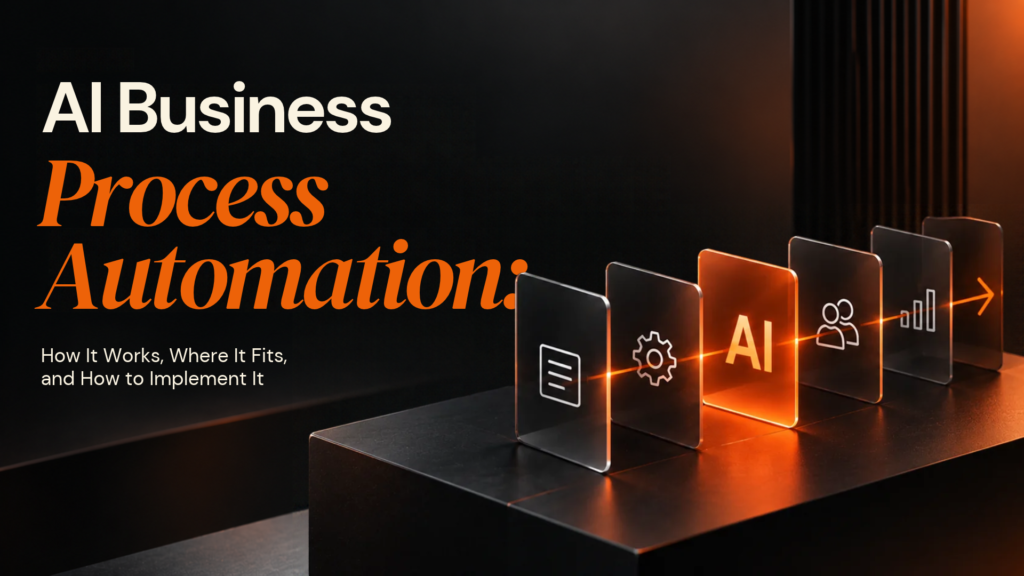
AI business process automation uses artificial intelligence inside a defined business workflow to interpret information, make bounded decisions, generate outputs or trigger actions that would otherwise require manual work.
Traditional automation is usually:
Trigger → Rule → Action
AI-enabled automation can become:
Trigger → Context → AI interpretation → Policy check → Action → Feedback
The difference is important.
A rule-based system works best when the input and expected outcome are known. AI becomes valuable when the workflow has to deal with information that is less predictable.
Example: invoice processing
A conventional automation may rely on:
- Known suppliers
- Structured invoice fields
- Fixed matching rules
- Predefined approval thresholds
An AI-enabled workflow can handle more variation:
- An invoice arrives by email.
- AI extracts supplier, invoice number, amounts and line items.
- The system retrieves the relevant purchase order.
- Business rules validate thresholds and required fields.
- AI interprets ambiguous descriptions or missing context.
- Straightforward invoices continue automatically.
- Exceptions are routed to finance with the relevant evidence.
- The outcome is logged for review and improvement.
The important point is that AI does not need to control the entire workflow.
Use AI where interpretation helps. Use deterministic software where predictability matters more.
02
AI Automation vs Traditional Automation, RPA and AI Age
“Automation” covers several different approaches, and choosing the right one is an architectural decision.
| Approach | Best suited to | Logic | Typical output | Main limitation |
|---|---|---|---|---|
| Rule-based workflow | Predictable processes | Explicit rules | System action | Struggles with variable inputs |
| RPA | Repetitive work across existing interfaces | Mostly predefined | Data movement / record updates | Can be fragile when interfaces change |
| AI-assisted workflow | Interpretation and classification | Rules + AI | Structured decision or output | Requires evaluation and controls |
| AI agent | Multi-step tasks with reasoning and tools | Goal + policies + tools | Decisions and actions | Higher testing and governance needs |
| Hybrid workflow + agent | Complex enterprise processes | Deterministic flow + bounded autonomy | Controlled end-to-end execution | More architecture to design |
Microsoft's current guidance treats workflows and agents as complementary: workflows provide structure and repeatability, while agents add adaptability where inputs and decisions vary. Google Cloud similarly describes agentic workflows as AI-driven, multi-step processes that use reasoning and external tools.
The decision rule
Use rules when the answer is deterministic.
Use AI when interpretation or classification is the difficult part.
Use an agent when the system must reason through multiple steps and act through approved tools.
In many enterprise workflows, the strongest architecture combines all three.
03
Where AI Business Process Automation Creates Value
The strongest automation opportunities usually combine meaningful manual effort, variable inputs, repeatable objectives and measurable outcomes.
Finance and accounting
AI can support:
- Invoice extraction
- Purchase-order matching
- Expense classification
- Finance query handling
- Document validation
- Exception routing
- Reconciliation preparation
- Financial-report summarisation
The highest-value opportunities are often the tasks where finance teams spend time reading, comparing, classifying and routing information rather than making final high-risk decisions.
Customer service
A traditional chatbot may answer a question.
An AI-enabled workflow can connect the conversation to the operational system:
Customer request → Intent detection → Account lookup → Knowledge retrieval → Policy check → Response → CRM update → Escalation
That difference matters. If the AI can answer but cannot update the case, trigger the next action or route an exception, much of the manual work remains.
Sales operations
AI automation can handle:
- Lead qualification
- CRM enrichment
- Meeting preparation
- Account research
- Follow-up creation
- Opportunity summarisation
- Quote preparation
- Sales administration
The business value often comes from reducing the operational work that keeps salespeople away from customers.
HR
Relevant workflows include:
- Candidate document processing
- Onboarding administration
- HR policy search
- Employee-document classification
- HR query routing
- Training administration
Employment-related AI needs stronger governance because some uses can fall into higher-risk regulatory categories under the EU AI Act. Businesses should classify the intended use before automating consequential employment decisions.
Procurement
Procurement is a strong candidate because it combines:
Emails + PDFs + supplier conversations + contracts + purchase requests + pricing rules + approvals
AI can interpret incoming supplier information, retrieve the relevant purchasing policy, identify exceptions and route the case for the correct approval.
IT operations
Useful areas include:
- Ticket classification
- Incident summarisation
- Knowledge retrieval
- Alert correlation
- Common remediation steps
- Access-request routing
- Operational reporting
The critical decision is defining which actions AI can execute and which require approval.
Operations and supply chain
AI automation can support:
- Order exception handling
- Inventory alerts
- Delivery coordination
- Supplier communication
- Document processing
- Operational reporting
- Demand analysis
The real value appears when AI is connected to the ERP, CRM, warehouse or logistics systems that own the underlying process.
04
How to Choose the Right Process to Automate
“Automate repetitive work” is too broad to guide an enterprise programme.
Start by evaluating each candidate workflow across five dimensions:
| Question | What to examine |
|---|---|
| Volume | How often does the process run? |
| Manual effort | How much human time is consumed? |
| Variability | How different are the inputs and cases? |
| Business impact | What happens when the process is slow or wrong? |
| Data readiness | Is the required information accessible and usable? |
The AI automation fit test
A strong candidate usually has:
High volume + meaningful manual effort + variable inputs + repeatable objective + measurable outcome
A weak candidate often has:
Low volume + unclear process + poor data + high decision risk + no meaningful KPI
Example
| Process | AI fit | Why |
|---|---|---|
| Move approved employee records between systems | Low | Deterministic |
| Read HR questions and route them | Medium–High | Language varies |
| Approve sensitive employment decisions automatically | High technical risk | High consequence |
AI capability does not automatically justify AI autonomy.
Define the workflow before building
Document:
Trigger → Inputs → Steps → Decisions → Rules → Systems → Exceptions → Approval points → Output → KPI → Failure response → Owner
This becomes the foundation for architecture, test cases and ROI measurement.
05
Production-Ready AI Automation Architecture
A production AI automation system should be designed as a controlled operating workflow, not as an LLM with a few integrations attached.
Reference architecture
Business event
↓
Workflow orchestrator
↓
Data & context layer
↓
AI model / agent
↓
Policy & validation
↓
Business tools and APIs
↓
Human approval where required
↓
Action
↓
Logging, monitoring and evaluation
1. Trigger layer
Triggers can include:
- New email
- Uploaded document
- CRM event
- ERP transaction
- Customer request
- Webhook
- Scheduled job
- Database event
The trigger itself should be deterministic.
2. Context layer
AI needs the right business context to produce useful results.
This can include:
- Structured business data
- Documents
- Policies
- CRM records
- ERP data
- Knowledge bases
- Transaction history
- Approved APIs
For large or changing knowledge sources, RAG can retrieve relevant information at runtime.
3. AI reasoning layer
Depending on the task, this layer may perform:
- Classification
- Extraction
- Summarisation
- Entity resolution
- Intent detection
- Prediction
- Document interpretation
- Recommendations
- Decision support
Not every workflow needs an LLM. A classifier, rules engine or retrieval system may be the better tool.
4. Tool and API layer
This is where AI becomes operational.
Controlled tools may allow the system to:
- Query business systems
- Create records
- Update statuses
- Retrieve documents
- Send notifications
- Initiate workflows
- Request approval
An AI response by itself is not automation. Automation happens when the system can safely move the workflow forward.
5. Policy and validation layer
AI may recommend an action, but policy should determine whether that action is allowed.
For example:
AI: “The invoice is ready for payment.”
Policy checks: supplier approved? Is PO valid? amount within threshold? required fields present? additional approval needed?
Separating reasoning from execution creates a stronger control boundary.
6. Human-in-the-loop
Human review should be designed into the process where risk requires it.
A practical model is:
Low risk → automate
Medium risk → automate with review
High risk → recommend and prepare, but require human approval
7. Observability
Production monitoring should cover accuracy, task success, exceptions, human overrides, latency, cost and failed actions.
NIST's AI Risk Management Framework and Generative AI Profile provide a cross-sector approach to managing AI risks across the lifecycle.
06
How to Implement AI Business Process Automation
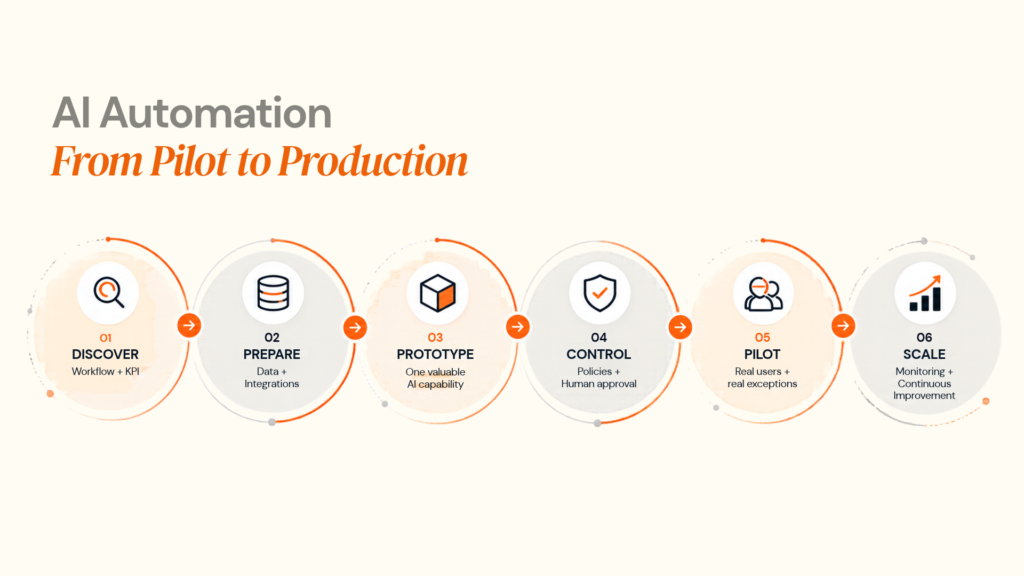
The safest implementation path is to reduce uncertainty before increasing autonomy.
Stage 1: Process discovery
Map the workflow from the first trigger to the final outcome.
Do not start by selecting a model.
Start by identifying where the business loses time, creates avoidable manual work or struggles with inconsistent inputs.
Stage 2: Establish a baseline
Measure the current process.
| KPI | Example baseline |
|---|---|
| Average processing time | 2.4 days |
| Manual touchpoints | 7 |
| Exception rate | 18% |
| Cost per transaction | £X |
| Human review rate | 100% |
The exact numbers will vary. The baseline is what allows the business to measure change.
Stage 3: Select the smallest useful AI component
The first version may only:
- Classify requests
- Extract fields
- Retrieve policy
- Draft a response
- Detect anomalies
Prove the difficult capability before giving the system authority to act.
Stage 4: Connect business systems
Integrate the workflow with the systems where work already happens:
CRM + ERP + databases + email + document storage + ticketing + identity
API-first architecture prevents AI automation from becoming another isolated application.
Stage 5: Define autonomy boundaries
Specify exactly what AI can do.
| Action | AI autonomy |
|---|---|
| Categorise inbound request | Automatic |
| Extract document data | Automatic |
| Draft response | Automatic |
| Update non-critical CRM field | Automatic |
| Issue financial refund | Approval required |
| Change sensitive customer data | Approval required |
| Make legally significant decision | Human decision |
Stage 6: Test exceptions
Real workflows fail outside the happy path.
Test:
- Malformed documents
- Missing records
- Conflicting information
- Unusual wording
- Duplicate transactions
- API failures
- Authentication failures
- Ambiguous requests
End-to-end testing matters more than model testing alone.
Stage 7: Pilot
Start with a controlled process segment or user group.
Compare:
AI result vs expected result
Then inspect where the system succeeds, where people override it, and where downstream systems or the original process need redesign.
Stage 8: Production and improvement
Use staged releases, permissions, audit logging, fallbacks, alerting, rollback procedures and model/prompt versioning.
Then create a feedback loop:
Process → Outcome → Error → Human correction → Evaluation → Update
07
Security, Governance and Compliance
AI automation often handles information that businesses cannot afford to expose or mismanage.
That may include:
- Customer records
- Employee data
- Contracts
- Financial information
- Health information
- Internal policies
- Commercially confidential data
Security therefore belongs in the architecture.
Core controls
Access control
Only authorised users, services and agents should access or modify specific resources.
Data minimisation
Send the model only the information required for the task.
Encryption
Protect data in transit and at rest.
Auditability
Log important decisions, approvals, actions and tool calls.
Secrets management
Keep credentials out of prompts and application code.
Tool security
Do not let an agent call a sensitive function simply because a prompt asks it to.
Human oversight
Define where a person can review, reject or override automated actions.
UK considerations
The ICO's AI and data-protection guidance covers how data-protection law applies to AI systems that process personal data. The ICO also states that this guidance is under review following changes made by the Data (Use and Access) Act.
EU considerations
The EU AI Act is now in the implementation and enforcement phase, with different requirements applying according to the risk category and transition timeline. Some employment-related and other high-risk uses require additional controls. The practical lesson is straightforward:
Classify the use case first. Design governance into the workflow.
Automating a sensitive or regulated business process?
Designoweb can help map data flows, access controls, human-approval boundaries and AI governance requirements into the solution architecture.
→ Discuss Your AI Project
08
AI Automation Cost, ROI and Business Case
There is no universal price for AI business process automation.
The cost depends more on the workflow and surrounding system than on the AI model alone.
Main cost drivers
| Cost driver | What increases cost |
|---|---|
| Process complexity | More branches, exceptions and decision paths |
| Integrations | Multiple ERP, CRM, finance or legacy systems |
| AI models | More complex models or higher usage volumes |
| Data | Cleaning, extraction, indexing and retrieval |
| RAG | Large or frequently changing knowledge sources |
| Agent autonomy | More tools, actions and decision paths |
| Security | Identity, permissions, auditability and data protection |
| Monitoring | Evaluation, observability and model tracking |
| Scale | Higher transaction volume and concurrency |
| Change management | Training, redesign and adoption |
A practical investment range
For early planning, a focused AI automation proof of concept may fall in the $15,000–$40,000 range. A production workflow with multiple integrations and governance requirements can move into $40,000–$100,000+, while larger multi-workflow enterprise programmes can reach $100,000–$250,000+.
These are planning ranges, not market-standard prices or quotations. The actual budget depends on workflow complexity, integrations, data readiness, AI architecture, security, usage volume and ongoing support.
A practical ROI model
Instead of asking:
“How much does an AI agent cost?”
Ask:
“What does the current process cost, and how much of that cost can we remove without creating unacceptable risk?”
A simple model is:
Annual automation value =
Manual hours removed × loaded hourly cost
+ avoided rework
+ avoided delays
+ additional throughput
− AI and infrastructure costs
− maintenance and governance costs
What should be measured?
Track:
- Cycle time
- Cost per transaction
- Manual touchpoints
- First-pass accuracy
- Exception rate
- Human intervention rate
- Throughput
- SLA compliance
- Customer response time
- Revenue or cost impact
Do not use “percentage of tasks automated” as the only KPI.
An automation that handles 95% of cases but creates expensive errors in the remaining 5% may be a poor investment.
09
Build vs Buy vs Configure
Not every AI workflow needs to be custom-built.
The better question is:
Which parts should we own, and which parts should we use as services?
| Approach | Suitable when | Main trade-off |
|---|---|---|
| Buy | Standard workflow and common requirements | Less control |
| Configure | Existing platform already fits | Customisation can become complex |
| Custom build | Strategic or highly specialised process | Greater engineering responsibility |
| Hybrid | Standard infrastructure + differentiated workflow | Requires clean integration boundaries |
A custom build becomes more relevant when the process is strategically important, existing products cannot support the workflow, the data model is specialised, or the organisation needs stronger control over product direction and integrations.
The goal is not to build everything yourself. It is to own the part of the workflow that creates differentiation.
10
Common AI Automation Failure Modes
Automating a broken process
AI can make a poor process faster.
Fix unnecessary approvals, duplicated work and unclear ownership before automating them.
Treating the model as the system
An LLM is one component.
A production system still needs:
Workflows + permissions + databases + APIs + business rules + monitoring + recovery
Giving agents too much authority
An agent that can read information is different from one that can change records.
Increase autonomy only when evaluation supports it.
Ignoring downstream failures
AI may extract the correct invoice number while an integration writes it to the wrong account.
End-to-end validation matters.
Assuming RAG guarantees accuracy
RAG improves retrieval.
It does not automatically guarantee correct interpretation, permissions, business rules or actions.
Measuring activity instead of outcomes
The number of AI outputs generated is not the business result.
Measure faster processing, fewer exceptions, lower costs, higher throughput or better customer outcomes.
Forgetting the human role
When people become reviewers instead of operators, the interface should clearly show:
- What AI did
- What information it used
- Why the case was escalated
- What action the human needs to take
11
Where Designoweb Fits Into AI Business Process Automation
At Designoweb, we build AI automation around the systems where business work actually happens.
Our approach combines AI development, intelligent workflows, RAG, AI agents, application engineering, APIs, cloud infrastructure and production operations.
The engagement starts with:
Business problem → Process mapping → Automation opportunity → AI architecture → Integration → Governance → Pilot → Production
Designoweb proof: AI inside real workflows
Our Gold Sky project is a useful example of how AI can sit inside a broader business workflow rather than operate as a standalone assistant. The solution combined AI-powered candidate matching with job workflows, approvals, verification, feedback and analytics.
Explore the Gold Sky case study.
In Nexlead, AI-driven workflows were combined with campaign approvals, scheduling, content moderation, real-time data pipelines and performance analytics. The important part is the system around the intelligence.
Explore the Nexlead case study.
In VASD, image-based AI analysis connects to recommendations, service-provider matching and appointment booking. The architecture turns AI interpretation into a practical next action.
Explore the VASD case study.
Different business problems can share the same principle:
AI becomes valuable when intelligence is connected to workflow, systems and action.
Have a manual workflow that is expensive, slow or difficult to scale?
Bring the current process, systems involved and desired outcome. Designoweb can help identify where AI belongs, where deterministic automation is better, and how to take the solution into production.
→ Start an AI Automation Discussion
Author

Frequently Asked Questions
01
What is AI business process automation?
AI business process automation uses AI to interpret information, make bounded decisions, generate outputs or take actions within business workflows. It extends traditional automation into processes that contain variable inputs, unstructured information or contextual decisions.
02
What is the difference between AI automation and business process automation?
Traditional business process automation generally follows predefined rules and workflows. AI automation adds capabilities such as classification, extraction, prediction, natural-language understanding and reasoning where fixed rules are insufficient.
03
What business processes can AI automate?
Common examples include invoice processing, customer service routing, procurement, document processing, lead qualification, HR administration, IT support and operational reporting. Suitability depends on process volume, variability, data quality, risk and measurable business value.
01
Do AI automation systems need large language models?
No. The model should match the task. Some workflows need an LLM, while others are better served by machine learning models, rules, document-processing systems or conventional workflow automation.
02
What is the role of RAG in AI process automation?
RAG, or Retrieval-Augmented Generation, allows an AI system to retrieve relevant information from approved knowledge sources at runtime. It is useful for policy, document and knowledge-heavy workflows, but it does not replace workflow controls, permissions or business rules.
03
When should a business use an AI agent instead of a workflow?
Use an AI agent when the process requires multi-step reasoning, dynamic planning or tool use. Use a conventional workflow when the sequence is predictable and needs consistent execution. Many production systems combine both approaches.
04
Can AI agents work with CRM and ERP systems?
Yes. Agents can be connected to enterprise applications through APIs, connectors and controlled tools. The important architectural consideration is permissioning: the agent should have access only to the data and actions required for its assigned workflow.
01
How much does AI business process automation cost?
There is no single price. Costs depend on workflow complexity, integrations, data preparation, model usage, security, monitoring, scale and the level of autonomy required.
02
How do you calculate AI automation ROI?
Start with the existing process cost. Measure labour time, transaction volume, processing delays, error correction and throughput. Compare that baseline with implementation, AI infrastructure, maintenance and governance costs.
01
Is AI business process automation secure?
It can be, but security depends on architecture and operational controls. Access management, data minimisation, encryption, audit logs, tool permissions, human approval and monitoring should be designed into the system.
02
How does AI automation affect GDPR or UK data protection obligations?
Where AI processes personal data, data protection requirements can apply during training, testing and deployment. Organisations need to consider lawful processing, security, transparency, individual rights and appropriate safeguards. The UK ICO provides dedicated guidance for organisations using AI and personal data.
03
How should European businesses approach AI automation compliance?
Start by identifying what the system does, what data it processes and whether its use falls into a regulated risk category. The EU AI Act follows a risk-based framework and is now entering its active implementation and enforcement phase, with different requirements applying on different dates.
01
What should I look for in an AI automation development company?
Look beyond model expertise. Evaluate process discovery, systems integration, architecture, security, evaluation, monitoring, deployment experience and the vendor's ability to work with existing business systems.
02
Should we build AI automation in-house or use an external development company?
It depends on the organisation's existing engineering capacity, process complexity, integration requirements and long-term ownership strategy. A partner can accelerate architecture and delivery when the required AI and integration capabilities are not already available internally.
03
What should happen before starting an AI automation project?
Document the target workflow, identify the process owner, establish baseline KPIs, map systems and data sources, define automation boundaries and agree how success will be measured.