
Key Takeaways
01
WebVR is legacy technology. New browser-based immersive projects should be evaluated around WebXR.
02
WebAR is not one API. It is a broad way of describing augmented-reality experiences delivered through web-based entry points.
03
WebXR provides access to supported XR hardware and sessions; rendering still depends on technologies such as WebGL and 3D frameworks.
04
Browser and device support remains a real constraint, so a production experience needs capability detection and a fallback.
05
For many consumer experiences, web 3D + device-specific AR + standard web fallback is more practical than a headset-first build.
06
The biggest engineering work is often in 3D assets, performance, integrations, analytics, and content architecture.
07
The right choice comes from user behaviour, audience, device access, interaction depth and measurable business value—not from choosing the more advanced-sounding technology.
Immersive experiences are easier to bring to the web, but the terminology around them is easy to mix up. WebAR describes browser-delivered augmented reality, WebVR is legacy technology, and WebXR is the current web foundation for immersive AR and VR.
The distinction affects browser support, development effort, 3D assets, device coverage, and user entry.
Fortune Business Insights estimates the global augmented and virtual reality market at $40.76 billion in 2026, with further growth forecast through 2034.
But market growth does not mean every business needs XR. A furniture brand may benefit from 3D and WebAR. A manufacturer may need browser-based VR for training. An enterprise with a controlled headset fleet may justify deeper WebXR.
So the real question is not “WebAR or WebVR?”
It is:
What does the user need to understand, experience, or accomplish, and which technology delivers that outcome with the least unnecessary friction?
At Designoweb, we define the product problem first, then choose the immersive technology, 3D architecture, and delivery model around it.
01
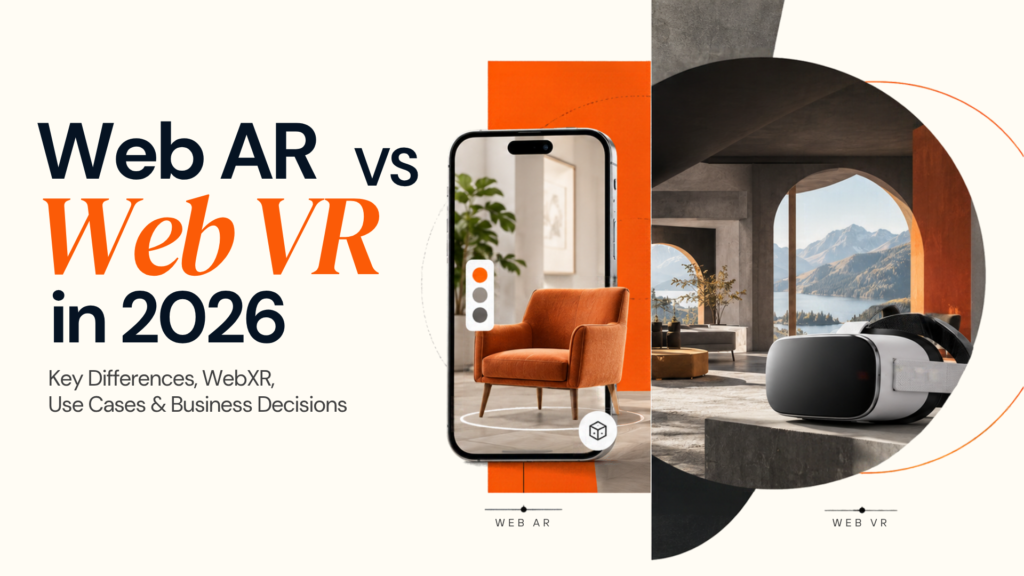
Web AR vs Web VR: The Difference at a Glance
WebAR and WebVR are often framed as competing technologies. In 2026, that is no longer an accurate way to look at them.
WebAR remains a useful business term for browser-based augmented reality. WebVR refers to a deprecated web API. For new browser-based VR, the technology conversation should move toward WebXR.
| Decision factor | WebAR | Browser VR / WebXR VR |
|---|---|---|
| Primary purpose | Add digital content to the physical environment | Place the user inside a digital environment |
| Typical entry point | QR code, product page, campaign link, browser | Website or immersive web experience |
| Common device | Smartphone or tablet | VR/MR headset |
| Headset required | Not necessarily | Usually for full immersion |
| Typical interaction | Tap, place, scan, move, rotate | Controllers, hands, gaze, head movement |
| Best business fit | Commerce, packaging, marketing, product visualisation | Training, simulation, immersive tours, virtual environments |
| Main friction | Browser/device variation and tracking | Hardware access, performance and comfort |
| Typical fallback | 3D, video, images or native AR | Standard web experience or supported-headset route |
The practical decision framework is:
Inspect → 3D
Place → AR
Simulate → VR
Reach broadly → Browser-first
Need deeper immersion → WebXR / native XR
This is the pattern businesses should use when planning an immersive product: define the job first, then choose the experience.
02
Why WebAR Is Still Relevant in 2026
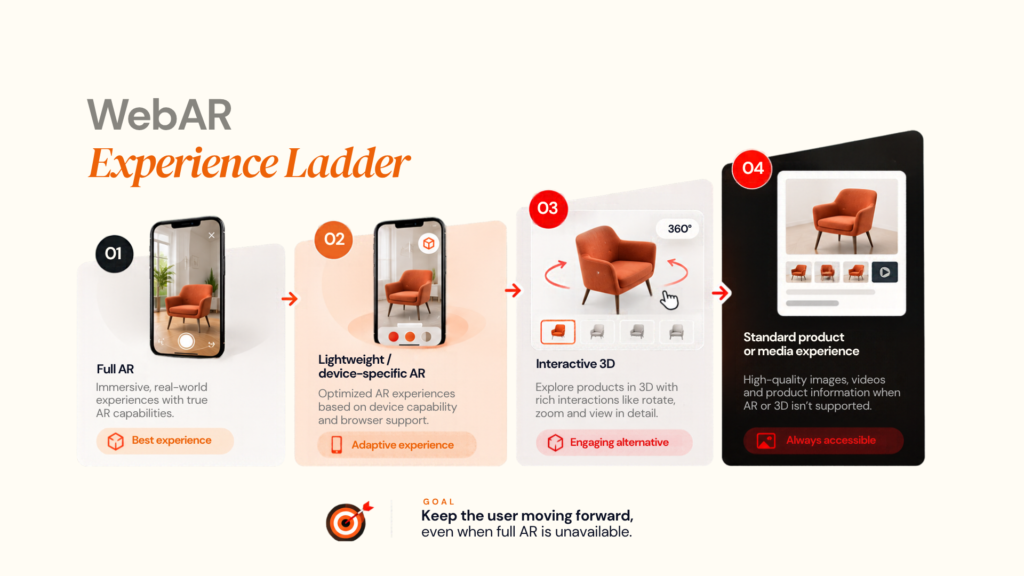
Goal: keep the user moving forward, even when full AR is unavailable.
WebAR lowers one of the biggest barriers to immersive experiences: getting the user into the experience.
Instead of asking someone to search for an app, install it, create an account, and learn a new interface, a business can start from a URL, QR code, product page, or campaign.
That makes WebAR useful for short, contextual interactions such as:
- Product visualisation
- Furniture placement
- Packaging experiences
- Interactive advertising
- Retail activations
- Event experiences
- Education and museums
- Product demonstrations
WebAR is a delivery model, not a single technology
A browser-based experience can combine several routes.
A product page might show a 3D model first, offer a device-specific AR viewer on supported phones, and use WebXR when the browser and hardware support the required session.
Google's <model-viewer> illustrates this layered approach. It can display interactive 3D content on the web and support WebXR, Scene Viewer, and Quick Look paths where appropriate. Apple documents AR Quick Look for supported USDZ content.
So the real WebAR experience can look like:
3D viewer → supported AR → fallback
rather than:
AR available → yes/no
Why this matters for business
The main benefit is reduced friction. A customer can scan a code, open a product page, or click a campaign link and move directly into the experience.
No-app delivery still requires 3D assets, tracking, compatibility, performance, analytics, and fallback planning.
The real limitation: browser support
WebXR support is still uneven across browsers and devices. MDN classifies the WebXR Device API as having limited availability, so teams should verify the actual target browser, operating system, and device rather than assume that a feature works everywhere.
That is why strong WebAR products use capability detection and progressive enhancement.
03
What Happened to WebVR?
This is the biggest terminology issue in the Web AR vs Web VR discussion.
WebVR is not the technology to choose for a new project.
The WebVR API was an earlier browser approach to virtual reality. It was deprecated in favour of WebXR, which is designed to cover both augmented and virtual reality use cases.
The W3C's current WebXR Device API was published as a Candidate Standard on June 9, 2026, and describes web access to VR and AR devices, including sensors and head-mounted displays.
| Capability | WebVR | WebXR |
|---|---|---|
| Status | Legacy / deprecated | Current web technology |
| VR | Yes | Yes |
| AR | No | Yes |
| Modern XR input | Legacy model | Designed for XR input |
| New projects | Not recommended | Evaluate where browser XR fits |
| Standards direction | Historical | Active development |
WebXR is not a 3D engine
This distinction is important when estimating development effort.
WebXR handles the browser-facing relationship with XR sessions and supported hardware. It does not automatically build your 3D environment.
The application still needs a rendering stack such as:
- WebGL
- Three.js
- Babylon.js
- A-Frame
- <model-viewer>
- Other specialised WebAR platforms
For a simple product viewer, a lightweight stack may be enough.
For a multi-scene training platform, collaborative environment, or advanced simulation, the architecture may need a fuller 3D framework.
The Khronos OpenXR 1.1 specification is also relevant when planning the broader XR application strategy. OpenXR is an API for XR applications rather than a replacement for browser rendering.
The takeaway: stop treating “WebVR” as a modern competitor to WebAR. The current technical conversation is WebAR experience vs browser-based WebXR VR, with 3D rendering and application architecture underneath both.
04
How WebXR Works
WebXR gives a web application a way to work with supported immersive hardware, but the overall experience still depends on several technical layers.
The core building blocks
- XR session management
The application checks which immersive sessions the browser supports and requests the required mode, such as immersive-ar or immersive-vr.
- Hit testing
In AR, hit testing can help the application determine where virtual content can be placed relative to detected real-world geometry.
- Depth and spatial data
Where supported, depth information can improve occlusion and the relationship between digital and physical objects.
- XR input
WebXR supports interaction models that can involve controllers, hands, and other XR input sources beyond traditional touch and mouse controls.
- Rendering
The application still needs to render the actual scene using WebGL and an appropriate 3D framework.
Useful technical references include the MDN XRSystem documentation, Three.js WebXR documentation, and Babylon.js documentation.
Why WebXR matters commercially
Consider an automotive experience.
A basic browser experience may allow a customer to rotate a vehicle and launch an AR placement mode.
A more advanced XR experience could allow the user to:
- Explore the exterior
- Open doors
- Inspect interior features
- Switch trims
- Compare configurations
- Enter a headset-based experience
The difference changes interaction, asset complexity, engineering effort, device requirements, and measurement.
That is why WebXR needs product planning, not just front-end implementation.
05
Technical Architecture: What You Actually Need to Build
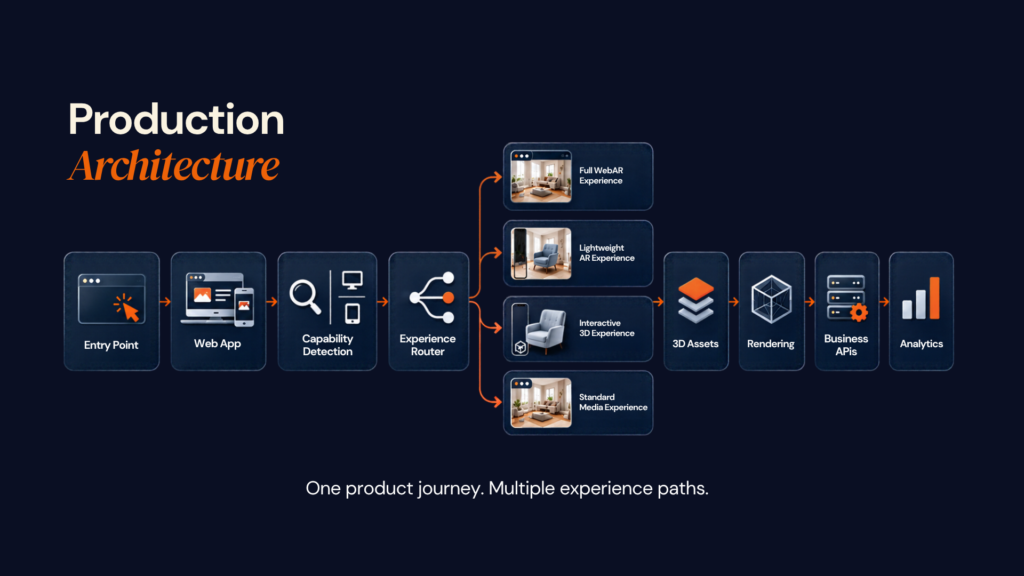
A production immersive web product is rarely just a webpage with an “Enter AR” button.
A practical architecture looks like this:
User entry point
QR code/product page/campaign/portal
↓
Web application
Navigation + business logic + analytics
↓
Capability detection
Browser + OS + device + XR support
↓
Experience router
WebXR / platform AR / 3D viewer/fallback
↓
3D asset layer
GLB / glTF / USDZ / textures/animation
↓
Rendering layer
WebGL + Three.js / Babylon.js / equivalent
↓
Application services
CMS + APIs + authentication + commerce
↓
Business systems
Catalogue + CRM + PIM + analytics
The 3D asset pipeline is often the hidden project
A business may already own CAD models or high-resolution product assets. That does not make them ready for browser-based real-time rendering.
A practical pipeline may look like:
Source model → optimisation → material simplification → texture optimisation → GLB/glTF or USDZ → compression → device testing
The same product may require different asset budgets for:
- Desktop
- Mobile
- Browser AR
- Headset XR
The key questions are:
How much geometry is really needed?
Which textures can be reduced?
What can load progressively?
What should be shared across experiences?
At Designoweb, 3D Product Design can sit alongside application engineering so the asset is treated as part of the product rather than as an isolated creative deliverable.
Framework selection
There is no universal best framework.
Project requirement
- Product viewing
- Interactive 3D website
- Structured WebXR experience
- Specialist WebAR campaign
- Large immersive application
Possible direction
- / lightweight 3D
- Three.js / Babylon.js
- Three.js / Babylon.js / A-Frame
- WebAR platform
- 3D engine + WebXR or native XR
The right stack depends on the experience, supported devices, and amount of control the product requires.
Capability detection comes before immersion
Before the user reaches the immersive flow, the application should know:
- Is the browser compatible?
- Is the required XR session supported?
- Can the device handle the rendering load?
- Is camera access available?
- Is the content available?
- What is the fallback?
This turns compatibility from a late-stage surprise into a planned part of the UX.
06
WebAR and WebVR Use Cases by Industry
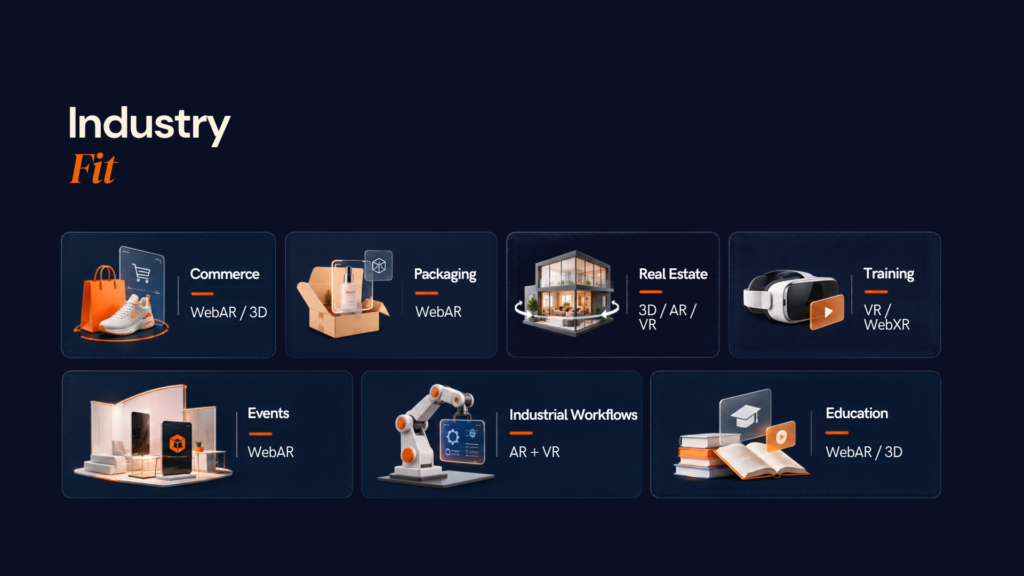
The best WebAR and WebVR applications do not start with the technology. They start with a clear user need. Businesses get the most value when immersive experiences help customers understand a product, make a decision, complete a task, or interact with something difficult to experience through a traditional website.
The right approach can also vary by industry. A retailer may need lightweight AR for product visualisation, while a manufacturer may benefit more from an immersive VR training environment. The technology should match the problem, audience, and level of interaction required.
E-commerce and Product Visualisation
E-commerce is one of the clearest examples of where WebAR can improve the customer journey. Online shoppers often have to make decisions without being able to physically see, touch, or place a product in context.
For a furniture shopper, the question is simple:
“Will this look right in my room?”
A standard product page can provide dimensions, images, videos, and specifications, but the customer still has to imagine how the product will fit into their space. WebAR can reduce that uncertainty by allowing shoppers to view a 3D version of the product in their own environment.
A practical browser-first journey could look like:
Product page → 3D model → AR placement → Configuration → Purchase
The shopper can inspect the product, place it in the room, change colours or configurations where supported, and then return to the normal e-commerce journey to complete the purchase.
This does not mean every retailer needs to build a complete VR storefront. In many cases, that would introduce unnecessary complexity and hardware requirements. A combination of 3D product visualisation and WebAR can deliver the spatial context customers need while keeping the experience accessible through devices they already use.
WebAR is particularly valuable when the physical environment influences the buying decision, for example, furniture, home décor, appliances, lighting, kitchen products, or other products where size, placement, appearance, or fit can affect purchase confidence.
The business value comes from solving a specific problem: helping customers make better-informed decisions before they buy.
Retail and packaging
A QR code on packaging can open:
- Product demonstrations
- Interactive instructions
- 3D models
- Promotions
- Assembly guidance
- Brand experiences
The technology becomes useful because it appears at the moment the customer already has the product in front of them.
Real estate
Interactive 3D and WebAR can help prospects inspect:
- Room layouts
- Interior finishes
- Property configurations
- Development models
- Furniture placement
VR becomes more relevant for virtual sales centres, off-plan presentations and fully immersive property exploration.
Training and simulation
VR has a different business advantage.
When a task is expensive, hazardous or difficult to reproduce physically, a controlled virtual environment can be valuable.
Examples include:
- Safety training
- Equipment operation
- Maintenance workflows
- Medical simulation
- Operational rehearsal
- Employee onboarding
A useful rule is:
AR assists the real-world task.
VR rehearses the task.
Events and experiential marketing
WebAR works particularly well for temporary activations because the audience can enter via a link or QR code.
This can be useful at:
- Conferences
- Product launches
- Sports events
- Retail activations
- Outdoor campaigns
- Exhibitions
For a short interaction, app-install friction can be more damaging than the technical benefit of a native application.
Education and museums
A visitor can use a smartphone to unlock:
- 3D reconstructions
- Historical information
- Animations
- Translation
- Video
- Interactive timelines
The best implementations make the physical exhibit more informative rather than simply adding a digital effect.
Manufacturing and industrial environments
The AR vs VR decision becomes especially clear here.
Use AR when the worker needs the real machine plus digital information.
Use VR when the worker needs a controlled simulation of the machine or procedure.
Where AI fits
AI can make immersive experiences more useful, but it should solve a real information or interaction problem.
Examples include:
- Conversational product assistants
- Natural-language search
- Personalised tours
- Recommendation
- Multilingual support
- Object recognition
- Automated asset tagging
For product, property, or enterprise assistants, answers should be grounded in approved business data.
Adding AI to an immersive experience?
Designoweb can combine AI development, product engineering, and immersive technology so intelligence supports the workflow instead of becoming a disconnected feature.
→ Explore Product Development Services
WebAR/WebXR Development Cost and Key Factors
One of the first questions businesses ask when planning an immersive web experience is:
“How much does WebAR or WebXR development cost?”
The answer depends on what you are building.
A simple WebAR product viewer, a QR-led marketing experience, and a multi-user WebXR application all require different levels of 3D production, engineering, device support, and backend integration. Treating them as the same type of project can lead to unrealistic budgets and the wrong technical decisions.
For planning purposes, WebAR and WebXR projects can range from a few thousand dollars for focused experiences to $100,000+ for complex, enterprise-grade products. The final investment depends on the experience, number of assets, supported platforms, integrations, interaction complexity, and long-term maintenance requirements.
Typical WebAR/WebXR Development Cost
The following ranges provide a practical starting point for budgeting:
| Project Type | Indicative Cost | Typical Scope |
|---|---|---|
| Simple WebAR / 3D experience | 5,000–15,000 | Basic 3D viewer, simple AR interaction, limited assets, browser delivery |
| Interactive WebAR experience | 15,000–40,000 | Custom interactions, multiple assets, tracking, animation, analytics, and device testing |
| WebXR pilot | 20,000–60,000 | Interactive 3D environment, immersive interaction, WebXR integration and backend connectivity |
| Complex WebXR application | 40,000–150,000+ | Multiple scenes, advanced interactions, custom 3D, integrations, analytics and broader device coverage |
| Enterprise immersive platform | $150,000+ | Large-scale content, enterprise systems, advanced security, multi-user features and continuous development |
These are planning ranges, not fixed quotations. At Designoweb, we scope the project around the actual user journey, technical requirements, and business outcome before defining the final development budget.
What Actually Drives WebAR and WebXR Development Cost?
The framework or API is only one part of the project. In practice, the surrounding product requirements have a much bigger impact on cost.
| Cost Driver | Lower Complexity | Higher Complexity |
|---|---|---|
| 3D Assets | Existing optimised models | Custom modelling, photogrammetry, animation |
| Interaction | Rotate, zoom, place | Physics, simulation, hand interaction, collaboration |
| Tracking | Simple triggers | Spatial, hand, environment or advanced tracking |
| Platforms | One device class | Mobile, desktop and multiple headsets |
| Backend | Static content | CMS, commerce, authentication and APIs |
| Analytics | Basic events | Behavioural, funnel and conversion analytics |
| Content | Small asset library | Large, continuously updated catalogue |
| User Accounts | Not required | Authentication, profiles and personalisation |
| Multi-user | Not required | Real-time collaboration and synchronisation |
| Support | One-time launch | Ongoing maintenance and platform updates |
The more complex the experience becomes, the more the project moves from a lightweight immersive feature to a full digital product.
3D Content Is Often the Biggest Hidden Cost
Many businesses focus on the application itself and underestimate the work required to make the 3D content production-ready.
Having a CAD file or high-resolution 3D model does not mean it can immediately be used in a browser, AR experience, or WebXR environment.
Depending on the project, the asset may need:
Source model → 3D optimisation → material preparation → texture optimisation → animation → compression → device testing
The cost increases further when the project involves dozens, hundreds or thousands of products.
This is particularly important for e-commerce, manufacturing, automotive, furniture and other businesses with large product catalogues.
At Designoweb, we treat the 3D asset pipeline as part of the product architecture. The goal is to create assets that are accurate, lightweight, reusable, and suitable for multiple channels—not assets that only work in one immersive experience.
A well-planned 3D foundation can support:
Web 3D + WebAR + WebXR + mobile + marketing + future immersive experiences
That makes the asset investment significantly more valuable over time.
Development Cost Is Only the Beginning
The initial build is not the full cost of running an immersive product.
A production experience may also require:
3D content + development + cloud infrastructure + CDN/bandwidth + analytics + testing + third-party services + maintenance
There can also be ongoing costs associated with:
- Adding new 3D products
- Updating existing assets
- Supporting new browsers and devices
- Updating integrations
- Monitoring performance
- Maintaining backend services
- Improving the user experience after launch
For a campaign, these costs may remain relatively small.
For a long-term immersive platform, they become part of the product lifecycle budget and should be planned from the beginning.
How We Approach WebAR/WebXR Investment at Designoweb
We do not recommend building the largest possible version of an immersive experience on day one.
We structure the investment around clear stages:
1. FOUNDATION
Define the user problem, audience, devices, content requirements, and technical constraints.
2. PILOT
Build one focused use case and validate the core interaction with real users.
3. PRODUCTION
Connect the experience to the required CMS, APIs, commerce, CRM, analytics, and business systems.
4. SCALE
Expand content, platforms, personalisation, AI, collaboration or advanced XR capabilities based on proven demand.
This gives the business a clear answer at every stage:
Does the experience work?
Do users engage with it?
Does it improve the intended business outcome?
Is it worth scaling?
How to Keep WebAR/WebXR Costs Under Control
The best cost decisions happen before development begins.
Start with one high-value use case.
Do not try to convert an entire catalogue or business process into XR immediately. Prove one workflow first.
Reuse your 3D assets.
Build models that can serve web, AR, WebXR, marketing, and future product experiences.
Choose the simplest technology that solves the problem.
A product that only needs inspection may need web 3D—not a complete WebXR application.
Define supported devices early.
Trying to support every browser, phone, and headset can significantly increase optimisation and QA requirements.
Prototype the highest technical risk first.
Test the difficult interaction before investing heavily in the surrounding interface.
Design the fallback from day one.
A standard web or 3D experience can keep the product usable when immersive features are unavailable.
The Real Question Behind the Budget
The goal should not be to build the cheapest possible immersive experience.
It should be to identify the smallest investment that can prove the business case.
A $10,000 prototype that validates the right use case can be far more valuable than a $100,000 immersive platform built before anyone has confirmed whether customers actually need it.
That is the approach we take at Designoweb.
We start with the business objective, define the experience that can influence it, identify the technical risks, and then build the product in stages. This keeps the investment connected to measurable outcomes rather than technology for technology's sake.
07
Challenges, Security, Performance and Accessibility
Immersive web development has a few failure points that traditional websites do not.
1. Browser and device fragmentation
A feature can work perfectly on one device and fail on another.
Define:
Browser + OS + device + minimum capability + fallback
before development reaches production.
2. Performance problems
3D assets can increase:
- Download size
- Memory use
- Rendering workload
- Initial load time
- Battery consumption
A practical performance review should include:
Geometry → textures → materials → loading → frame stability → memory → device thermals
Do not optimise only for the most powerful development device.
3. Security and privacy
XR experiences may interact with cameras, sensors and spatial information. The W3C WebXR specification includes dedicated security and privacy considerations around immersive capabilities.
At minimum, review:
- HTTPS
- Camera and sensor permissions
- Data minimisation
- Telemetry
- Third-party SDKs
- Authentication
- API security
- Asset protection
- CMS permissions
For enterprise projects, privacy should be considered during architecture rather than after the experience is built.
4. Accessibility
An immersive experience should never make essential information available only through XR.
Provide:
- Standard web content
- Text alternatives
- Touch or keyboard alternatives where appropriate
- Captions and transcripts
- Clear controls
- Non-XR routes to essential content
5. Poor fallback design
A user should not hit a dead end that says:
“Your device does not support WebXR.”
A stronger pattern is:
-
1
Full XR
-
2
lighter AR/3D
-
3
standard web
08
How to Implement the Right Immersive Web Strategy

he 7-Step Immersive Product Roadmap
- Define
↓
2. Select
↓
3. Prepare
↓
4. Prototype
↓
5. Integrate
↓
6. Test
↓
7. Measure & Scale
A strong implementation begins with the business case, not the framework.
Step 1: Define the problem
Start with a sentence such as:
“Users struggle to understand product scale before purchase.”
or:
“Technicians need a safer way to rehearse a maintenance procedure.”
That gives the team a measurable problem to solve.
Step 2: Define the audience and devices
Document:
- Target audience
- Primary browser
- Operating systems
- Supported devices
- Minimum capability
- Headset availability, if relevant
- Fallback experience
Step 3: Choose the simplest experience that can solve the problem
Consider:
-
1
2D
-
2
3D
-
3
WebAR
-
4
WebXR
-
5
native XR
Move further along the spectrum only when the additional capability creates additional value.
Step 4: Audit the 3D foundation
Review the source models, content quality, ownership, and expected update frequency.
Then establish:
Asset standards + optimisation rules + versioning + delivery strategy
Step 5: Prototype the highest technical risk
Do not spend the first sprint designing a polished landing page.
Prototype the difficult part:
- Accurate AR placement
- Hand interaction
- Complex animation
- High-fidelity rendering
- Multi-user interaction
- Real-world tracking
Step 6: Build the fallback as part of the product
Do not treat the standard web path as an error state.
It should be a planned experience that protects users on unsupported devices.
Step 7: Connect business systems
Depending on the project, integrate:
- CMS
- Product catalogue
- PIM
- Commerce
- CRM
- Authentication
- Analytics
- Content APIs
This prevents the immersive layer from becoming a disconnected technology island.
Step 8: Test real devices
Emulators help during development, but physical devices are necessary for validating browser, rendering, and tracking behaviour.
Step 9: Launch around a measurable KPI
Examples:
-
1
Commerce
-
2
conversion / configuration completion
-
1
Training
-
2
completion / assessment outcome
-
1
Campaign
-
2
qualified interaction / conversion
-
1
Support
-
2
task completion / reduced service time
Step 10: Expand only after the pilot proves value
Once the core workflow works, add more content, devices, personalisation, AI or deeper XR capability based on evidence.
09
Where Designoweb Fits
At Designoweb, we do not start an immersive project by deciding that the answer must be WebAR, WebXR, or native VR.
We start with the business problem, user journey, and technical constraints.
Our immersive product work can combine:
- AR/VR App Development
- 3D Product Design
- Unity Solutions
- Virtual Space Creation
- Product Development Services
That matters because an immersive product rarely succeeds as an isolated visual layer. It needs the right combination of 3D content, application engineering, UX, APIs, analytics, performance, and deployment strategy.
Our approach is:
Business problem → User journey → Device strategy → 3D foundation → Experience architecture → Product engineering → Integration → Testing → Optimisation
For some projects, that leads to WebAR.
For others, it leads to WebXR.
For others, the evidence may point to a simpler 3D experience or native application.
The technology should serve the product.
Author

Frequently Asked Questions
01
What is the difference between WebAR and WebVR?
WebAR adds digital content to the user's real-world environment through a browser-based experience. WebVR was a legacy browser API for virtual reality and has been deprecated in favour of WebXR, which supports both AR and VR.
02
Is WebVR still used?
The WebVR API is deprecated and should not be selected for new projects. Existing WebVR experiences should be evaluated for migration to WebXR.
03
What is WebXR?
WebXR is a web standard/API for accessing AR and VR hardware from web applications. It manages XR sessions, device interaction and presentation, while rendering is handled by technologies such as WebGL and 3D engines.
01
Is WebAR the same as WebXR?
No. WebAR is a broader term describing augmented reality delivered through the web. WebXR is a technical API used for immersive AR and VR in supported browsers and devices. Some WebAR implementations can also use alternative browser or platform-specific AR routes.
02
Does WebXR work on iPhone?
General WebXR support is still not available in Safari on iOS according to current compatibility data. Apple does, however, provide AR Quick Look for web-based AR experiences using supported 3D assets such as USDZ.
03
Does WebAR require an app?
The defining advantage of WebAR is that the experience can be launched from the web without requiring a dedicated application download. Depending on the implementation and device, the browser may hand the experience to a platform-provided AR viewer such as Scene Viewer or Quick Look.
04
What 3D formats are commonly used for WebAR?
GLB and glTF are widely used for browser-based 3D, while USDZ remains important for Apple AR Quick Look. Google documents GLB/glTF support for , while Apple documents USDZ for Quick Look.
05
Does WebXR replace Three.js or Babylon.js?
No. WebXR provides access to immersive device capabilities. Three.js, Babylon.js and other rendering frameworks help create and manage the 3D experience itself.
01
Is WebAR cheaper than a native AR app?
It can reduce distribution and some development overhead, particularly for public campaigns and simple product visualisation, but cost still depends on 3D asset production, tracking, integrations, analytics, device coverage, testing and content management. A complex WebAR platform can still require substantial engineering.
02
How much does WebAR development cost?
There is no reliable single market-wide price. The strongest cost predictors are asset complexity, interaction depth, device support, backend integration, CMS requirements, analytics and long-term maintenance. Provider-specific 2026 cost guides show how dramatically the scope can vary between prototypes and enterprise platforms.
03
What should an enterprise measure after launching WebAR?
Measure the business journey, not just AR launches. Relevant metrics can include engagement rate, product interactions, configuration activity, add-to-cart behaviour, lead generation, conversion and assisted revenue, depending on the use case.
01
How do I make WebAR work across Android and iPhone?
Use capability-based routing rather than assuming one implementation works everywhere. A common pattern is browser 3D as the baseline, WebXR where available, Google Scene Viewer for supported Android devices and Apple Quick Look for compatible Apple workflows.
02
Does WebXR require HTTPS?
Yes. WebXR is exposed only in secure contexts, with localhost treated as an exception for development.
03
Should I build WebAR or a native AR app?
Choose WebAR when reach, low-friction access and short or occasional interactions matter. Consider native AR when the experience requires deep platform integration, persistent app context, advanced sensor capabilities or repeated engagement inside an existing application.
04
What should I prototype first?
Prototype the riskiest interaction rather than the full visual experience. For example, test spatial placement, tracking accuracy, controller/hand input, multi-user synchronisation or target-device performance before investing in the entire content set.
01
Is WebXR secure?
WebXR includes security and privacy controls, but immersive experiences still require careful handling of camera, sensor, spatial and interaction data. WebXR's security documentation explicitly identifies privacy, fingerprinting and user-profiling considerations.
02
What should I ask a WebAR or WebXR development company?
Ask about device support, fallback architecture, 3D asset optimisation, testing on physical hardware, analytics, backend integrations, security, content management and post-launch support—not just which XR framework they use.