
Key Takeaways
01
Start with a validated problem and measurable business outcome, not a technology stack.
02
Define an MVP around the riskiest assumptions you need to test.
03
Design, architecture and product scope should influence one another before heavy engineering begins.
04
Choose native or cross-platform based on platform needs, UX, performance, integrations and total cost.
05
A production app includes backend services, security, analytics, integrations, infrastructure and operations.
06
Test real devices, real networks, accessibility, security, performance and failure states.
07
Plan App Store and Google Play requirements before launch day.
08
Treat launch as the beginning of measurement, maintenance and product improvement.
Knowing how to build a mobile app is less about picking Swift, Kotlin, Flutter or React Native and more about deciding what to build, for whom, what the first release must prove, and how it will behave in production.
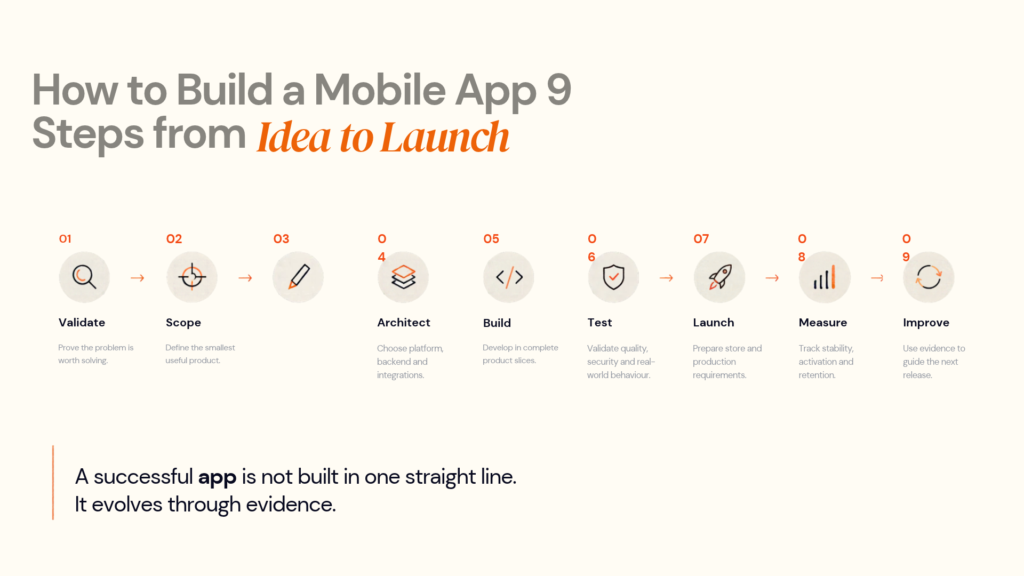
The modern process is a sequence of decision gates:
Validate → Scope → Design → Architect → Build → Test → Launch → Measure → Improve
Each stage reduces a different product or technical risk. Designoweb approaches mobile delivery through broader product development services, connecting product thinking, UX and engineering.
In this guide, we will explain how to build a mobile app step by step, from validating the idea and defining the MVP to choosing the right technology stack, designing the user experience, developing and testing the product, preparing for launch, measuring performance and improving the app after release.
01
What the Mobile App Development Process Actually Involves
A simple model is Idea → Design → Development → Testing → Launch. A production product is more disciplined: Validate → Scope → Design → Architect → Build → Test → Launch → Measure → Improve.
A mobile app usually includes the client plus APIs, authentication, databases, third-party services, analytics, security, infrastructure and release tooling. Each stage should reduce a specific product or technical risk.
At every stage ask: What are we proving? What could fail? What evidence do we have? What does the next stage need?
02
Step 1: Validate the Problem, Users and Business Case
The first output should not be a completed design or development backlog.
It should be a defensible answer to:
Who has the problem, how are they solving it today, and why would they change?
Start with the user's problem
Write the problem in one sentence.
Weak:
We want to build an AI-powered logistics app.
Stronger:
Dispatch teams spend too much time calling drivers to confirm delivery status because shipment updates are fragmented across systems.
The second statement gives product and engineering something concrete to investigate.
Define the primary user
Avoid designing for “everyone.” Identify the user who experiences the problem most frequently and document their context, task, workaround and adoption barriers. For B2B products, separate the user from the buyer.
Test the riskiest assumption first
Every product contains assumptions about demand, behaviour, integrations, payments, permissions and feasibility. Test the highest-risk ones with the cheapest reasonable method:
| Assumption | Low-cost validation |
|---|---|
| Users have the problem | Interviews, surveys, support tickets, review analysis |
| Users understand the proposed workflow | Clickable prototype testing |
| Customers may pay | Pricing conversations, pilot agreements, pre-orders |
| Integration is possible | Technical spike or API proof of concept |
| AI can perform adequately | Small evaluation dataset and prototype |
| Workflow saves time | Controlled pilot with baseline measurements |
When structured discovery is needed, Designoweb also supports concept definition and MVP planning through MVP development services.
Define success before development
Choose a small number of measurable outcomes.
For a consumer app, these might include activation, conversion, retention and feature usage. For an enterprise workflow, they may include task completion time, adoption by role, support-request reduction or operational savings.
Step 1 output
Problem statement + target users + business objective + validation evidence + success metrics + major risks
Do not move forward just because the idea feels exciting. Move forward when the evidence is strong enough to justify the next investment.
03
Step 2: Turn the Validated Idea Into a Product Scope
A validated problem can still become an uncontrolled project.
This is where discovery becomes a buildable product definition.
Map the core user journey
Start with the main path:
Discover → Sign up → Configure → Complete core action → Receive result → Return
Then identify what must exist for the user to complete that journey successfully.
Define the MVP correctly
The MVP is not “the full app with fewer features.”
A better definition is:
The smallest product that can test the most important business and user assumptions with real users.
Use a simple prioritisation model:
| Feature | User value | Business value | Complexity | MVP? |
|---|---|---|---|---|
| Account creation | High | High | Low | Yes |
| Core transaction | High | High | Medium | Yes |
| Admin dashboard | Medium | High | Medium | Depends |
| Advanced personalisation | Medium | Medium | High | Usually later |
| Social sharing | Low | Low | Medium | No |
| Complex reporting | Medium | Medium | High | Usually later |
The goal is to make the learning loop fast.
04
Step 3: Design the User Experience and Prototype
When teams ask how to create a mobile app, they often jump straight to high-fidelity screens. That can be expensive because a polished screen can hide a broken workflow.
Start with:
User journey → information architecture → wireframes → interactive prototype → usability testing → high-fidelity UI
Design the journey before the screens
Ask:
What does the user need to accomplish, and how many decisions or interactions stand between them and the outcome?
The highest-risk journeys usually deserve the earliest prototypes:
- onboarding
- search
- booking
- checkout
- payments
- content creation
- workflow completion
Prototype the risky parts
A clickable prototype should test the workflows most likely to create expensive rework. Even short usability sessions can expose unclear terminology, unnecessary steps, missing information and navigation problems. Designoweb's mobile app design services and prototyping services support this validation stage.
Build accessibility into the design
Accessibility should be considered during interaction design. Apple's current Human Interface Guidelines list a 44×44 pt minimum hit region for many iOS/iPadOS controls, while W3C explains how WCAG principles apply to mobile applications. See Apple's accessibility guidance and W3C's mobile accessibility guidance.
Think about:
- text scaling
- contrast
- labels and screen-reader navigation
- touch targets
- focus order
- error messaging
- motion
- alternative input
- orientation and adaptive layouts
Step 3 output
User flows + information architecture + tested prototype + UI system + adaptive states + accessibility considerations + development specifications
That package gives engineering a much clearer starting point than a folder of isolated screens.
05
Step 4: Choose the Right Architecture and Technology Stack
Technology should follow product requirements, not the other way around.
The key question is not:
Should we use Flutter?
It is:
Which architecture gives this product the right balance of platform capability, performance, delivery speed, maintainability, security and total cost?
Native vs cross-platform app development
| Approach | Best fit | Main advantage | Trade-off |
|---|---|---|---|
| Native iOS | Deep Apple integration | Maximum platform control | Separate iOS implementation |
| Native Android | Deep Android integration | Strong platform access | Separate Android implementation |
| Flutter | Multi-platform delivery | Shared codebase | Native integration may still be needed |
| React Native | React/JavaScript teams | Shared development model | Native modules may still be needed |
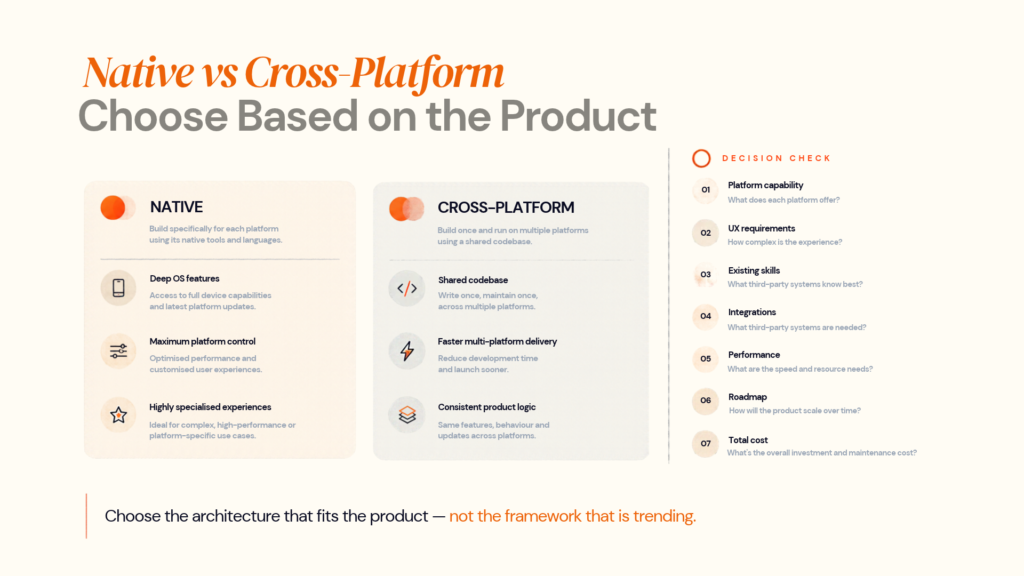
Flutter's current documentation describes a model for building, testing and deploying multi-platform applications from a single codebase, while still supporting platform-specific integrations when needed. Flutter documentation is a useful technical reference before choosing the framework.
Designoweb supports iOS app development, Android app development, Flutter app development and React Native app development, so the framework can be matched to the product rather than forcing the product into a fixed delivery model.
Architecture should include the backend
A production architecture may include mobile app → API → authentication → business logic → database → external services → analytics/observability. Define contracts, data models, caching, offline behaviour, notifications, logging, secrets and third-party integrations early.
Do not over-engineer the first release
A new product does not automatically need microservices. Use the simplest architecture that meets current requirements and leaves a credible path to scale.
06
Step 5: Build the App in Testable Product Increments
Once scope, UX and architecture are clear, engineering can begin.
The common mistake is to build a large frontend first and connect the backend later.
A better approach is to build thin vertical slices that travel through the full system.
For example:
Login UI → authentication API → database record → session handling → analytics → automated test
Then complete the next valuable workflow.
This exposes integration problems early and produces working software throughout delivery.
Use a controlled engineering workflow
Use source control, code review, automated builds and tests, separate environments, dependency and secrets management, versioning, monitoring and controlled deployment.
Designoweb's development process describes iterative development, testing, launch preparation and post-launch support, alongside practices such as API-first delivery, cloud-native development, Agile delivery and security by design.
Design for failure, not just success
Plan for poor connectivity, interrupted sessions, denied permissions, low storage, background process termination and third-party outages. For payments, a timeout should not automatically mean “payment failed”; the system may need to determine whether the transaction is complete, pending or safe to retry.
A real-world Designoweb example
Designoweb's Road Trip Tribes case study illustrates why mobile architecture becomes more than a UI problem. The Flutter-based product combines real-time navigation, group communication, manual location sharing, trip planning and Android Auto support across Android and iOS.
The broader lesson is that product design, mobile engineering, real-time behaviour and external platform integrations need to be considered together.
07
Step 6: Test Performance, Security, Accessibility and Reliability
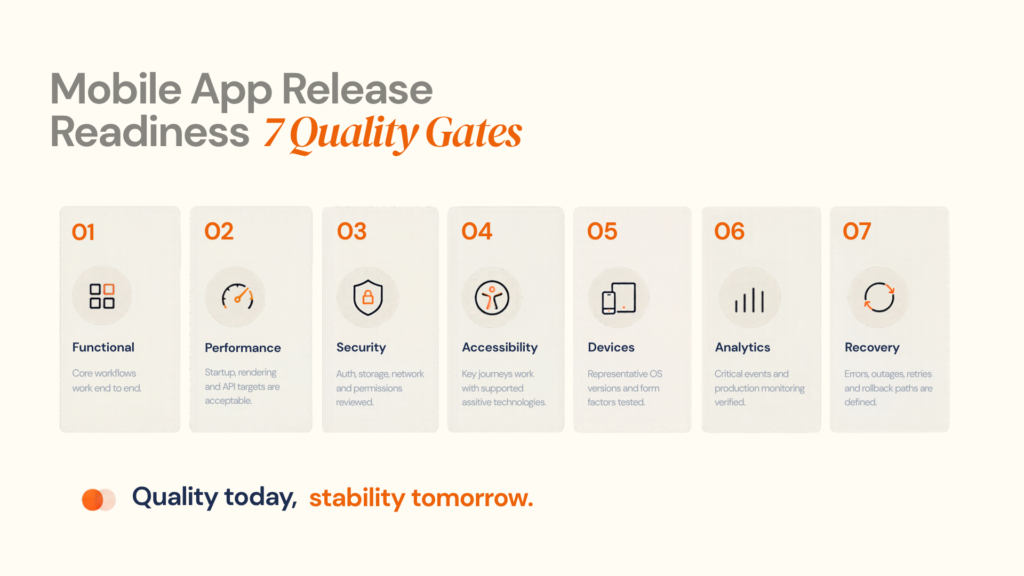
“Testing completed” is not a meaningful release criterion by itself.
The better question is:
Which risks have we actually tested?
Build a layered QA strategy
Cover unit and integration behaviour, core workflows, regression, real devices, performance, security, accessibility, UAT and production release configuration.
Performance is part of the product
Android's current core app quality guidance treats usability, startup feedback, rendering performance and stability as quality concerns, including visible feedback for longer startup and rendering-performance checks. Use these as Android-specific engineering signals. Android core app quality provides the current reference.
Set measurable targets for startup, core flows, API latency, rendering and offline recovery.
Security and accessibility need built-product testing
Review authentication, authorisation, secure storage, cryptography, network communication, deep links, sensitive logs, WebViews, third-party SDKs, privacy and data retention. OWASP MASVS provides a mobile security verification framework, and OWASP released MASWE 1.0 in August 2026.
Also test screen readers, larger text, reduced motion, different displays and alternative input where relevant. W3C mobile accessibility guidance explains how WCAG principles apply to mobile applications.
08
Step 7: Prepare for App Store and Google Play Launch
Launch preparation should begin before the final day of development.
Apple App Store
Apple's current App Store Connect workflow requires the appropriate build and required metadata before an app version can be submitted for review. Teams also need to provide the information reviewers require to understand and test the app. Apple's App Store submission guidance and App Review information requirements should be part of the release checklist.
Prepare signing, capabilities, metadata, screenshots, age rating, privacy information, reviewer notes/credentials where required, payment configuration, production APIs and monitoring.
Google Play
Google Play's current developer requirements include app-content declarations such as target audience, privacy information, app access and advertising details where applicable. The Play Console target audience and content guidance explains the information developers need to provide.
Google also states that apps must meet the latest target API-level requirements by the annual deadline; its July 2026 policy announcement set August 31, 2026 as the current deadline for the latest target API level requirements. Google Play policy announcement — July 15, 2026
Before release, verify the App Bundle, signing, target-audience and content declarations, permissions, privacy policy, reviewer access, testing tracks, production configuration and rollout strategy.
Use controlled rollout where appropriate
For products with meaningful release risk, avoid treating 100% rollout as the only option. Use staged or limited distribution where the platform and product support it, monitor real-world behaviour and expand when the data is healthy.
09
Step 8: Launch, Measure and Stabilise
After release, the question changes from “Will this work?” to “Does it work for real users, and does it create the intended outcome?”
Track technical health
Use Android Vitals and App Store Connect analytics where applicable to monitor crashes, ANRs, startup time, API latency, failed requests, memory/battery issues and OS-version regressions.
Track product health
Technical stability tells you whether software works. Product analytics tells you whether the product matters.
A useful funnel is:
Acquisition → Activation → Core action → Retention → Conversion
For a booking application, that might become:
Install → Account creation → Search → Booking started → Booking completed → Second booking
Now the team can identify where value is being lost.
High installs with weak activation may point to onboarding or product-message problems. Strong activation with weak retention can suggest that recurring value is unclear. Good retention with weak conversion may point toward pricing or commercial friction.
10
Step 9: Improve the Product After Launch
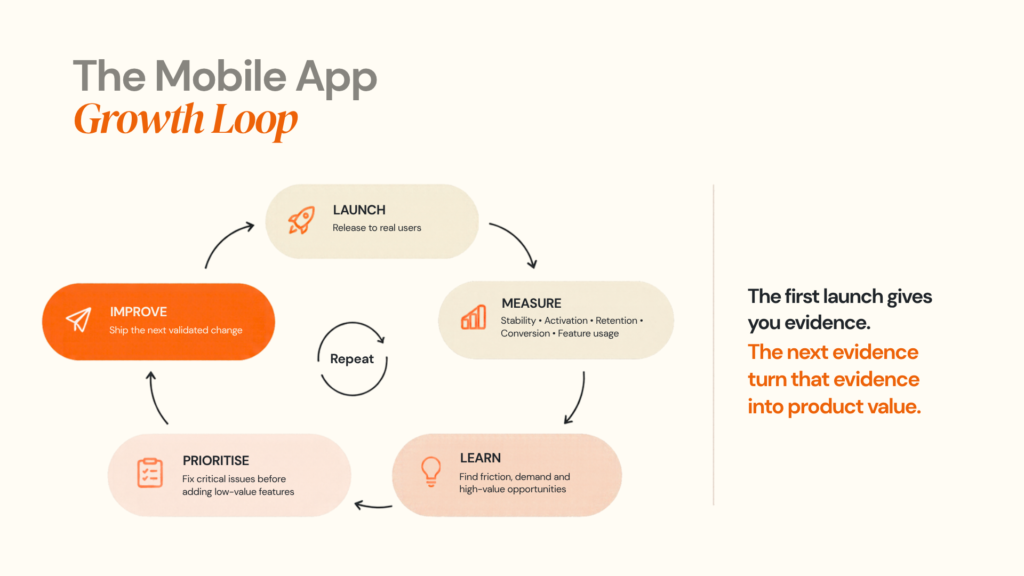
The mobile app development lifecycle does not end when the product reaches the store.
A useful post-launch loop is:
Observe → Diagnose → Prioritise → Build → Test → Release → Measure
Bring evidence from product analytics, app-store reviews, support, crash reports, session behaviour, customer interviews, sales and operational teams.
Use feature flags carefully
Feature flags can support controlled releases and experiments. Govern them, document them and remove obsolete flags so they do not become technical debt.
Budget for maintenance
Maintenance may include OS and dependency updates, security fixes, performance work, API/SDK changes, store-policy updates, accessibility improvements, new device support and infrastructure changes. Treat it as part of the original product plan.
11
How Much Does It Cost to Build a Mobile App?
There is no meaningful single price for “a mobile app.”
A useful estimate is driven by:
Product complexity + platforms + backend + integrations + security/compliance + QA + infrastructure + post-launch support
Major cost drivers
| Cost driver | Lower complexity | Higher complexity |
|---|---|---|
| Platforms | One platform | iOS + Android + additional form factors |
| Backend/integrations | Basic APIs | Real-time workflows, payments, ERP, IoT or enterprise systems |
| Data/security | Standard | Sensitive or regulated data |
| Features | Simple journeys | Offline, AI, real-time or complex workflows |
| QA/operations | Standard | Large device matrix, security, observability and controlled releases |
The common budgeting mistake is estimating the mobile interface while ignoring everything around it.
An app that displays data from a stable API is very different from an app that requires real-time location, payments, offline synchronisation and enterprise integrations.
A reliable estimate should therefore follow discovery + UX + architecture, not precede them.
For teams still deciding what should be built first, Designoweb's MVP development services provide a practical starting point because scope can be tied to the assumptions the product needs to test.
12
How to Choose a Mobile App Development Partner
A development partner should be evaluated on how well it manages decisions, risk and change—not only on the number of developers it can provide.
Ask these questions
- How do you validate assumptions and define the MVP?
- Why is native or cross-platform right for this product?
- How will APIs, integrations, security and QA be handled?
- Who owns source code, environments and documentation?
- How will production issues and post-launch releases be managed?
A strong partner should explain trade-offs instead of presenting one framework or architecture as the answer to every project.
Designoweb's current delivery model combines product discovery, UX, architecture, iterative engineering, testing and launch preparation. Its portfolio also provides examples of products built for very different environments, which is more useful than evaluating a partner purely on visual similarity between projects.
A practical vendor test
Before signing, ask shortlisted partners to produce a compact technical discovery covering:
Problem assumptions → MVP scope → core user journeys → architecture options → integrations → major risks → QA strategy → release approach → initial delivery plan
The quality of that thinking often tells you more than a long services brochure.
CTA — Building an app but not sure what the right first release looks like?
Share the problem, target users and core workflow with Designoweb. We can help determine whether the next step should be validation, an MVP, a prototype, architecture planning or full product development.
13
Conclusion
The best mobile apps are rarely the result of simply following a checklist.
They come from making the right decision at the right stage.
Validate the problem before building.
Define the smallest product that can create useful evidence.
Design the important journeys before committing heavy engineering effort.
Choose architecture based on actual requirements.
Build in complete, testable increments.
Test the conditions real users will experience.
Prepare the product and store requirements before launch.
Then use production data to decide what comes next.
That is what turns an app development project into a product development process.
Author

Frequently Asked Questions
01
What is the mobile app development process?
The mobile app development process is the sequence of product and engineering activities used to take an application from problem validation through design, architecture, development, testing, release and continuous improvement.
02
How long does it take to build a mobile app?
There is no reliable universal timeline. Duration depends on scope, platform coverage, UX complexity, backend requirements, integrations, security requirements, testing depth and the maturity of the product definition. Discovery and architecture should happen before committing to a detailed schedule.
03
Can I build an MVP before building the full app?
Yes. An MVP can validate the core user problem, workflow and business assumptions before the full product is built. The MVP should contain the smallest set of capabilities required to test the most important assumptions.
01
What should I do before hiring mobile app developers?
Define the problem, target users, desired business outcome, primary workflow and major assumptions. A validated concept, rough scope and initial success metrics will make technical discovery more productive.
02
Should UX design happen before development?
The core user journeys should be designed and tested before significant engineering begins. This does not mean every pixel must be finalised before coding. Design and development should continue to inform one another throughout the product lifecycle.
01
Should I build a native or cross-platform mobile app?
Choose based on the application's technical and business requirements. Native development is often appropriate when deep platform capabilities or platform-specific behaviour are central. Cross-platform approaches such as Flutter can be useful when a shared multi-platform codebase and consistent product experience are priorities.
02
Is Flutter suitable for business applications?
Flutter can be suitable for many multi-platform products. Flutter's official documentation supports multi-platform development from a shared codebase and also provides mechanisms for platform-specific integration when required.
03
Do mobile apps need a backend?
Not always, but many business applications require a backend for authentication, data storage, business logic, payments, integrations, analytics or synchronisation. The backend architecture should be determined by the product's actual requirements.
01
How do I secure a mobile application?
Security should cover authentication, authorisation, network communication, sensitive data storage, cryptography, platform interaction, code security and privacy. OWASP MASVS provides a useful baseline for mobile security verification.
02
What is required to publish an app on Apple App Store?
You need the appropriate developer account and signing configuration, a release build, required metadata and other submission information. Apple App Store Connect provides the workflow for selecting builds and submitting versions for review.
03
What is required to publish an app on Google Play?
Google Play requires app information and policy declarations covering areas such as privacy, advertising, target audience, restricted access and sensitive permissions.
01
What is the biggest factor affecting mobile app development cost?
Scope and complexity are usually more useful predictors than the number of screens. Backend requirements, integrations, platforms, security, real-time functionality, offline behaviour, testing and ongoing support can materially change the engineering effort.
02
Should I choose the cheapest mobile app development company?
Price should be evaluated against the scope, technical ownership, quality controls, architecture, security, delivery model and post-launch support. A lower initial estimate can become expensive when unclear requirements create rework or when production problems require major changes.