
Key Takeaways
01.
Flutter is strongest when a product needs iOS and Android from a shared application foundation.
02.
One codebase does not mean zero native work; platform channels, plugins, FFI and native SDKs still matter.
03.
Flutter performance should be measured in profile or release-like builds, not assumed from the framework.
04.
React Native's modern architecture means older bridge-based comparisons are outdated.
05.
Kotlin Multiplatform offers another model: share business logic while keeping native UI where platform fidelity matters.
06.
The biggest financial benefit of Flutter comes from reducing duplicated engineering work, not from assuming a fixed percentage saving.
07.
Products with specialised device or OS requirements need a native-integration strategy from the beginning.
08.
Architecture, testing, release engineering and maintenance are as important to success as framework selection.
Choosing a mobile framework is easy when the decision is treated as a technology preference. It becomes much harder when the application has to support real users, real devices and a roadmap that lasts for years.
A startup may need iOS and Android before its next funding milestone. An enterprise may want feature parity across both platforms without maintaining two completely separate product codebases. A consumer brand may need a highly customised interface, payments, analytics, notifications, offline support and device connectivity in one application.
That is where Flutter cross-platform app development becomes a practical option.
Flutter is not valuable because it removes native development. It does not. Its stronger proposition is that teams can share a large part of the application while still accessing native APIs when the product requires them. Flutter's official architecture documentation describes the framework as a cross-platform toolkit designed for code reuse while allowing applications to interface with underlying platform services. Release builds for native targets compile Dart to machine code. Flutter's architectural overview explains the architecture in detail.
So the better question is not “Is Flutter better than native?”
It is:
“How much of this product should be shared, and where does the business genuinely need native control?”
At Designoweb, we treat framework selection as a product-engineering decision. The stack follows the user journey, device requirements, performance targets, team capability and long-term maintenance model.
01
Why Flutter Is a Practical Choice in 2026
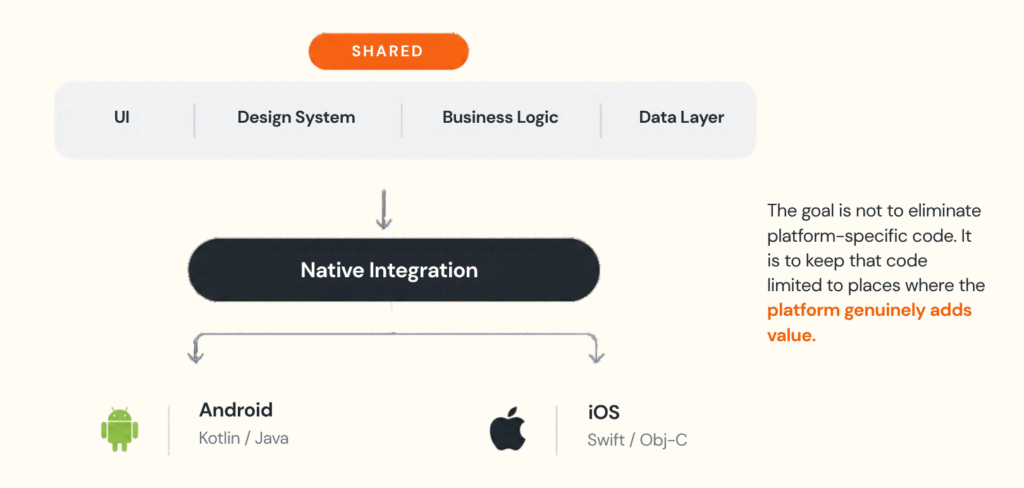
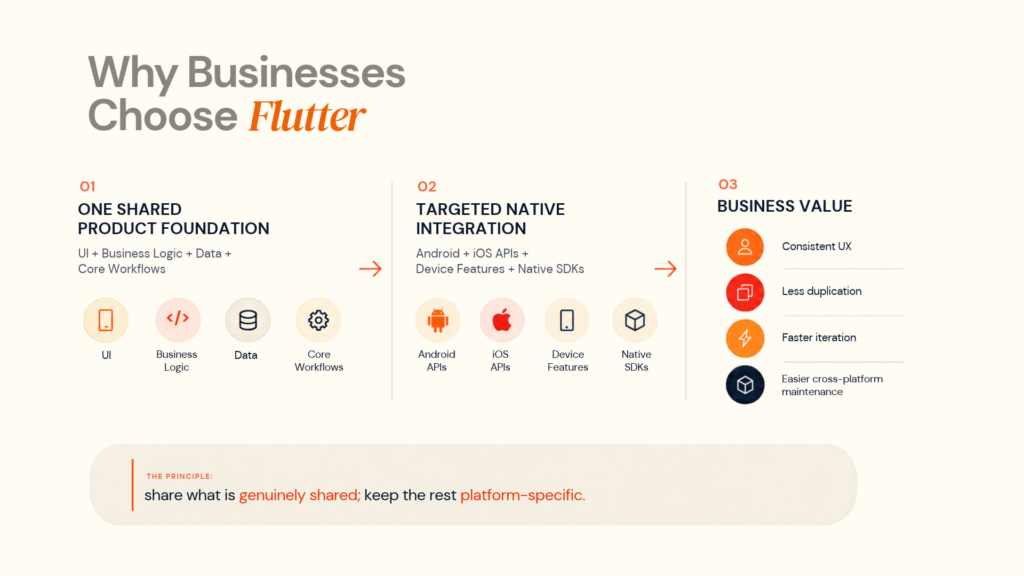
The common business case for Flutter is shared development across platforms.
That value is broader than writing fewer lines of code. One product foundation, not one identical application
A mature Flutter product often looks like this:
Flutter is particularly useful for UI-heavy products
The widget model gives teams strong control over the interface, which can be useful for:
- ecommerce
- marketplaces
- travel
- education
- media
- fitness
- social products
- SaaS companion apps
When visual consistency matters, a shared UI layer can reduce the risk of two platforms drifting apart.
Fast iteration can improve product learning
Flutter's stateful hot reload helps teams see UI and interaction changes quickly during development.
That matters because product development is iterative. A designer can change a flow, a product manager can test it, and engineers can validate the behaviour without repeatedly rebuilding the entire experience.
Hot reload does not make a production app automatically faster. It makes the development feedback loop faster.
Modern Flutter is not a web wrapper
Flutter's current architecture is a native-compiled, cross-platform system. Its official documentation states that release applications for native platforms compile to machine code, while the Flutter engine handles rendering and lower-level runtime responsibilities.
Flutter also supports platform-specific integrations through platform channels, allowing Dart code to communicate with Kotlin, Java, Swift and Objective-C code. Flutter platform channels documents this approach.
02
How Flutter's Architecture Actually Works
The framework is only one layer of the product.
A production Flutter application can be structured as:
-
1
Flutter UI
-
2
State / View Models
-
3
Business Logic
-
4
Repositories
-
5
APIs / Local Storage / Device Services
-
6
Backend + External Systems
-
7
Analytics + Monitoring
Presentation layer
The UI layer should manage rendering, navigation, interaction, accessibility and adaptive layouts. Business rules should remain outside the widget tree so they can be tested independently.
Business logic and state
Pricing, booking, subscription, permission and authentication rules should be separated from presentation so they can be tested and changed independently.
Repositories and data
Repositories create a boundary between the app and external data sources, making API changes, caching, offline support and backend migrations easier to manage.
Isolates and heavier processing
Flutter uses Dart isolates for work that should happen away from the main UI isolate. This matters for data transformation, file processing or other computationally expensive tasks.
For a logistics app processing many location records, the data path should look more like:
Network
↓
Processing
↓
Repository
↓
State
↓
UI
rather than sending all work through the rendering path.
Native integration
Native integration is part of the architecture, not a failure of the cross-platform model.
Flutter supports platform channels for native APIs and FFI for native libraries.
This is important for:
- Bluetooth
- sensors
- biometrics
- camera pipelines
- health devices
- automotive
- proprietary SDKs
The right objective is minimum necessary native work, not zero native work.
Testing architecture
Flutter supports unit, widget and integration testing. Its official testing guidance recommends using integration tests for important end-to-end behaviours and supports running them on devices, emulators and Firebase Test Lab. Flutter testing overview and integration testing cover the current approach.
03
Flutter vs Native vs React Native vs Kotlin Multiplatform
There is no universal technology winner. The right comparison is based on what the product needs to share.
| Factor | Flutter | React Native | Native iOS/Android | Kotlin Multiplatform |
|---|---|---|---|---|
| Shared UI | Strong | Strong | Low | Optional |
| Shared business logic | Strong | Strong | Low | Strong |
| Native access | Platform channels + FFI | Native modules / New Architecture | Direct | Direct |
| UI consistency | High | High | Highest per platform | Depends on approach |
| Main fit | Shared UI-heavy products | React/TypeScript-led teams | Deep platform products | Shared logic + native UI |
| Main trade-off | Dart/Flutter expertise | React ecosystem complexity | More duplicated work | Selective sharing is more complex |
Flutter vs React Native
The old argument that React Native is fundamentally limited by the legacy bridge is outdated.
React Native enabled its New Architecture by default from 0.76, and the 2026 0.84 release continued the shift with Hermes V1 as the default JavaScript engine and further removal of legacy architecture components. React Native 0.84 and New Architecture provide the current context.
A practical distinction is:
Flutter: strong shared UI model, Dart-first development, direct control over the visual layer.
React Native: particularly attractive when a company already has deep React and TypeScript capability.
Designoweb provides both Flutter app development and React Native app development, so the framework can be selected according to the product.
Flutter vs native
Native development becomes more compelling when:
- one platform is the primary target
- platform-specific behaviour is central
- specialised hardware APIs dominate the roadmap
- native UI conventions are part of differentiation
- the team already has strong platform-specialist capability
The trade-off is more duplicated implementation where the products are genuinely similar.
Flutter vs Kotlin Multiplatform
Kotlin Multiplatform takes a more selective approach to sharing. Teams can share networking, data models and business logic while retaining native UIs, and can expand sharing further with Compose Multiplatform.
This can be useful for Kotlin-heavy organisations or products that want native UI with shared logic.
Decision rule
Use this sequence:
Business requirement → User experience → Device capability → Native dependency map → Team skills → Architecture → Framework
Do not choose the framework before the product boundary is understood.
04
When Flutter Is a Strong Fit
1. Startups launching on iOS and Android
Flutter can help startups establish a shared product foundation while they validate:
- product-market fit
- monetisation
- onboarding
- retention
- core user workflows
This is particularly useful for marketplaces, ecommerce, booking, education, fitness and SaaS products.
Designoweb's MVP development services can support this stage when the product still needs scope and validation.
2. Highly branded consumer apps
Flutter can be useful when a consistent design system is important across iOS and Android.
Examples include:
- custom product cards
- animated transitions
- advanced filters
- dashboards
- onboarding
- branded checkout
The benefit is not that both platforms must look identical. It is that the shared design foundation makes consistency easier to maintain.
3. Companion apps for connected products
Flutter can also work well as the application layer around a connected product when native device integration is separated cleanly.
Examples:
- Bluetooth devices
- wearable products
- sensors
- vehicle systems
- health products
Designoweb's Pro Bike Sensor App case study is a relevant example of a mobile product connected to sensor-driven riding data and analytics.
4. Enterprise applications with common workflows
Flutter can be practical for:
- field service
- workforce apps
- sales tools
- logistics
- internal operations
- customer self-service
These products often share the same business workflows while requiring a smaller set of platform-specific capabilities.
5. Products that need fast cross-platform iteration
If product teams expect frequent UX changes, a unified development base can reduce coordination overhead.
The benefit comes when faster delivery supports better product learning.
05
When Flutter May Not Be the Right Choice
1. The application is genuinely single-platform
If there is no realistic second-platform requirement, a native solution may be simpler.
2. Platform-specific behaviour is the product
When the product depends heavily on specialised operating-system capabilities, the amount of native work can reduce the economic advantage of shared development.
3. Hardware integration dominates the application
Flutter supports native integration, but every native dependency requires additional testing and maintenance. Map those dependencies before deciding.
4. The purchase decision is based on a promised percentage saving
Do not select Flutter because a vendor claims “50% lower cost.”
Flutter can reduce duplication. It does not eliminate:
- backend engineering
- product management
- UX
- QA
- security
- infrastructure
- analytics
- integrations
- support
- maintenance
5. You need an SEO-first public website
Flutter supports web targets, but a public content-driven website and a cross-platform application are different architecture problems.
Use the technology that fits the job rather than assuming one framework should own every digital surface.
06
Flutter App Development Cost: What Actually Drives It
Flutter app development cost depends more on product complexity than on the framework itself. Major cost drivers
| Cost driver | Lower complexity | Higher complexity |
|---|---|---|
| Product scope | Few workflows | Many roles and edge cases |
| UI | Standard screens | Advanced interactions and animations |
| Backend | Simple API | Real-time or distributed services |
| Integrations | Few services | Payments, ERP, CRM, maps, hardware |
| Native work | Minimal | Multiple SDKs and device APIs |
| Offline | Not required | Sync and conflict resolution |
| Device features | Standard | Bluetooth, sensors, camera, biometrics |
| QA | Narrow matrix | Broad cross-platform coverage |
| Security | Standard | Enterprise/regulated |
| Operations | Basic support | Continuous monitoring and upgrades |
Why screen count is not enough
Two apps can both contain ten screens and have completely different engineering costs.
App A: account, list, detail, search, standard API.
App B: real-time messaging, payments, geolocation, offline sync, Bluetooth, custom backend and enterprise security.
The visible UI is similar in size. The system complexity is not.
The hidden cost: native integration
A mostly shared Flutter product may still require:
Flutter
↓
Native Interface
├── Android SDK
└── iOS SDK
Budget for the native layer, device testing and future SDK maintenance.
The hidden cost: testing
Cross-platform does not mean test once. Budget for unit, widget and integration tests, native integration, real-device coverage, performance testing and release regression.
A better cost model
Estimate in layers:
Discovery → Architecture → Design → Development → Native integrations → QA → Release → Maintenance
That produces a more realistic total cost than a screen-count quote.
07
How to Build a Production-Ready Flutter App
Step 1: Define the product boundary
Document:
- target users
- supported platforms
- primary journeys
- integrations
- device requirements
- performance expectations
- security requirements
Do not start with “We want Flutter.”
Start with the product.
Step 2: Map shared and native responsibilities
Create two lists.
SHARED
UI, business rules, data models, API clients, validation, analytics.
NATIVE
permissions, specialised hardware, proprietary SDKs, platform-specific services and exclusive UX.
This exposes whether Flutter is actually creating economic value.
Step 3: Spike the hardest dependency
Test the riskiest requirement before the full build: Bluetooth, camera performance, payment SDKs, background execution or proprietary hardware. A small technical spike can prevent major rework later.
Step 4: Define architecture
A simple structure can be:
Flutter UI
↓
State / View Model
↓
Repository
↓
API / Local Storage / Native Service
Keep UI, business logic, data access and platform-specific code separated.
Step 5: Build vertical slices
Instead of building every screen independently, build complete user journeys.
For example:
Login: UI → validation → authentication → session → error handling
Checkout: product → cart → payment → confirmation → analytics
This exposes integration problems earlier.
Step 6: Test continuously
Use unit, widget and integration tests, with real-device coverage for important workflows and native integrations.
Step 7: Profile real performance
Flutter's documentation recommends profiling release-like builds in profile mode rather than using debug mode to judge production performance. Common issues include unnecessary rebuilds and inefficient list rendering. Flutter also documents Impeller as its default graphics renderer on supported mobile configurations. Flutter rendering performance.
Measure:
- startup
- frame rendering
- scrolling
- memory
- network latency
- background work
- image handling
- battery impact
Step 8: Test native boundaries
If the product uses plugins or platform channels, test those integrations independently. Flutter's plugin guidance notes that native code requires additional testing beyond Dart-only tests. Flutter plugin testing.
Step 9: Build release engineering
Plan:
- versioning
- signing
- environments
- CI/CD
- analytics
- crash monitoring
- dependency management
- rollback
Step 10: Optimise after launch
Monitor:
- crashes
- feature adoption
- retention
- API failures
- device-specific issues
- performance
- support signals
08
How to Evaluate a Flutter Development Company
A Flutter development company should be evaluated as a product-engineering partner, not simply by the number of developers on staff.
Ask what is actually shared
The proposal should identify:
- shared UI
- shared business logic
- shared data layer
- native modules
- platform-specific dependencies
Ask what requires native code
A strong team should be comfortable discussing platform channels, native plugins and FFI.
Ask how performance will be measured
Look for:
- profiling
- real-device testing
- startup measurement
- frame analysis
- memory analysis
- performance regression checks
Ask how upgrades are handled
The team should have a plan for:
- Flutter/Dart upgrades
- package updates
- iOS changes
- Android changes
- native SDK updates
- security patches
Ask who owns the architecture and post-launch system
For complex products, someone should be accountable for the whole system, including source code, repositories, documentation, cloud ownership, support, technical debt and platform upgrades.
Vendor checklist
| Area | What to ask |
|---|---|
| Product | What problem is the app solving? |
| Architecture | What will be shared vs native? |
| Native integration | Which SDKs and platform APIs are required? |
| QA | Which devices and OS versions will be tested? |
| Performance | What are the acceptance criteria? |
| Security | How is sensitive data protected? |
| Release | Release Who owns CI/CD and store deployment? |
| Maintenance | How are SDK and dependency upgrades handled? |
| Ownership | Who owns code and infrastructure? |
Where Designoweb Fits
Designoweb approaches Flutter as part of broader product engineering.
A product can begin with MVP development when scope needs validation, move into product development services for broader engineering, and use Flutter app development for the shared mobile implementation.
The workflow is:
Business goal → User journeys → Platform strategy → Shared/native boundary → Architecture → Flutter development → QA → Release → Optimisation
RoadtripTribes: Flutter + real-world mobile workflows
Designoweb's RoadtripTribes case study documents a Flutter-based mobile application and web platform for group road trips. The mobile experience focuses on live navigation, location sharing, real-time communication and Android Auto, while the web platform supports trip planning and organisation.
This illustrates an important product principle:
Use mobile for the work that benefits from mobility; use other surfaces where they make more sense.
Pro Bike: Cross-platform app + physical sensor
The Pro Bike case study shows another architecture pattern: mobile software connected to sensor-driven riding data and analytics. Designoweb's portfolio lists the product under IoT and sensor applications.
The lesson is not that every connected product should use Flutter.
It is that cross-platform product code and native device integration can coexist when the boundary is engineered intentionally.
09
Practical Flutter Decision Framework
Before committing to Flutter, answer:
| Question | Signal for Flutter |
|---|---|
| Do we need iOS + Android? | Yes |
| Is much of the UI shared? | Yes |
| Are business rules largely shared? | Yes |
| Is visual consistency important? | Yes |
| Are native dependencies limited and understood? | Yes |
| Is fast iteration valuable? | Yes |
| Can the team support Flutter/Dart? | Yes or partner can |
Author

Frequently Asked Questions
01
Is Flutter still relevant in 2026?
Yes. Flutter remains an actively maintained cross-platform framework, and the official API documentation currently shows Flutter 3.47.5 as a stable release.
02
Is Flutter good for cross-platform app development?
It is well suited to products that need iOS and Android from a shared application foundation, particularly when shared UI and product consistency matter.
03
Is Flutter better than React Native?
Neither is universally better. Flutter offers a shared widget/rendering model, while React Native can be a natural choice for organisations with strong React and TypeScript capabilities. Modern React Native should be evaluated using its New Architecture rather than legacy bridge assumptions.
04
Is Flutter better than native development?
Flutter can reduce duplicated work for genuinely shared requirements. Native development remains a strong fit for platform-specific products, specialised hardware and experiences where native conventions are central.
05
Is Flutter really one codebase?
Flutter allows substantial code sharing, but production applications can still contain native code for device APIs, SDKs and platform-specific functionality.
06
Can Flutter handle Bluetooth and hardware integrations?
Yes, but the application may require platform-specific code through plugins, platform channels or native libraries. Those boundaries should be identified and tested early.
07
Is Flutter fast?
Flutter can deliver strong performance, but implementation quality still matters. Profile realistic builds, measure frame rendering and test on representative devices rather than assuming a framework guarantee.
08
How should a Flutter app be tested?
Use a mix of unit, widget and integration tests, plus real-device validation for important flows and native integrations. Flutter supports integration testing on devices, emulators and Firebase Test Lab.
09
How much does Flutter app development cost?
There is no reliable universal price. Cost depends on product scope, backend complexity, integrations, native dependencies, device coverage, QA, security and ongoing maintenance.
10
Is Kotlin Multiplatform a competitor to Flutter?
Yes, but it solves code sharing differently. KMP can share business logic while retaining native UI, while Compose Multiplatform can optionally extend sharing into UI.